
The Complete Checklist for Submitting Successful Reimbursement Claims


TL;DR
Know what you can claim, including lost inventory, damaged goods, and overcharged FBA fees.
Gather key reports from Seller Central, such as Inventory adjustments, reimbursement, and returns reports.
Check your inventory and FBA fees for discrepancies before filing a claim.
Stay within the claim window (usually 9 months) to avoid rejections.
Ensure you have all necessary documents ready, like ASINs, order IDs, and proof of damage.
Use tools like Refunzo to automate tracking and manage your claims more efficiently.
Submitting successful reimbursement claims to Amazon can be a game-changer for your FBA business, ensuring you recover money for lost, damaged, or mishandled inventory. However, the process can be tricky if you don’t follow the right steps. From knowing what you can claim to submitting the case and tracking your claims, each part of the process plays a crucial role in getting your reimbursements approved.
In this guide, we’ve created a checklist to help you navigate the reimbursement claims process smoothly. You'll learn what you can claim for, how to gather the right reports, and how to avoid common mistakes that can lead to claim rejection. We’ll also share tips on how to track your claims effectively and when to follow up.
By staying organized and proactive, you can ensure that you're maximizing your reimbursements and keeping your business profitable.
The checklist for submitting successful reimbursement claims

#1 Know what you can claim for
Knowing what you can claim is the first step in submitting a successful Amazon FBA reimbursement claim. As an FBA seller, there are several types of issues that Amazon may owe you money for, but it’s important to know exactly what qualifies for reimbursement under their policy.
Here are the main types of claims you can file:
Lost inventory: If Amazon loses your products after they’ve been received at the warehouse, you can file a claim for reimbursement.
Damaged inventory: If your products are damaged while being stored or handled by Amazon, you’re entitled to reimbursement.
Customer-damaged returns: When customers return items in poor condition, preventing them from being resold, Amazon may reimburse you for the damages if they’re marked as “customer damaged.”
Refunds without returns: If a customer gets a refund but doesn’t return the product, you can claim reimbursement for the missing inventory.
Overcharged FBA fees: If Amazon overcharges you for storage, handling, or shipping fees, you’re eligible for a reimbursement claim.
Incorrect or missing returns: If inventory is marked as returned but not restocked properly, you may be eligible for reimbursement.
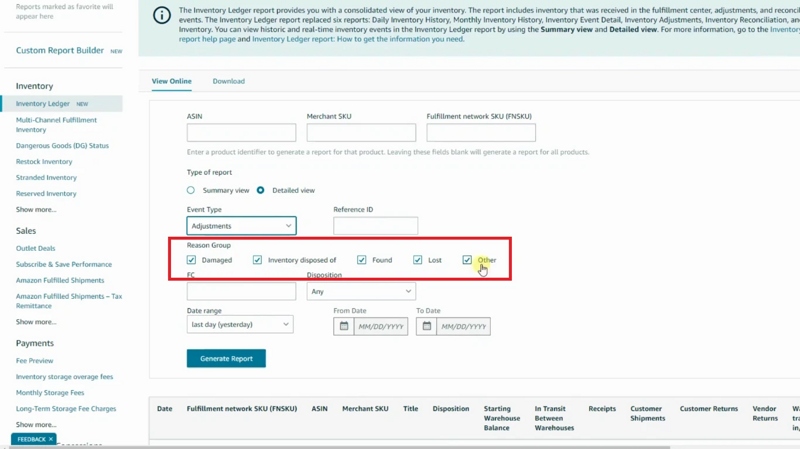
Understanding these categories will help you avoid filing incorrect claims and ensure you’re only claiming for eligible issues. This will save time and increase the chances of your claim being accepted.
#2 Gather the right reports
To submit successful Amazon inventory reimbursement claims, the first step is gathering the right reports from Amazon Seller Central. These reports provide the data you need to spot any issues and support your claim.
Inventory adjustments report: This shows any changes in your inventory like lost or damaged products.
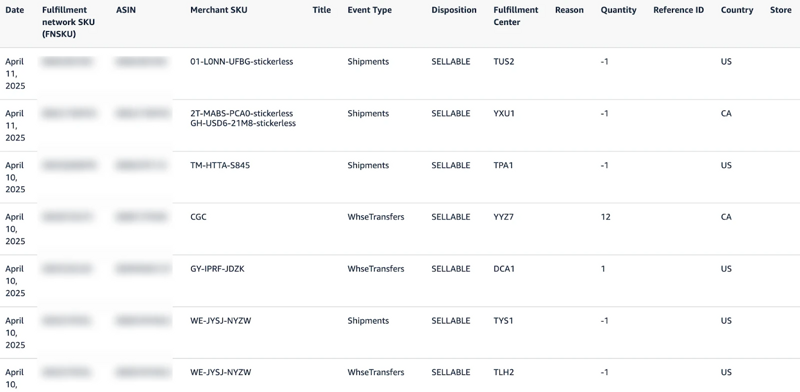
Reimbursement report: This details any reimbursements Amazon has already processed for your claims.
Returns report: This tracks customer returns, so you can identify if any returned items are damaged and eligible for reimbursement.
Customer concessions report: This report helps track items marked as "customer damaged" that may need reimbursement.
By downloading these reports regularly, you can quickly identify issues like missing inventory or damaged goods. Having all the necessary reports ready will make it easier to file a complete and accurate reimbursement claim.
#3 Check for issues
Before you submit a reimbursement claim, it’s important to carefully check for any issues with your inventory or fees. Start by reviewing your FBA reports, such as the inventory adjustments report and the returns report, to identify any missing or damaged items. Look for discrepancies, like items marked as "lost" or "damaged," that haven’t been reimbursed yet.
Also, check for any overcharged FBA fees in the reimbursement report, including extra storage or handling fees that might have been applied incorrectly. If any mistakes or problems are eligible for reimbursement, make sure you have all the details before filing a claim.
By checking for issues before submitting, you can ensure that your claims are accurate and well-supported. This step helps prevent unnecessary delays and increases the chances of getting your reimbursement approved. Always stay organized and track these issues regularly.
#4 Stay within the claim window
Staying within the claim window is crucial for submitting successful reimbursement claims with Amazon. Amazon typically allows you to file claims for lost or damaged inventory within 9 months of the issue. If you miss this deadline, your claim will be automatically rejected, and you won’t be reimbursed.
To avoid this, regularly check your FBA reports, like the inventory adjustments report and the reimbursement report. set a reminder to review your inventory at least once a month so you can catch any issues early. If you notice missing or damaged items, file a claim as soon as possible to stay within the claim window.
#5 Get your documents ready
Getting your documents ready is an essential step when submitting Amazon FBA refund reimbursement claims to Amazon. Without the right paperwork, your claim can be rejected or delayed. Start by gathering all the necessary information related to the issue.
For example, if you're claiming lost inventory, you’ll need the ASIN, order ID, and tracking details to prove the item was shipped and received. For damaged goods, provide clear photos of the damage along with the product details.
Other useful documents include invoices, receipts, and inventory adjustment reports that show discrepancies in your stock. Make sure all your documents are clear, accurate, and complete. This will help Amazon process your claim faster and increase your chances of getting reimbursed.
#6 Submit the case
Submitting your reimbursement claim to Amazon is a crucial step in the process. Once you’ve gathered all the necessary reports and documents, you’re ready to file your case. Here’s how to do it:
Go to Seller Central: Log in to your Seller Central account.
Navigate to help: Click on the "Help" section, then select "Get Support."
Choose the right issue: Select "Fulfillment by Amazon" and then choose the appropriate option like "Lost Inventory," "Damaged Goods," or another relevant claim type.
Fill out the details: Provide the required information, such as ASIN, order ID, and details about the issue. Attach supporting documents like photos or receipts.
Submit: Review everything to make sure it’s correct, then submit your claim.
By following these steps carefully, you ensure your case is complete and can be processed without delays.
#7 Track your claims
Tracking your reimbursement claims is a key step in ensuring you recover the money you're owed. After submitting a claim, it's important to follow up and make sure it’s processed correctly. In Seller Central, you can track your claims by using the case ID assigned to each one. This will allow you to check the status of your claim and ensure it's moving forward.
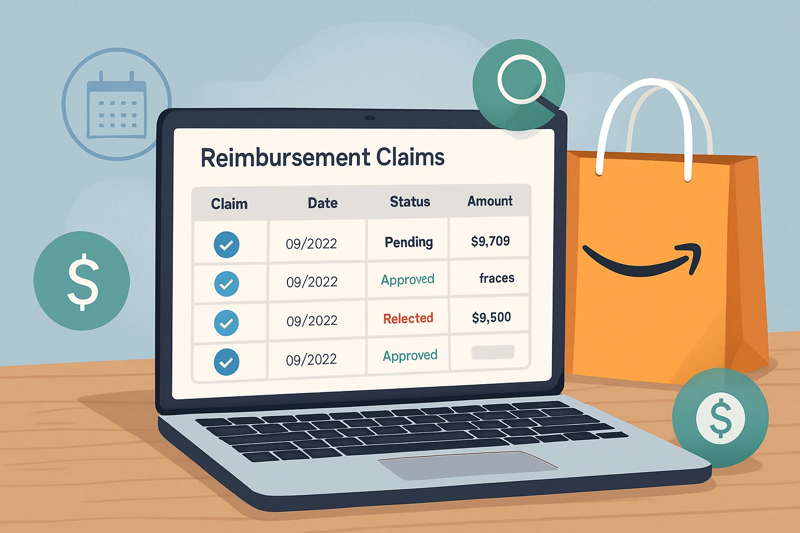
Make it a habit to check your claims at least once a week. If you haven’t received an update within a few days, it’s a good idea to follow up. Keeping track helps prevent missed claims and ensures you don’t lose money.
You can also set reminders to check regularly, so you stay on top of any pending reimbursements. This way, you can quickly address any issues and make sure you get reimbursed in a timely manner.
#8 Follow up smartly
Following up smartly is key to ensuring your Amazon lost inventory reimbursement claims are processed correctly. Once you've submitted a claim, Amazon may take a few days to respond. If you haven’t heard back in a reasonable time (usually a week or so), follow up to check the status of your claim.
Be polite and clear in your communication. Keep track of your case ID and refer to it when you contact Amazon. If your claim is denied, ask for a detailed explanation and see if you can provide more proof. Following up helps ensure that your claim is reviewed properly and that any issues are resolved quickly, so you don't miss out on reimbursements you're owed.
#9 Avoid mistakes
Avoiding mistakes is key to submitting successful reimbursement claims on Amazon. To ensure your claims are approved, double-check all details before submitting, including the correct claim type, ASIN, and order ID.
Make sure your documentation is complete, such as proof of damage, lost inventory, or overcharged fees. Failing to provide accurate or enough information can lead to claim denials. Additionally, file your claims within the required time frame to avoid missing the deadline.
Lastly, don’t rush through the process taking time to review and gather everything carefully will increase your chances of a successful claim. Avoiding mistakes helps keep the process smooth and efficient.
#10 Consider using tools
Using tools like Refunzo can make the reimbursement claims process much easier and more efficient. Refunzo helps you track and manage your claims automatically, saving you time and reducing the chances of missing any opportunities.
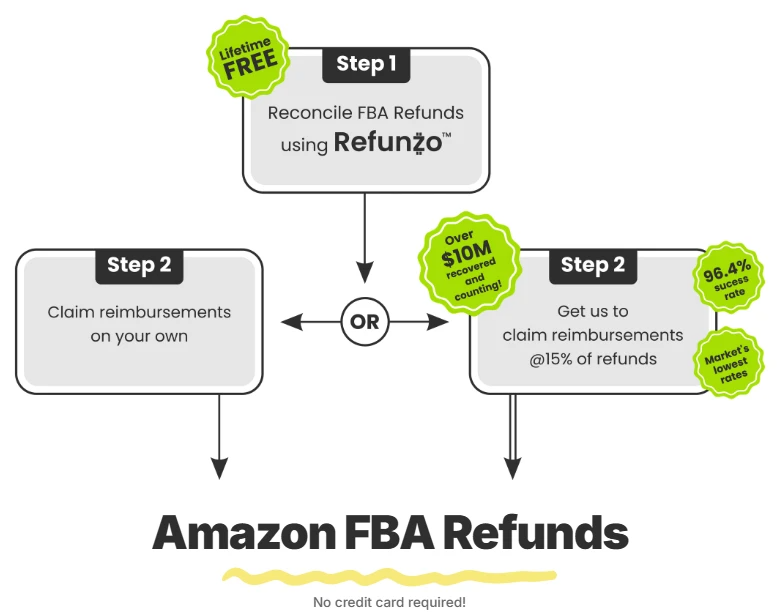
It pulls data directly from your Amazon account, so you can quickly spot any lost or damaged inventory, overcharged fees, or other issues that need reimbursement. By using Refunzo, you can stay organized, ensure you don’t miss deadlines, and file claims with accurate data.
This tool can streamline your reimbursement process, making it less stressful and more effective in recovering the money you’re owed.
Final words
Submitting successful Amazon reimbursement claims is essential for recovering money lost due to issues like damaged inventory, overcharged fees, or missing products. By following the steps outlined in this checklist gathering reports, staying within the claim window, providing the right documents, and tracking your claims you can improve your chances of getting reimbursed.
To make the process even easier, consider using Amazon Seller reimbursement services or tools like Refunzo. These services help automate tracking, manage claims, and ensure you never miss out on reimbursements. By staying organized and proactive, you’ll keep your business running smoothly and protect your profits.