
FBA Inventory Damaged by Amazon: How to Get Reimbursed


TL;DR
Check your FBA reports regularly for any damaged or lost inventory.
If Amazon is responsible for the damage, you are eligible for reimbursement.
Gather the necessary documents, such as ASIN, order ID, photos, and tracking details.
File a reimbursement claim through Seller Central under the correct category (Like lost inventory or damaged goods).
Track your claims with the Case ID and follow up if needed to ensure timely processing.
Consider using Amazon inventory reimbursement services to automate the process and avoid missing reimbursements.
If you're an Amazon FBA seller, dealing with damaged inventory can be a major setback for your business. Sometimes, the damage occurs while your products are stored or handled by Amazon in their fulfillment centers. When this happens, you may be entitled to reimbursement, but the process can be confusing if you're not sure where to start.
In this guide, we'll explain what happens when Amazon damages your inventory and when they're responsible for the damage. We’ll also show you how to check if your inventory was damaged, so you can track and verify any issues. Additionally, you’ll learn about the conditions that make you eligible for reimbursement and how to file a claim to recover your losses.
By understanding these steps, you’ll be able to protect your profits, avoid unnecessary delays, and get reimbursed for the damaged inventory Amazon is responsible for. Stay proactive to ensure you’re not losing money due to damaged goods.
What happens when Amazon damages your inventory?
When Amazon damages your inventory, it can be frustrating and lead to lost profits. Amazon handles your inventory while it’s in their fulfillment centers, and while they take responsibility for storing, picking, packing, and shipping, things don’t always go smoothly.
Your products can get damaged in various ways during storage, handling, or even when being packed for shipment to customers.
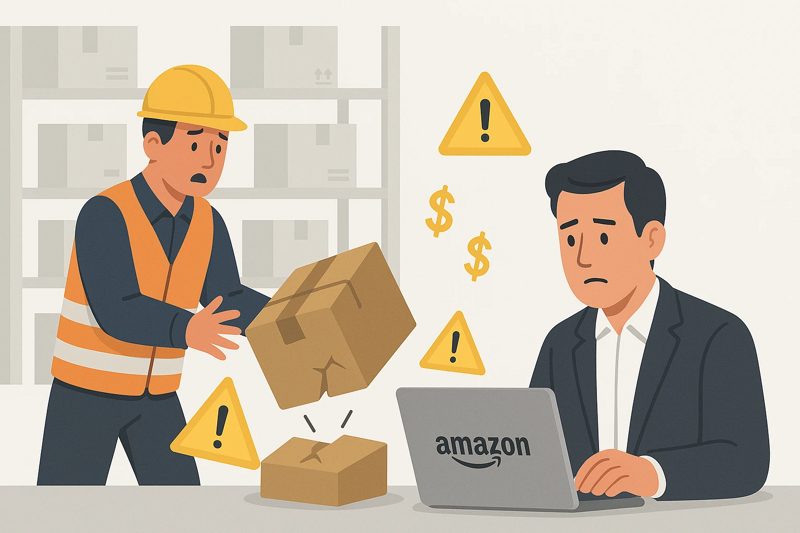
For example, your products might be crushed, scratched, or broken because of improper storage or mishandling by Amazon’s warehouse staff. Sometimes, an item might be damaged during the return process if a customer returns it in poor condition. If Amazon marks the item as damaged, they are responsible for reimbursing you.
It’s important to know when Amazon is liable for the damage. If the damage occurs while the item is in their care, such as while stored in their warehouse, you are usually eligible for Amazon FBA reimbursement. However, if the damage is caused by a customer (like customer-damaged returns), then Amazon may not reimburse you.
Once you notice the damage, you should check your FBA reports to see if the item is marked as "damaged." If it is, Amazon may have already processed the reimbursement or you might need to file a claim.
To get reimbursed, you’ll need to follow Amazon’s process and submit a reimbursement claim. You’ll need to provide the necessary details, such as the ASIN, order ID, and any proof of the damage. Keep track of your inventory and report any issues promptly to ensure you’re not losing money due to Amazon’s mistakes.
When Amazon is responsible for inventory damage
Amazon is responsible for inventory damage when it occurs while your products are in their fulfillment centers. As an FBA seller, you trust Amazon to store, handle, and ship your products. However, sometimes damage happens during these processes, and in such cases, Amazon is liable for the loss.
Here are a few situations where Amazon is responsible for inventory damage:
During storage: If items are stored improperly, like being exposed to water or excessive heat, Amazon is responsible for the damage.
During handling: If your products are mishandled during sorting, packaging, or preparation for shipment, and they get damaged, Amazon is liable.
Return handling: If customers return items that are damaged, and Amazon fails to restock or dispose of them properly, they may be responsible for the damage.
Shipping mistakes: If an item is damaged during the shipping process and Amazon is at fault, such as improper packaging or handling, they are accountable.
In these cases, you are eligible for Amazon warehouse damage reimbursement. It’s important to track your inventory carefully and file a claim if you notice any damage caused by Amazon. Regularly check your reports and stay on top of issues to ensure you get reimbursed for the damage.
How to check if your inventory was damaged
To check if your inventory was damaged by Amazon, you need to regularly review your reports in Seller Central. Here are the steps to follow:
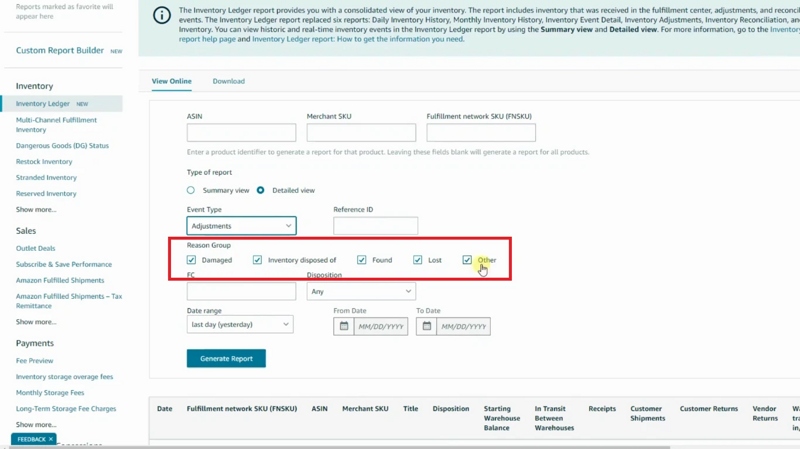
Review the inventory adjustments report: This report shows any changes made to your inventory, including lost or damaged items. Look for any items marked as “damaged” in the report. If you notice a product that was marked as damaged but you haven't been reimbursed, it's a sign that you may be eligible for reimbursement.
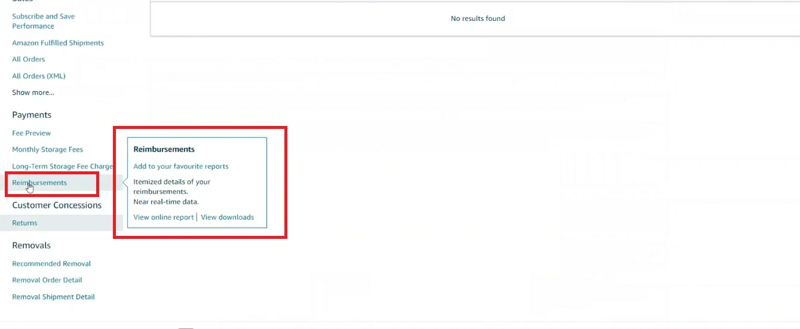
Check the reimbursement report: This report lists all the reimbursements Amazon has processed. If an item was damaged and you’ve been reimbursed, it should show up here. If it’s missing, you may need to file a claim.
Use the returns report: If a customer returns a product that was damaged, this report will show the details. Check for returns marked as “customer damaged” or “unsellable.”
Look for "damaged" labels in Seller Central: Sometimes Amazon marks products as “damaged” when they can’t be resold. These items will be tagged in your inventory, and you can take action to get reimbursed.
By keeping track of these reports regularly, you can easily identify any damaged inventory and file a claim for reimbursement if needed.
When you are eligible for reimbursement
You are eligible for Amazon inventory reimbursement when they are responsible for damaging or losing your inventory. This can happen while your products are in Amazon's fulfillment centers. If your inventory is damaged, lost, or mishandled by Amazon, you may be entitled to get your money back.
Some common situations when you are eligible for reimbursement include:
Lost inventory: If Amazon loses your products after they’ve been received at the warehouse.
Damaged inventory: If your items are damaged while in Amazon’s warehouse or during the fulfillment process.
Customer returns: If a customer returns an item in poor condition, and Amazon marks it as "customer damaged."
To qualify for reimbursement, the item must be unsellable and the damage or loss must be Amazon’s fault. Make sure to file a claim within the allowed time frame (usually within 9 months) to ensure you recover the money you're owed.
How to file a reimbursement claim
Filing an Amazon lost inventory reimbursement claim for damaged or lost inventory can be an essential step in recovering money for products that are mishandled. Here’s a simple, step-by-step guide on how to file a reimbursement claim.
Step 1: Review your reports
Before filing, you need to gather the right information. The first thing to do is log into your Seller Central account and download the necessary reports. These reports will give you a clear picture of what happened and help you identify any discrepancies.
Inventory adjustments report: This shows any changes in your inventory, including lost or damaged items.
Reimbursement report: This shows if any reimbursements have already been processed for your claim.
Returns report: This helps you track customer returns and check if any items are marked as damaged.
Step 2: Identify the issue
Check your reports for discrepancies. Look for any inventory that’s been marked as “damaged” or “lost.” If your item is still in Amazon's warehouse, but it’s unusable or damaged, it’s time to file a claim.
Step 3: Prepare supporting documents
To make your claim successful, you’ll need the following:
ASIN and order ID: These will help Amazon identify the product and transaction.
Proof of damage: If possible, take photos of the damaged inventory. This can be useful to prove the issue.
Shipping and tracking details: If it was a lost item, you need proof that it was shipped to Amazon.
Make sure all documents are clear, organized, and accurate.
Step 4: File the claim
Now that you have all the necessary documents, it’s time to file your claim. Here’s how:
Go to Seller Central and log into your account.
Click on the help section, then select Get Support.
Choose Fulfillment by Amazon and then select the appropriate claim category like lost inventory or damaged goods.
Fill in the necessary details (ASIN, order ID, damage description, etc.) and attach your supporting documents.
Review everything carefully and click submit.
Step 5: Follow up
Once the claim is submitted, you’ll receive a case ID. Use this to track the status of your claim. If you don’t get a response in a few days, don’t hesitate to follow up. Stay organized and ensure your claim is processed promptly.
By following these steps, you’ll ensure a smooth reimbursement claim process and increase your chances of getting the reimbursement you deserve.
Final thoughts
In conclusion, dealing with damaged inventory on Amazon can be tricky, but by following the steps above, you can get reimbursed for the damage. Regularly check your reports, file claims quickly, and make sure to include all required documents.
Stay on top of your inventory to spot issues early. If managing claims feels difficult, you can choose our Amazon inventory reimbursement services to make the process easier and ensure you don’t miss any opportunities to recover your money. This will help protect your profits and keep your business running smoothly.