
Never miss Amazon’s 60-day reimbursement claim window: A weekly reconciliation SOP


TL;DR
The FBA reimbursement 60-day clock starts on the incident date, not when you notice the issue.
Checking reports only once a month can leave you with problems that are already 30 to 40 days old.
Less time means more pressure to gather documents and submit claims correctly.
Missed or rushed claims often lead to denials or lost reimbursements.
Weekly reconciliation helps catch issues early and keeps you within deadlines.
Consistent tracking reduces stress and protects your reimbursements.
Most Amazon sellers check their accounts once a month, maybe once a quarter. That's completely normal when you're juggling inventory, ads, and customer service. But here's what nobody tells you: while you're busy running your business, money is slipping through your fingers.
Amazon has a little-known 60-day deadline for certain reimbursements. Not 18 months like other claims; just 60 days. Miss it by even one day, and that money is gone forever. No appeals, no second chances.
But what if you had a system that caught every issue before the clock ran out?
This guide walks you through exactly how the 60-day claim window works, shows you a step-by-step filing process, and gives you a weekly reconciliation system that ensures you never miss another deadline using Amazon reimbursement software like Refunzo.
What is the 60-day Amazon reimbursement claim window?
The 60-day Amazon reimbursement claim window is the time limit sellers have to file a reimbursement request with Amazon when inventory is lost, damaged, or mishandled inside Amazon’s fulfillment network.
You have 60 days from the date Amazon marks an issue as resolved or closed to submit an Amazon reimbursement claim.
If you miss this window, Amazon usually will not reimburse you, even if the loss was their fault.
Which claims fall under the 60-day window?
Lost or damaged inventory in fulfillment centers: When your products go missing or get damaged while stored in Amazon's warehouses, you have 60 days from when Amazon reports the item as lost or damaged to file a manual claim if you didn't receive automatic reimbursement.
Removal claims: If you requested Amazon to return inventory to you and it gets lost or damaged during the removal process, you must file within 60 days of the shipment being delivered back to you.
Incorrect or missing automatic reimbursements: Amazon now automatically reimburses most lost and damaged inventory. However, if the automatic reimbursement never arrives or the amount seems wrong, you have 60 days to challenge it.
What doesn't fall under the 60-day window:
Customer return claims: These have their own timeline. You can file between 60 and 120 days after the customer receives their refund or replacement.
Removal claims for lost-in-transit items: These must be filed between 15 and 75 days from shipment creation.
When does the 60-day clock start?
The 60-day countdown doesn’t start when you notice the problem. It starts the moment the issue actually happens, which is when the Amazon reimbursement deadline begins, whether you know about it or not. Let's break this down with an example:
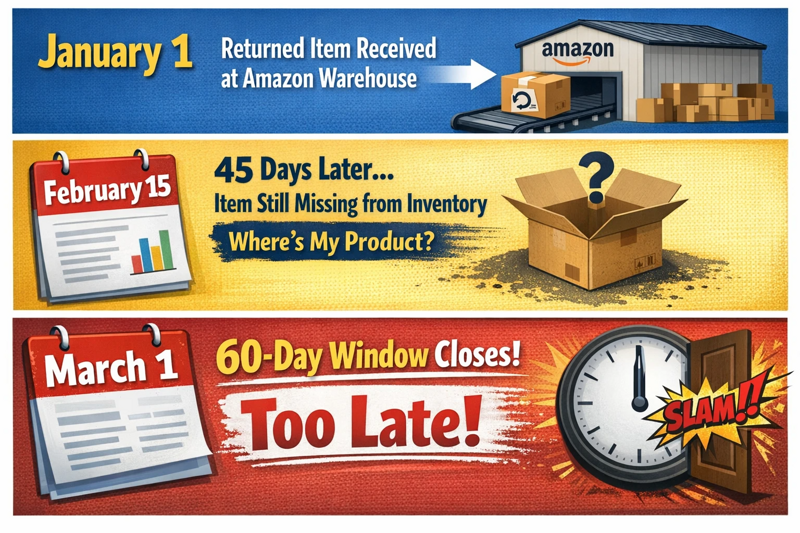
You only have 15 days left to file your claim after discovering the issue. Think about that. You could stumble across a legitimate reimbursement on day 58, and now you've got less than 48 hours to gather documentation, write up the claim, and submit everything correctly.
Why this matters:
Most sellers don't check their inventory reports daily. They review things weekly, monthly, or even quarterly. By the time you spot the discrepancy, the clock has already been ticking for weeks, sometimes almost the entire 60 days.
This isn't Amazon being sneaky. It's just how their system works. The issue date is locked in their database the moment it happens, and that's your deadline anchor, whether you're aware of it or not. You can't afford to wait until problems find you.
You need an Amazon reimbursement audit system that catches these issues early, ideally within the first week or two, so you still have time to file a proper reimbursement claim with all the right documentation.
How do I file a claim before the 60-day deadline expires
Instead of manually digging through five different reports trying to find issues before they expire, here's what happens when you use an Amazon reconciliation tool like Refunzo:

#1 Connect your Amazon account to Refunzo
Takes about 2 minutes
Secure connection directly to your Seller Central
No complicated setup, no technical skills needed
#2 Run a comprehensive check
Once connected, Refunzo automatically runs a deep scan based on over 20 different criteria to reconcile your entire account. This isn't just checking one or two things; it's a complete audit that looks at:
Customer returns are not credited to inventory
Lost warehouse inventory
Damaged items you weren't reimbursed for
Fee overcharges (wrong dimensions, duplicate charges)
Removal order discrepancies
Inventory adjustments that don't add up
Receive a detailed report within minutes; you get a comprehensive breakdown showing:
Exactly what issues were found
How many days remain before each claim expires
An estimate of the total amount Amazon owes you
Which claims are urgent (approaching the 60-day deadline)
Complete documentation for each issue
#3 Gather your documentation
Amazon won't approve vague claims. You need proof.
Screenshot of returns report showing "received" status
Screenshot proving the item is NOT in your current inventory
Order ID and customer return tracking number
ASIN, FNSKU, and SKU of the product
The exact date Amazon received the return
Current selling price (to calculate claim amount)
Your inventory count before and after the incident
Pro tip: Document everything the day you discover the issue. Don't wait until you're ready to file reports changes and the data might not be accessible later. Now it's time to actually submit your claim.
How often to file a reimbursement claim
There's no magic number, but here's the reality: the frequency depends on your sales volume, inventory size, and how closely you monitor your account.
The general rule
Most successful sellers file claims weekly or bi-weekly. This keeps you well ahead of the 60-day deadline and ensures you're not scrambling at the last minute with a pile of expired claims.
By sales volume:
Low Volume Sellers (under $10K/month): File claims bi-weekly or monthly. You likely won't have many issues to claim, so checking every two weeks is usually sufficient.
Medium Volume Sellers ($10K-$100K/month): File claims weekly. At this level, discrepancies happen more frequently, and the dollar amounts start adding up quickly.
High Volume Sellers ($100K+/month): File claims weekly or even multiple times per week. With thousands of units moving through Amazon's system, issues pile up fast. Waiting too long means you'll have dozens of claims to file at once, and you risk missing deadlines.
How to audit FBA reimbursements weekly
The FBA reimbursement 60-day clock starts from the incident date, not when you discover it. If you only check once a month, you might find an issue that’s already 30-40 days old, leaving very little time to gather documents and file before the deadline.
Filing weekly gives you a comfortable buffer. Even if you discover an issue that's 20-30 days old, you still have plenty of time to prepare a solid claim. Here's where automation changes everything. With Refunzo, you don't have to decide how often to file. It monitors your account continuously and alerts you the moment a reimbursable issue appears.
You're not tied to a weekly schedule or worried about missing deadlines. Refunzo tracks every issue from day one, sends you notifications before deadlines expire, and even helps you prepare the documentation you need. It's like having someone filing claims for you around the clock.
Reimbursement claim window 60-day checklist
Category | Action items | Timing/details |
Weekly audit tasks | Review Reimbursements Report | Every Monday |
Check Inventory Adjustments for unmatched “M” entries | Past 7 days | |
Scan customer returns | 45 to 105 days old | |
Review lost and damaged items | Past 60 days | |
Verify removal orders arrived | 15 to 75 days ago | |
Before filing claims | Confirm the incident date | When the clock started |
Calculate the filing deadline | Incident date + 60 days | |
Gather supporting proof | Invoices, screenshots, and records | |
Verify no duplicate payment | Check Reimbursements Report | |
Track in a spreadsheet | Incident date and deadline | Document everything |
ASIN or SKU | Product identifiers | |
Issue type | Lost, damaged, return | |
Amount owed | Expected reimbursement | |
Filing status | Pending, approved, denied | |
File immediately if | The issue is 45+ days old | Only 15 days left |
High-value items | $100+ products | |
Large quantities affected | Multiple units lost | |
Key deadlines | Lost or damaged inventory | 60 days from incident |
Customer returns | 45 to 105 days after refund | |
Removal claims (lost in transit) | 15 to 75 days from shipment | |
Other removal claims | 60 days from delivery | |
Refunzo automation | Continuous account scanning | 24/7 monitoring |
Deadline alerts | Before expiration | |
Pre-prepared documentation | Ready-to-file claims |
Conclusion
Amazon reimbursements aren’t “extra money”; they’re your money. The 60-day claim window doesn’t care how busy you are, how big your catalog is, or when you finally notice something went wrong. Miss it, and that loss is permanent.
You don’t need to obsess over reports every day. A simple weekly reconciliation audit can quietly protect your profits in the background while you focus on growing your business.
Run your free Refunzo reconciliation check today and see what Amazon may already owe you, before the 60-day clock runs out.
FAQs
Which Amazon claims have a 60-day window vs. 18 months?
The 60-day window applies to lost or damaged FBA inventory, most removal orders, and incorrect automatic reimbursements. The 18-month window covers general inventory discrepancies and fee overcharges, while customer returns follow a separate 60 to 120-day timeline.
How often should I check my Amazon account for reimbursements?
Check at least once a week. Monthly checks usually mean discovering issues too late, leaving very little time before the 60-day deadline.
What reports do I need to check for the 60-day window?
You need to review five reports: Reimbursements, Inventory Adjustments, Customer Returns, Removal Order Detail, and Inventory Reconciliation. Checking these manually takes time, which is why many sellers automate it.
Why did Amazon deny my claim filed within 60 days?
Most denials happen due to missing documents, duplicate reimbursements, incomplete details, or filing customer return claims too early. Appeals with proper proof often get approved.