
How to Spot Shipment Discrepancies in FBA


FBA shipment discrepancies can cost you money. These happen when the inventory you send to Amazon doesn’t match what they record. Common issues include missing units, damaged items, or incorrect counts.
Quick Steps to Spot Discrepancies:
Check Quantity Differences: Compare shipped vs. received units.
Monitor Shipment Status: Look for irregular updates like "complete" with unresolved issues.
Track Inventory Changes: Investigate unexplained stock drops.
Tools to Simplify the Process:
Manually checking reports can be time-consuming. Automated tools like Refunzo can spot over 20 types of errors, including damaged inventory or return issues, and help you file claims for reimbursements.
Key Tip: Keep your documents ready (shipping manifests, tracking info, and inventory reports) for faster claims. Whether you handle it yourself or use automated help, acting quickly ensures you recover lost funds.
SHIPMENT DISCREPANCIES! How To Avoid & Reconcile ...
Warning Signs of Shipment Problems
Catching shipment issues early can protect your inventory and prevent losses. Below are key signs to watch for when reviewing shipments.
Quantity Differences
Check that the number of units shipped matches what was received. If the numbers don’t line up, there’s a problem. These mismatches often occur when unit counts change unexpectedly after delivery. Always compare the shipping manifest with the actual received goods during reconciliation.
Unusual Shipment Status
Look out for irregular status updates. For instance, a shipment marked as "complete" despite unresolved unit discrepancies could mean inventory wasn’t processed correctly. Regularly review shipment statuses to catch these unresolved issues.
Unexpected Inventory Changes
Drops in inventory that don’t match sales records are a red flag. If inventory levels decrease without a clear reason, it’s time to investigate. Automated tools can help by running systematic checks to identify these problems.
Warning Sign | What to Check | When to Check |
|---|---|---|
Quantity Differences | Shipping manifest vs. received units | When the shipment is received |
Unusual Shipment Status | Shipment status updates | During routine reconciliation |
Unexpected Inventory Changes | Inventory records vs. actual stock | Regularly during periodic reviews |
Keeping an eye on these signs can help you address problems quickly and make refund claims easier to process.
Finding Shipment Errors Step by Step
Using Seller Central

Log in to Seller Central and go to 'Manage FBA Shipments' to check unit counts and shipment statuses. Pay special attention to shipments marked 'Closed' or 'Complete', as these often have discrepancies.
Key details to review:
Shipment status updates
Expected vs. received unit counts
Dates of receipt and processing
Notes or exceptions logged by Amazon's receiving team
Compare these details against your shipment records to identify any inconsistencies.
Checking Shipment Records
Match your shipping manifests with Amazon's received inventory reports to spot any mismatches.
Document Type | What to Check | Where to Find It |
|---|---|---|
Shipping Manifest | Original unit counts and SKUs | Your shipping records |
Receiving Report | Units processed by Amazon | Seller Central Reports |
Inventory Adjustments | Post-receipt changes | Inventory Adjustments Report |
Once you've identified discrepancies, gather the necessary evidence.
Required Documentation
Collect these documents to support your case:
Shipping manifest – Details what was sent to Amazon
Carrier tracking information – Confirms delivery to Amazon
Amazon receiving report – Shows how Amazon processed the shipment
Original purchase invoices – Prove product ownership
For a streamlined process, connect your Seller Central account to Refunzo. Their system performs over 20 automated checks and generates detailed reports, making refund claims faster and more accurate.
Software for Finding Discrepancies
Tracking countless SKUs and managing frequent shipments manually can be a slow and error-filled process. That’s where automated solutions come into play.
Challenges with Manual Checks
Manually reconciling data means sorting through multiple reports and juggling various data points. This increases the chances of mistakes and delays, especially when it comes to filing claims.
How Refunzo Simplifies the Process
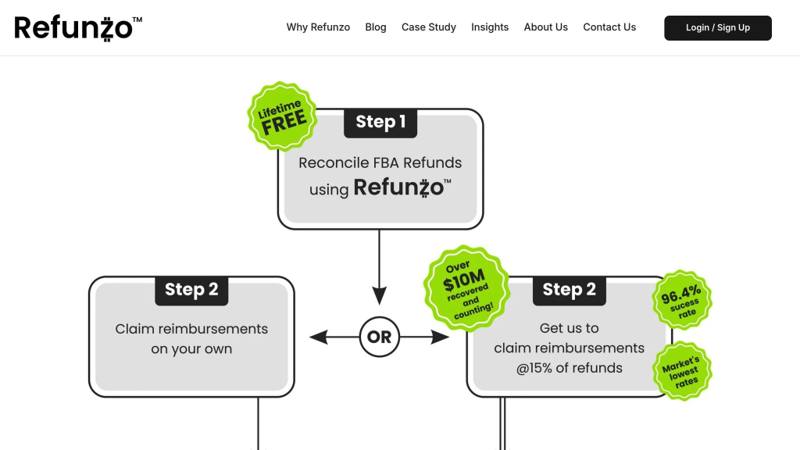
Refunzo takes the hassle out of manual checks by automating the entire process and providing actionable reports. Their 21-point check system connects directly to your Seller Central account to scan for issues like:
Shipment quantity mismatches
Stock deductions after closure
Damaged inventory during processing
Return-related discrepancies
Payment and fee inconsistencies
With these checks, Refunzo generates detailed reports that estimate potential reimbursements. Here’s what Greens Plus had to say about their experience:
"Refunzo have been a great partner for our company. They work seamlessly and are able to get us refunds from Amazon for lost or misallocated inventory at FBA warehouses. I would recommend them to any company doing business with Amazon FBA." - Greens Plus
By replacing manual spreadsheet tracking, Refunzo helps sellers spot problems faster. Their lifetime free reconciliation service allows you to identify discrepancies and either handle claims on your own or use their assistance - paying only after a successful reimbursement.
"Refunzo is great. Have found me 10's of thousands of dollars. Professional and efficient." - Doug Joyce
Getting Ready for Refund Claims
Submitting a successful reimbursement claim starts with keeping your documentation in order. Properly organizing your evidence before submitting can make the process much smoother and increase your chances of approval.
Required Documents
Make sure to gather all relevant paperwork, including records like shipping manifests and inventory reports. You’ll also need:
BOL (Bill of Lading): Confirms the quantities shipped.
Purchase orders: Proof of the original items sent to FBA.
Photos or videos: Visual proof of product condition, especially for damage claims.
Correspondence: Any communications you’ve had with Amazon regarding the shipment.
Ensure all documents are clearly dated and easy to read. This helps Amazon’s review team quickly verify your claim. Once everything is ready, you can move on to filing.
Filing Your Claim
After organizing your documents, it’s time to file your claim through Seller Central’s reimbursement request system. Tools like Refunzo can simplify this process by identifying eligible claims and estimating potential reimbursement amounts.
Here’s what sellers have said about Refunzo:
"I mainly use Refunzo for finding inventory that was lost or damaged at Amazon's warehouse and they are worth every penny of the commission they charge. I will continue using them for a long time." - Robert Cuttler
To improve your claim’s success, keep these tips in mind:
Be specific: Include precise details like dates, quantities, SKUs, shipment IDs, and case numbers.
Provide a clear timeline: Explain when and how the issue was discovered.
Organize your evidence: Present documentation in chronological order.
Maintain a professional tone: Keep your communication polite and clear.
"Refunzo is great! Everyone should get this service and get paid on their items. No matter what products you are selling!" - Tracy Lear
Sticking to Amazon’s guidelines and presenting detailed, well-organized records can significantly improve your chances of getting reimbursed.
Conclusion: Recovering Lost Funds
Identifying discrepancies is just the beginning; getting your money back is the real goal. Thanks to automation tools, the process has become much easier. After spotting an issue, gather your documentation, file support cases, and stay persistent with Amazon to improve your chances of reimbursement.
Here are two main ways to recover lost funds:
Self-managed recovery: This approach means connecting your account to a reconciliation tool, collecting the necessary documentation, and handling support cases directly through Seller Central. While it takes more time and effort, it gives you full control over the entire process.
Automated assistance: Services like Refunzo simplify everything. They handle everything for you - checking for discrepancies using over 20 criteria and managing the claims process. They charge 15% of the reimbursed amount (with a cap of $5,000) for their assistance. This option saves time and may lead to better recovery results.
Staying on top of your account and acting quickly are key to recovering lost funds. Whether you go the DIY route or use an automated service, keeping a close eye on your claims ensures your business stays profitable.
FAQs
What are the main reasons for shipment discrepancies in Amazon FBA, and how can I avoid them?
Shipment discrepancies in Amazon FBA often occur due to miscounts, damaged items, or lost inventory during transit or at fulfillment centers. These issues can result in a mismatch between what you sent and what Amazon received.
To minimize discrepancies, double-check your inventory counts before shipping, ensure proper packaging to prevent damage, and use a reliable carrier with tracking. Regularly review your shipment reports in Seller Central to identify any inconsistencies early. For a more streamlined approach, consider using tools that automate reconciliation and help identify potential reimbursement opportunities for missing or damaged inventory.
How can Refunzo help streamline the process of finding and resolving shipment discrepancies in Amazon FBA accounts?
Refunzo simplifies the process of identifying and resolving shipment discrepancies in Amazon FBA accounts by automating reconciliation. With over 20 detailed criteria checks, it ensures accurate inventory tracking and highlights potential reimbursement opportunities.
Users receive clear, actionable reports to address discrepancies. You can either manage claims yourself or let Refunzo handle them for a capped commission fee. Plus, Refunzo offers a lifetime free reconciliation service, making it an efficient and cost-effective solution for Amazon sellers.
What documents do I need to file a reimbursement claim for FBA shipment discrepancies, and how should I organize them?
To successfully file a reimbursement claim for FBA shipment discrepancies, you’ll typically need to provide proof of inventory ownership and shipment details. This may include invoices, packing slips, tracking numbers, and carrier receipts. Amazon may also request additional documentation, such as proof of delivery or product details, depending on the nature of the discrepancy.
To stay organized, ensure all documents are clearly labeled and stored in chronological order. Use digital formats like PDFs or scanned copies for easy access when submitting claims. Keeping your records well-structured not only streamlines the process but also helps resolve issues faster.