
The Ultimate Guide to Amazon FBA Reimbursements


TL;DR
Amazon often makes inventory and fee-related errors, costing sellers money.
Common issues include lost inventory, incorrect refunds, and overcharged FBA fees.
Sellers must manually check reports and file claims to recover missing reimbursements.
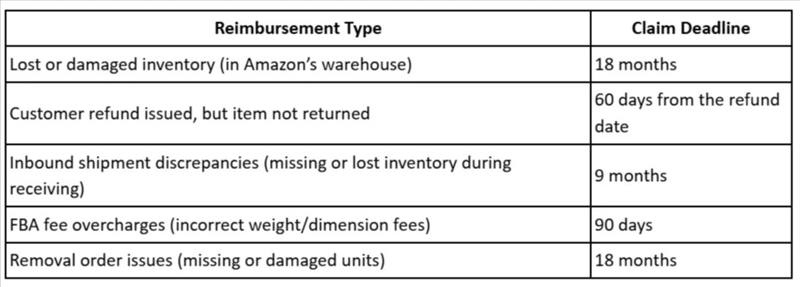
Amazon has strict deadlines; claims must be filed within 60 days to 18 months.
Avoid mistakes like missing deadlines, vague claims, or lack of supporting documents.
FBA reimbursement services can automate claims and maximize recovery without manual work.
Selling on Amazon FBA comes with a lot of advantages—fast shipping, hassle-free fulfillment, and access to millions of customers. But what many sellers don’t realize is that Amazon makes mistakes—and those mistakes could be costing you money.
Lost inventory, overcharged fees, incorrect refunds—Amazon’s systems aren’t perfect, and these errors add up over time. The good news? You’re entitled to get that money back through FBA reimbursements. But Amazon won’t always do it for you—you need to identify the errors, file claims, and follow up to recover what’s rightfully yours.
That’s where this guide comes in. We’ll break down everything you need to know about Amazon FBA reimbursements, including what qualifies, how to file claims, and how to maximize your reimbursements without wasting hours in Seller Central.
If you’ve ever wondered how much money Amazon owes you, this guide will help you find out—and get it back.
Quick guide:
What are Amazon FBA reimbursements?
Why does Amazon owe you money?
Types of FBA errors that qualify for reimbursements
How to check if Amazon owes you a reimbursement
Step-by-step process to file an FBA reimbursement claim
Amazon’s reimbursement policies and claim time limits
Common mistakes sellers make when filing claims
Why working with an FBA reimbursement service can help
What are Amazon FBA reimbursements?
Amazon FBA reimbursements are refunds Amazon issues to sellers when they make errors while handling inventory. Since Amazon takes full control of your products in the Fulfillment by Amazon (FBA) system, they are responsible for storing, packing, shipping, and even processing returns. However, mistakes happen, and Amazon may lose, damage, or mishandle your inventory—sometimes without notifying you.
The good news? Amazon has policies that require them to reimburse sellers for certain errors. But here’s the catch: while Amazon does automatically refund some issues, many go unnoticed unless you manually file a claim. This means you could be losing money without realizing it.
When do you qualify for an Amazon FBA reimbursement?
You may be eligible for reimbursement if:
Amazon loses or damages your inventory in their warehouse.
A customer returns an item, but Amazon doesn’t add it back to your sellable inventory.
You’re overcharged on FBA fees, such as incorrect weight or dimension fees.
Amazon destroys your inventory without permission or without crediting you.
Refunds are issued incorrectly, costing you extra.
Why does Amazon owe you money?
When you sell through Fulfillment by Amazon (FBA), you trust Amazon to store, handle, and ship your products correctly. However, Amazon’s system isn’t perfect, and mistakes happen frequently. These errors can lead to lost inventory, incorrect fees, or missing refunds—meaning you could be losing money without realizing it.
Amazon owes you money when it fails to follow its policies related to inventory handling, refunds, or fee calculations. While Amazon automatically reimburses some issues, many go unnoticed unless you manually track and file claims.
Types of FBA errors that qualify for reimbursements
Amazon handles millions of products in its fulfillment centers daily, and mistakes are bound to happen. Fortunately, Amazon has policies in place that require them to reimburse sellers for certain errors. However, many of these issues are not refunded automatically, so sellers must identify and file claims to recover their money.
Here are the most common FBA errors that qualify for reimbursements:
1. Lost or misplaced inventory: Amazon loses your products within its fulfillment centers. Items go missing during inbound shipments and never get checked in. Units disappear during transfers between warehouses.
2. Damaged inventory: Amazon damages your stock while handling or storing it. Products are destroyed but not reimbursed. Damage occurs during shipment to customers, and Amazon does not refund you.
3. Incorrect customer refunds: Amazon refunds a customer but fails to deduct the item from your inventory. The customer never returns the product, yet the refund is still processed. Amazon issues multiple refunds for a single order.
4. Overcharged FBA fees: Incorrect weight or size calculations lead to inflated fulfillment fees. Amazon updates product dimensions incorrectly, charging higher storage and shipping costs.
5. Destroyed or disposed of inventory: Amazon removes or disposes of inventory without your request. Products are marked as unsellable and destroyed, but no reimbursement is issued.
6. Inbound shipment discrepancies: You ship 100 units, but Amazon only acknowledges 90. Missing units are never added to your inventory, but Amazon does not compensate you.
7. Issues with removals and returns: You create a removal order, but Amazon fails to send back the correct number of units. Amazon marks a return as completed, but the item is missing from your inventory.
How to check if Amazon owes you a reimbursement
Step 1: Check the FBA inventory adjustments report
Amazon tracks inventory movements, losses, and adjustments, but errors can go unnoticed. To check for missing inventory:
Go to Seller Central → Reports → Fulfillment
Under Inventory, select Inventory Adjustments
Look for Lost, Damaged, or Destroyed status that was not reimbursed
Step 2: Review the FBA customer returns report
Amazon sometimes fails to return refunded items to your inventory, which means you lose money on both the refund and the product.
In Seller Central, go to Reports → Fulfillment
Click on Customer Returns
Look for refunded orders that were never restocked
Step 3: Analyze inbound shipment discrepancies
Amazon may miscount or lose inventory when receiving your shipments.
In Seller Central, go to Manage FBA Shipments
Open past shipments and check if the received quantity matches what you sent
If there’s a shortfall, Amazon may owe you a reimbursement
Step 4: Verify FBA fee charges
Amazon sometimes overcharges fulfillment fees due to incorrect product dimensions or weight calculations.
In Seller Central, go to Reports → Fulfillment
Select Fee Preview
Compare Amazon’s recorded dimensions/weight with your actual product specifications
Step 5: Check the reimbursements report
Amazon logs past reimbursements, but not every eligible claim is refunded automatically.
Go to Reports → Payments → Reimbursements
Look for missing reimbursements in cases where items were lost, damaged, or overcharged
Step 6: Compare all findings with your records
Keep track of how much inventory you send and what Amazon logs into its system
Regularly download reports and cross-check them with your data
Look for patterns in lost inventory, incorrect refunds, and fee miscalculations
Pro tip
Checking all these reports manually can be time-consuming, especially if you sell high volumes. Many sellers use automated tools or work with Amazon seller reimbursement services to identify and file claims efficiently.
Step-by-step process to file an FBA reimbursement claim
Step 1: Gather the necessary data
Before filing a claim, collect all the details related to the issue. This may include:
Order ID (for refund or return-related claims)
Shipment ID (for lost inbound inventory claims)
SKU/ASIN of the affected product
Supporting documents (e.g., proof of shipment, product dimensions, customer complaints)
Step 2: Open a support case in Seller Central
Log in to Seller Central
Click on Help (top-right corner)
Scroll down and select Get Support
Click on Selling on Amazon → Fulfillment by Amazon (FBA)
Choose the appropriate issue category:
"FBA inventory reimbursements" (for lost or damaged inventory)
"FBA customer returns issues" (for refund discrepancies)
"FBA fee disputes" (for incorrect fulfillment fees)
Step 3: Submit your claim
In the description box, clearly explain the issue (keep it concise and professional). Example:
"Amazon has refunded the customer for order #123-4567890, but the returned item was never restocked. Please review and reimburse the missing amount."
"Inbound shipment ID XXXXXX was short by 10 units. Attached are my shipment records showing that 100 units were sent, but Amazon received only 90. Please investigate and issue reimbursement."
Attach supporting documents (invoices, shipping receipts, or reports).
Click Submit and wait for Amazon’s response.
Step 4: Follow up on the case
Amazon typically responds within 3 to 7 business days, but they may ask for more information. If your case is taking too long:
Check case status in Seller Central → Case Log
Politely respond and provide any additional details requested
If denied, escalate the case by reopening it and requesting a manual review
Step 5: Track and verify reimbursement payments
Once Amazon approves the claim:
Go to Reports → Payments → Transaction View
Search for "Reimbursement" to confirm the amount credited to your account
Double-check that the amount is accurate and corresponds to the lost/damaged inventory
Pro tip: Filing claims regularly (at least once a month) ensures you don’t miss out on reimbursements. If you manage a large inventory, consider using automation tools or an FBA reimbursement service to track and file claims efficiently.
Amazon’s reimbursement policies and claim time limits
Only eligible errors qualify – Amazon reimburses for lost, damaged, or mishandled inventory, but claims must be valid and backed by evidence.
Reimbursements are based on Amazon’s fair value calculation – The refund amount is usually the average sale price of your product over a specific period, not necessarily your current selling price.
No duplicate claims – If Amazon has already reimbursed you for an issue, they won’t pay again.
Supporting documentation is required – Amazon may ask for proof of shipment, invoices, or transaction details to verify claims.
FBA reimbursement time limits
Amazon imposes strict deadlines for different types of claims. If you don’t file within these timeframes, Amazon will not process your claim:
Common mistakes sellers make when filing claims
1. Missing claim deadlines
Mistake: Waiting too long to file a claim and missing Amazon’s strict time limits (e.g., 9 months for inbound shipment discrepancies, 60 days for customer returns).
Solution: Regularly audit your account every month and file claims as soon as you identify an issue.
2. Not providing enough evidence
Mistake: Submitting a claim without proper supporting documents like invoices, shipping records, or transaction details.
Solution: Always attach proof of shipment, SKU details, order IDs, or Amazon reports that verify the discrepancy.
3. Filing duplicate claims
Mistake: Submitting multiple claims for the same issue, can lead to automatic rejection by Amazon.
Solution: Keep track of past claims and only file once per issue—you can follow up if Amazon hasn’t responded.
4. Using vague or unclear claim descriptions
Mistake: Writing incomplete or confusing messages when explaining the issue to Amazon.
Solution: Be clear, concise, and factual in your support ticket. Example:
Bad claim message: "I think my inventory is missing. Please check."
Good claim message: "Inbound shipment ID XXXXXX was short by 10 units. My records show 100 units were shipped, but only 90 were received. Please investigate and reimburse accordingly."
5. Assuming Amazon automatically reimburses everything
Mistake: Thinking Amazon will find and refund all errors automatically. Many go unnoticed unless sellers manually file claims.
Solution: Regularly check inventory reports, refund reports, and fee previews to catch missing reimbursements.
6. Not tracking reimbursement payments
Mistake: Assuming the reimbursement has been paid but not verifying the amount received.
Solution: After Amazon approves your claim, go to Reports → Payments → Transaction View and confirm the credited amount matches the claim.
7. Not following up on denied claims
Mistake: Giving up after an initial rejection, even when the claim is valid.
Solution: If Amazon denies a claim without proper reasoning, politely reopen the case and ask for a manual review.
Pro tip: If filing claims manually is too time-consuming, consider using FBA reimbursement tools or professional services that track errors and file claims on your behalf.
Why working with Amazon FBA reimbursement services can help
Every dollar lost to Amazon’s mistakes is profit out of your pocket—and most sellers don’t even realize how much they’re owed. An FBA reimbursement service helps recover lost revenue by identifying and filing claims for missing inventory, incorrect refunds, and fee overcharges. These services use data-driven audits to maximize reimbursements while ensuring compliance with Amazon’s policies. If you want to stop leaving money on the table, outsourcing your reimbursement process is a smart move.