
How to Track and Manage Amazon Reimbursement Claims Like a Pro


TL;DR
Tracking reimbursement claims helps you get money back for lost, damaged, or mishandled inventory.
Main claims to track include lost inventory, damaged inventory, customer-damaged returns, refunds without returns, and overcharged FBA fees.
Download and check your reports regularly in Seller Central, like inventory adjustments, reimbursement, and returns reports.
If you find a problem, raise a case in Seller Central and make sure to file before the deadline (usually within 9 months).
Use a simple system like a spreadsheet to track claims, or use tools to automate the process.
Don’t rely only on Amazon’s automatic reimbursements. Take action to make sure you’re not missing money.
Tracking and managing Amazon reimbursement claims is essential for protecting your profits as an FBA seller. When things go wrong, like lost or damaged inventory, shipping errors, or overcharged fees, Amazon may owe you money. However, staying on top of these claims can be tricky if you don’t have a system in place.
In this guide, we’ll show you why tracking reimbursement claims is so important and walk you through the process step by step. You’ll learn about the different types of claims to track, where to find the necessary data in Seller Central, and how to manually track claims.
We’ll also share tips on how to manage the process effectively, including when to raise a case, checking for errors, and keeping track of your claims. By following these steps, you can avoid missing reimbursements, keep your business profitable, and recover money you’re owed.
Why does tracking reimbursement claims matter?
Tracking Amazon FBA reimbursement claims is crucial for protecting your profits as an Amazon FBA seller. When Amazon makes mistakes like losing or damaging inventory, overcharging fees, or mishandling returns, it’s your responsibility to catch these issues and file claims for reimbursement. If you don’t track these claims, you could miss out on money that belongs to you.
Even though Amazon automatically reimburses some issues, they don’t catch everything. Without regular checks, you might lose track of opportunities to get reimbursed for lost or damaged goods. By staying on top of your claims, you can recover the money you’re owed, keep your inventory levels accurate, and avoid unnecessary costs.
Tracking your claims helps you stay organized, ensure that you’re getting reimbursed on time, and protect your profits. It’s an important part of managing your Amazon business, so don’t let these opportunities slip away.
Types of claims to track
As an Amazon seller, there are several types of reimbursement claims you should track to ensure you're getting the money you're owed. Here are the main types of claims to watch for:
Lost inventory: When Amazon can't find your products after receiving them at the warehouse, you’re entitled to reimbursement.
Damaged inventory: If items are damaged while being handled or stored by Amazon, you can file for reimbursement.
Customer-damaged returns: If a customer returns an item in poor condition that can’t be resold, Amazon may owe you money for that damage.
Refunds without returns: If a customer gets refunded but doesn’t return the product, you can claim reimbursement for the missing inventory.
Overcharged FBA fees: If Amazon overcharges you for storage, handling, or shipping fees, you’re eligible for a claim.
Tracking these claims ensures that Amazon reimburses you for mistakes and protects your profits.
Where to find reimbursement data in Seller Central
Finding Amazon FBA refund reimbursement in Seller Central is straightforward once you know where to look. Amazon provides several reports that give you information about reimbursements for lost or damaged inventory, overcharged fees, and other issues.
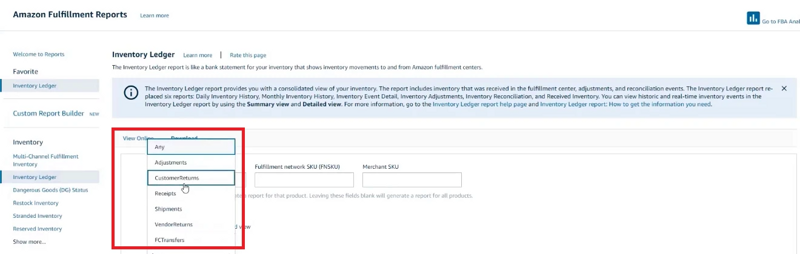
Inventory adjustments report: This report shows you any changes in your inventory due to Amazon’s mistakes, like lost or damaged items.
Reimbursement report: This is where you can track any reimbursements Amazon has already issued to you for lost or damaged inventory.
Returns report: This report shows returns made by customers. You can check for customer-damaged items that might be eligible for reimbursement.
Customer concessions report: It tracks any items marked as "customer damaged" that you may need to file a claim for.
To access these reports, log in to your Seller Central account, go to the reports section, and select the appropriate report to get detailed reimbursement data.
How to track claims manually
Tracking claims manually is a simple process, but it requires regular attention to ensure you don’t miss any reimbursements. Here’s how to do it:
Download your reports: Go to Seller Central and download key reports like the inventory adjustment report, reimbursement report, and returns report. These will show any issues related to lost or damaged inventory.
Identify discrepancies: Look for any missing or damaged items that haven't been reimbursed. If an item is marked as "lost" or "damaged" but no reimbursement has been issued, it’s time to file a claim.
Create a tracking system: Set up a simple spreadsheet or use a tool to keep track of claims you’ve filed. Include details like the ASIN, order ID, claim date, and reimbursement status.
Check regularly: Make it a habit to check your reports at least once a week. This helps catch mistakes early and ensures you don’t miss the claim deadline.
By manually tracking claims, you can stay organized and recover the money you're owed.
How to manage Amazon reimbursement claims
Managing Amazon reimbursement claims can seem overwhelming, but with the right steps, it becomes much easier. Here’s a simple guide to help you manage your claims effectively and ensure you’re getting back the money Amazon owes you.
#1 Know when Amazon gives reimbursements
Amazon will reimburse you when it loses or damages your inventory, or if there’s an issue with FBA fees. For example, if a product is lost in their warehouse or damaged while in their control, you may be eligible for a reimbursement. However, Amazon doesn’t always catch these errors on its own, so it’s important to track your inventory and file claims when needed.
#2 Download reports from Seller Central
The first step in managing your claim is to regularly download reports from Seller Central. Two key reports to check are:
Inventory adjustments report: This report shows any changes in your inventory, including lost or damaged products.
Reimbursement report: This report details any reimbursements Amazon has already issued.
By checking these reports, you can spot discrepancies like missing inventory or unpaid reimbursements.
#3 Check for mistakes or missing money
Once you have your reports, review them carefully for any errors. Look for discrepancies between what you’ve sent to Amazon and what’s shown in your reports. For example, if an item is marked as lost or damaged but you haven’t been reimbursed, it’s time to file a claim. Keeping track of these discrepancies ensures you don’t miss any opportunities to recover money.
#4 Raise a case to ask for reimbursement
If you spot an issue, go ahead and raise a case in Seller Central. To do this:
Go to Help> Get support > Fulfillment by Amazon.
Choose Investigate Other FBA Issues, and select the type of reimbursement claim.
Provide all the necessary details like ASIN, order ID, and the issue you're reporting. Be sure to attach any supporting documents, like screenshots.
#5 Keep track of your claims
After raising a case, keep track of it using your case ID. Amazon might take a few days to respond, so it’s important to follow up regularly to ensure your claim is being processed.
#6 Don’t miss the deadline to claim
Amazon has a filing window for reimbursement claims, usually up to 9 months from the issue. Make sure you file your claims before the deadline to avoid losing the opportunity for reimbursement.
#7 Only ask for money when it’s due
Be sure that the reimbursement is valid before you ask for it. Don’t file claims for mistakes you can correct yourself or for issues that don’t meet Amazon’s FBA reimbursement policy. This ensures that your claims are legitimate and increases your chances of success.
By following these steps, you’ll be able to manage your Amazon reimbursement claims like a pro, recover money you’re owed, and keep your business running smoothly.
Final thoughts
Managing Amazon reimbursement claims is key to keeping your FBA business profitable. By checking your reports regularly, filing claims quickly, and tracking them carefully, you can recover the money Amazon owes you for lost or damaged items. Don't just rely on Amazon’s automatic reimbursements; being proactive will help you avoid missing out on money.
Always make sure to meet the deadlines and provide accurate details when filing claims. Here, you can choose our best Amazon inventory reimbursement services that can help make this process easier and save you time by tracking claims automatically.
By staying organized and on top of your claims, you’ll protect your profits and keep your business running smoothly. With the right steps, you can recover your money and keep your FBA business profitable.