
How to Automate your Amazon Reimbursement Process


TL;DR
Amazon FBA reimbursements can be automated to save time and recover money from lost inventory, damaged goods, and incorrect fees.
Tools like Refunzo help detect issues, file claims, and follow up with Amazon, reducing manual work.
Refunzo offers a free, two-step setup: scan your account for issues, then choose to file claims yourself or let the team handle it.
You can use Refunzo entirely on your own or opt for expert support for a small success-based fee.
Automation reduces the risk of missed claims and saves hours of effort, especially for high-volume sellers.
Refunzo is free for life, requires no credit card to start, and gives full control over your reimbursement process.
Managing Amazon FBA reimbursements can be time-consuming and easy to overlook. Lost inventory, damaged goods, and incorrect refunds are more common than most sellers realize, and if you're not tracking them closely, you're probably leaving money on the table.
That’s where automation comes in. With the right tools, you can detect reimbursement opportunities, file claims, and follow up without manual effort. Software like Refunzo can help simplify the process and even run it in the background while you focus on growing your business.
In this guide, we’ll cover what parts of the reimbursement process can be automated, which tools are worth considering, and how to set everything up. We'll also look at when it makes sense to use a third-party service versus doing it yourself, along with the risks, best practices, and how to measure your return on automation.
What can be automated in the reimbursement process
A big part of the Amazon FBA reimbursement process can now be automated, saving sellers hours of work and reducing missed opportunities.
Detecting reimbursement opportunities: This includes spotting lost or damaged inventory, incorrect fee charges, returns not received, or customer refunds that weren’t adjusted correctly. Instead of manually checking reports, automation tools can scan your Amazon data and flag anything that looks off.
Filing claims: Once a potential issue is identified, the software can either create ready-to-submit claims for you or automatically file them with Amazon, depending on the tool you’re using. This cuts down on repetitive tasks and helps you stay compliant with Amazon’s claim submission rules.
Follow-up on claims: It is another area where automation can help. Some claims require multiple touchpoints with Amazon’s support team. Instead of constantly checking statuses or sending reminders, automation ensures nothing slips through the cracks.
When these three steps are automated, you stay on top of your reimbursements without having to manually dig through reports or emails. It’s like having a dedicated assistant keeping tabs on your FBA account.
Tools and software to consider
There are many tools that can help Amazon sellers get back money they’re owed from FBA issues. These tools make it easier to find mistakes like lost or damaged inventory, wrong fees, or refunds that were never returned.
Instead of checking everything manually, the software does the work for you. Some tools just help you find problems. Others also file the claims for you and follow up until you get your money. The best ones show you a clear dashboard, keep track of all your claims, and make sure everything follows Amazon’s rules. They also connect directly to your Amazon account, so they work in real-time.
Refunzo
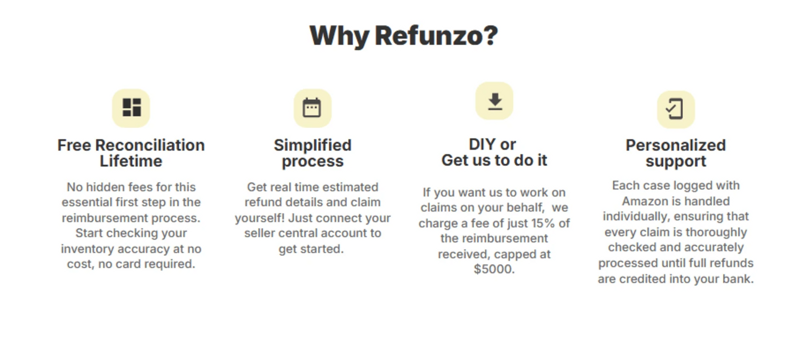
One great tool to consider is Refunzo. It’s built for Amazon sellers and takes care of the entire reimbursement process. Refunzo finds issues, files the claims, and keeps following up so you don’t have to. It’s simple to use and makes sure you don’t miss out on money Amazon owes you. Whether you’re a new seller or have lots of sales, Refunzo saves you time and helps protect your profits.
How to set up automation
Automating your Amazon FBA refund reimbursement process with Refunzo is simple, accurate, and flexible. You can choose to let Refunzo handle everything or stay in control and file the claims yourself. Here's how the process works in two easy steps:
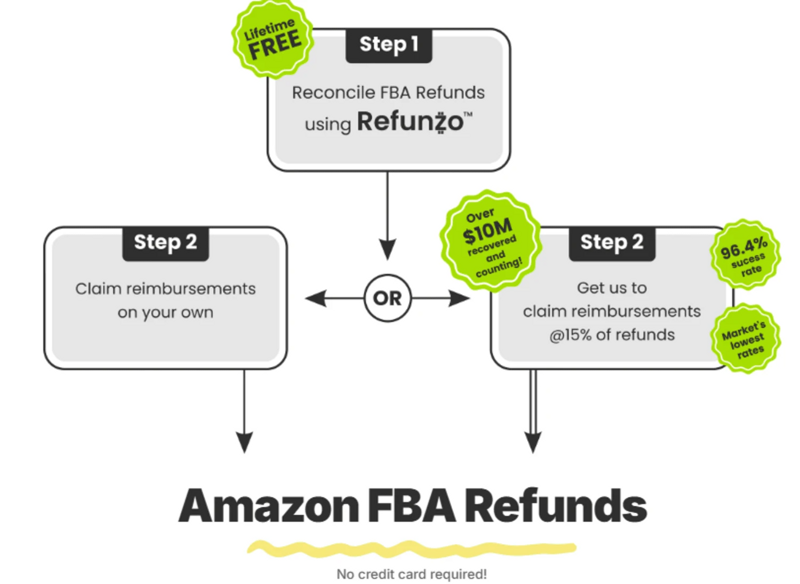
Step 1: Reconcile using the Refunzo web app
Start by connecting your Amazon account to Refunzo. This connection is secure and gives the tool access to your FBA data. Refunzo then runs a deep scan using over 20 different checks to find errors like lost or damaged inventory, overcharged fees, incorrect reimbursements, and more.
After the scan, you'll get a detailed report showing where Amazon may owe you money, along with an estimated refund value. You’ll also see step-by-step instructions and documentation you can use to create support cases and file claims with Amazon on your own, if you prefer a DIY approach.
Step 2: Get us to claim reimbursement
If you’d rather not handle claims yourself, you can let Refunzo do it for you. All you need to do is securely authenticate your credit card. No charges are made unless Amazon pays you back. Refunzo’s team will then raise support cases on your behalf, provide all required proof, and follow up with Amazon until each case is resolved.
Once Amazon approves the claims, the refund will go straight into your Amazon-linked bank account.
For this service, you only pay 15% of the refunded amount or $5000, whichever is lower. There's no upfront cost, no hidden fees.
Best of all, Refunzo is completely free to use for life. You can sign up, connect your Amazon account, run reports, and even create claims yourself without ever needing a credit card. Whether you want to go fully automated or stay hands-on, Refunzo puts the power in your hands.
Whether you want to automate everything or just get a detailed report and manage claims yourself, Refunzo gives you full control with full transparency and Amazon FBA reimbursement services. It's your choice, your money. Refunzo just makes sure you don’t leave it behind.
When to use third-party services vs. do it yourself
Deciding between using a third-party service or doing it yourself depends on how much time you have and how complex your FBA account is.
If you’re a small seller with just a few products and enough time to manage reports, you might be fine handling reimbursements yourself. Refunzo gives you everything you need to do this, including a detailed report and claim instructions.
But if you’re a busy seller with hundreds of orders, limited time, or don’t want to deal with Amazon’s support team, a third-party service can save you a lot of effort. They’ll find the issues, file the claims, follow up, and make sure you get paid without you lifting a finger.
With Refunzo, you get the best of both worlds. You can start for free, run reports yourself, and if needed, choose to let the experts handle the claims later. It’s flexible, simple, and built to fit your workflow.
Risks and best practices
While automating your Amazon FBA reimbursements is a smart move, there are a few risks to keep in mind and best practices to follow to stay on the safe side.
Filing incorrect or duplicate claims: Amazon has strict policies, and filing too many wrong claims can lead to account warnings or suspension. That’s why it’s important to use trusted tools like Refunzo that follow Amazon’s guidelines and check each claim carefully before submitting it.
Missing deadlines: Amazon usually gives sellers 18 months to file a claim. If you don’t track this, you could lose money. Automated tools help catch these in time, but it’s still a good idea to review reports regularly.
Best practices
Best practices include keeping your account healthy, avoiding false claims, and always using proper documentation when filing. Also, don’t rely only on automation, review your claims summary now and then so you know what’s going on. Lastly, never give full account access to unverified third-party services. Use secure apps like Refunzo that require only the data they need.
By combining smart tools with careful checks, you can safely automate your reimbursements and recover more money without risking your seller account.
Measuring the ROI of automation
Measuring the ROI (return on investment) of automating your Amazon FBA reimbursement process is simple when you look at the time and money saved. Manually checking reports, identifying issues, filing claims, and following up can take hours every week.
With automation tools like Refunzo, this entire process runs in the background, saving you time that can be spent growing your business. More importantly, automation helps you catch more reimbursement opportunities that you might miss manually. That means more money recovered and fewer losses.
Since Refunzo doesn’t charge any upfront fees, your costs only come from actual reimbursements recovered. This makes your ROI easy to track if you weren’t getting that money back before, every recovered dollar is profit.
Add the time saved and the increased accuracy, and you’ll see that automation doesn’t just pay for itself, it boosts your bottom line. It's a low-risk, high-reward solution for serious sellers.
Ready to stop chasing reimbursements manually?
Automating your Amazon FBA reimbursement process is one of the smartest moves you can make as a seller. It saves time, reduces errors, and helps you recover money you might never have realized Amazon owed you.
Whether you're just getting started or already managing a large volume of orders, tools like Refunzo make the entire process easier, offering both do-it-yourself options and full-service automation. With no upfront fees, lifetime free access, and full transparency, Refunzo gives you the flexibility and peace of mind you need. If you’re ready to stop leaving money on the table, it’s time to explore Amazon FBA reimbursement services that work for you.
Let automation do the heavy lifting while you stay focused on growing your business.