
Is Amazon Rejecting your Customer-Damaged Claim? Here’s How to Appeal


TL;DR
Customer-damaged claims happen when a customer returns an item in poor condition, and you request reimbursement from Amazon.
Amazon may reject your claim if the item is restocked, marked as "sellable," missing details, submitted late, or considered your fault.
To appeal, gather accurate info like ASIN, order ID, and return reason, then submit your appeal through Seller Central.
Tools like Refunzo help you track customer-damaged returns, catch missed reimbursements, and prepare stronger claims.
Regularly check your returns and claim status to avoid missed deadlines and improve your chances of approval.
Automating your reimbursement process with Refunzo helps you recover more money, save time, and reduce manual effort.
Dealing with customer-damaged claims can be a frustrating part of managing an FBA business. When a customer returns an item in poor condition, it can affect your profits if Amazon doesn’t reimburse you. However, sometimes Amazon may reject your claim, leaving you with damaged inventory and no reimbursement. Understanding why claims are rejected and knowing how to appeal is crucial to protecting your business.
In this blog, we’ll walk you through what a customer-damaged claim is, why Amazon might reject it, and how to navigate the process of appealing a denied claim. We’ll also explain how using tools like Refunzo can help track customer-damaged returns and make the appeal process easier.
With the right approach, you can recover the money you’re owed and avoid future claim rejections. Stay proactive by understanding Amazon’s policies and automating future claims to ensure your FBA business remains profitable.
What is a customer-damaged claim?
A customer-damaged claim is when you ask Amazon for reimbursement for a product returned by a customer in poor condition. This could happen if the item is broken, scratched, or missing parts, making it unsellable. For example, if a customer returns a piece of clothing with stains or a gadget with broken parts, the item is considered "customer-damaged."
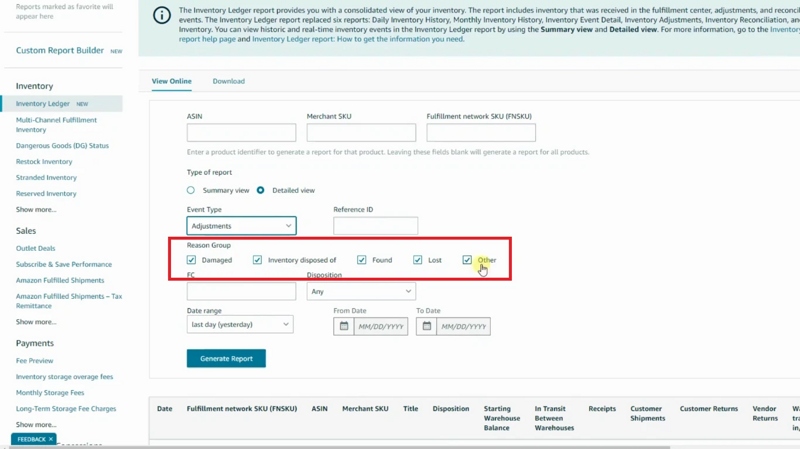
Amazon marks these returns as “customer damaged” and may reimburse you for the loss if the item can’t be resold. However, it’s important to note that Amazon doesn’t automatically reimburse all customer-damaged items. You need to check your returns reports regularly to identify these issues and file a claim if you believe you’re entitled to reimbursement.
If Amazon doesn’t reimburse you for these items, you can file a claim through Seller Central. Keeping track of customer-damaged returns and filing claims promptly can help you recover money for your Amazon inventory reimbursement.
Why may Amazon reject your customer-damaged claim?
Amazon may reject your customer-damaged claim for several reasons, and understanding these can help you avoid mistakes and increase your chances of getting reimbursed. Here are some common reasons why claims are rejected:
The item was restocked: If Amazon decides to restock the returned item, even if it’s damaged, they won’t reimburse you. They can only reimburse you if the item is marked as unsellable and not returned to inventory.
Missing information: If your claim doesn’t include all the necessary details, such as the ASIN, order ID, and a description of the damage, Amazon may reject it. Always ensure you provide clear and accurate information when filing a claim.
Incorrect claim timing: Amazon has strict time limits for filing claims. If you wait too long to file a claim, it could be rejected. It’s important to file claims promptly to avoid missing deadlines.
Amazon believes the damage was caused by the seller: If Amazon thinks the damage was due to poor packaging or other issues on your part, they won’t reimburse you.
Claim for items marked as "sellable": If Amazon marks the item as "sellable" instead of "customer damaged," you won’t be reimbursed.
By understanding these reasons, you can avoid mistakes and file stronger claims in the future.
Understand Amazon’s customer-damaged reimbursement policy
Understanding Amazon's customer-damaged reimbursement policy is key to protecting your profits as an FBA seller. When a customer returns an item in poor condition, Amazon may mark it as "customer damaged."
These items can no longer be resold as new, and that’s where the reimbursement comes in. Amazon’s policy states that if a returned item is damaged and can’t be restocked for sale, you may be eligible for reimbursement. However, there are some important details to keep in mind:
Restocking decision: If Amazon decides to restock the damaged item, it will not reimburse you. This means the item must be deemed unsellable, such as having broken parts, missing accessories, or damaged packaging.
Customer responsibility: The damage must have been caused by the customer. If the item is returned in perfect condition or with only minor wear, it won’t qualify for reimbursement.
Filing a claim: If your item is marked as customer damaged but you haven’t been reimbursed, you can file a claim in Seller Central. You’ll need to provide the ASIN, order ID, and other relevant details to support your claim.
Amazon doesn’t always reimburse: Amazon doesn’t automatically reimburse every customer-damaged return. It’s your responsibility to identify these returns and file claims.
By regularly checking your returns report and tracking customer-damaged inventory, you can ensure your Amazon inventory reimbursement for unsellable items. Being proactive about this process can help you recover lost revenue and avoid financial losses.
How to appeal a rejected claim
Appealing a rejected customer-damaged claim can be frustrating, but with the right steps, you can increase your chances of success. Here’s a simple guide to help you navigate the process and get the reimbursement you deserve.
#1 Understand why your claim was rejected
The first step in appealing a rejected claim is understanding why it was denied. Amazon may reject your claim for several reasons, such as:
Incomplete or inaccurate information: If you didn’t provide enough details or the correct order ID and ASIN, your claim might be rejected.
Wrong category: If Amazon mistakenly considers the item as resellable, you won’t be reimbursed.
Missed deadlines: Claims often have a filing deadline, usually within 9 months of the issue. Missing this window could lead to rejection.
To avoid future rejections, ensure that you’re providing the correct and complete information when filing your claims.
2. Use Refunzo to track customer-damaged returns
To make the process easier, use tools like Refunzo. Refunzo automatically tracks customer-damaged returns and helps identify any missed reimbursements. This tool pulls data directly from your Amazon account, making it easier to spot discrepancies like missing items or unapproved returns.
To prevent future hassles, consider automating your claims process with Refunzo. This tool helps track and file claims automatically, saving you time and ensuring you never miss a claim deadline.
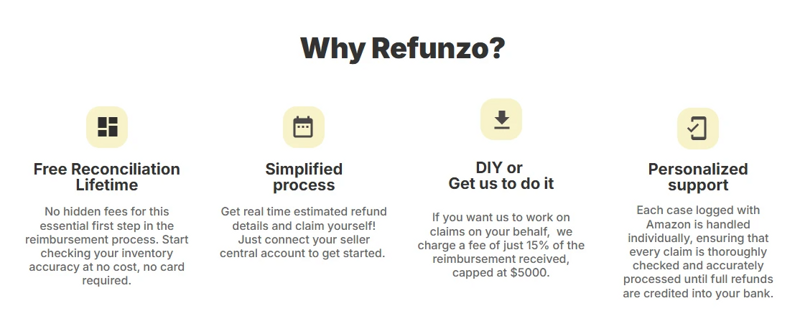
Refunzo also sends alerts when customer-damaged returns happen, so you can take action quickly. Using such tools will ensure you don’t miss any opportunities to file claims and streamline the reimbursement process.
3. Prepare your appeal with accurate data
Once you understand why your claim was rejected, you need to gather all the necessary data to support your appeal. This includes:
ASIN (Amazon Standard Identification Number)
Order ID
Return reason or customer feedback indicating the damage
Photos or reports of the damage (if applicable)
Having this information ready will help Amazon process your appeal faster and with more accuracy. Here, you can opt for the Amazon reimbursement specialist who handles your claim according to the Amazon policy update and requirements.
4. Submit your appeal on Seller Central
After you’ve gathered the necessary data, you can submit your appeal directly on Seller Central. Here’s how:
Go to Help > Get Support > Fulfillment by Amazon.
Choose to investigate other FBA Issues and select customer-damaged returns.
Fill in the details of your claim, attach the supporting documents, and submit the appeal.
Make sure to be clear and polite in your appeal message. State your case, provide the details, and request a review.
5. Regular checking
It’s important to regularly check your claims and keep track of any updates. Amazon may take a few days to respond, so be patient. If you haven’t received a response in a few days, follow up. By checking regularly, you can stay on top of your claims and avoid missing any deadlines.
By following these steps, you can effectively appeal a rejected customer-damaged claim and improve your chances of getting reimbursed.
Automate future claims with Refunzo
Automating your future Amazon FBA refund reimbursement with Refunzo is one of the easiest ways to save time and recover more money. Instead of manually checking reports, tracking damaged returns, and filing claims, Refunzo does the heavy lifting for you.
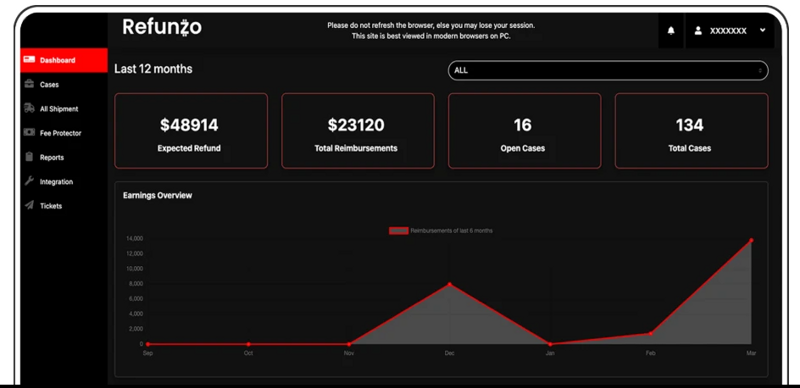
Once connected to your Amazon account, Refunzo continuously scans for customer-damaged inventory and other reimbursement opportunities. When eligible issues are found, it prepares and submits claims automatically or alerts you so you can take quick action.
You’ll also get reminders for important deadlines and regular updates on claim status, ensuring nothing slips through the cracks. This helps prevent missed claims and lost revenue. Plus, Refunzo follows Amazon’s guidelines, reducing the chances of rejections or account issues.
Whether you're a new seller or managing high-volume sales, Refunzo helps you stay on top of your reimbursements without extra effort.
Wrapping up
Dealing with customer-damaged returns can be frustrating, but understanding the process and using the right tools can make a big difference. By staying informed about Amazon’s reimbursement policies, filing accurate claims, and appealing when needed, you can recover money that might otherwise be lost.
Tools like Refunzo make this process easier by tracking returns, alerting you to missed claims, and even handling the filing for you. Whether you prefer to manage it yourself or let experts handle it, automating your claims with Refunzo can save time and protect your profits.
If you’re tired of doing everything manually, it’s time to explore Amazon seller reimbursement services that simplify the process and help you focus on growing your business.