
Ineligible vs. Eligible FBA Claims: Key Differences


Amazon sellers using Fulfillment by Amazon (FBA) often face financial losses due to inventory mishandling, lost shipments, or fee errors. Filing FBA claims can help recover up to $5,000 per item, but not all claims qualify. Here’s what you need to know:
Eligible Claims: These involve Amazon’s errors, like lost or damaged inventory in their fulfillment centers, inbound shipment discrepancies, or fee overcharges. Claims require detailed documentation (e.g., invoices, proof of delivery) and must be filed within strict deadlines (e.g., 60 days for most issues).
Ineligible Claims: These stem from seller mistakes, customer damage, or missed deadlines. For example, poor packaging, late submissions, or items marked for disposal won’t qualify for reimbursement.
Key Updates:
Starting March 2025, reimbursements for pre-sale losses will be based on manufacturing costs, not sale prices.
From February 16, 2026, the filing window for SAFE-T claims will shrink to 30 days.
To streamline this process and avoid missed reimbursements, tools like Refunzo automate claim filing and track deadlines, saving time and improving success rates.
New Amazon Reimbursement Rules: How to Claim Lost & Damaged Inventory in 2024 IMPORTANT Update
What Makes an FBA Claim Eligible?
For an FBA claim to qualify, your inventory must have been lost, damaged, or mishandled while under Amazon's control. The responsibility must lie with Amazon - not you or a third-party carrier. This includes items stored in fulfillment centers, products being moved between Amazon facilities, or shipments managed by Amazon-partnered carriers. Documentation is critical, and you must file your claim within the required timeframe.
To qualify, ensure your account is active, your items are properly registered in the FBA program, and shipment quantities align with your shipping plan. For inbound shipments, the quantities sent must exactly match what’s listed in your shipping plan - any discrepancies can disqualify your claim.
When filing, you'll need to provide key documents like purchase invoices, proof of delivery (POD), bills of lading (BOL), and timestamped photos for damage claims. Amazon has tightened the filing window to 60 days for most claim types, down from 18 months. Missing this deadline means forfeiting reimbursement. For customer return claims, however, you must wait at least 60 days after a refund is issued before filing, allowing Amazon time to process the return. Below are some typical scenarios that illustrate eligible claims.
Common Examples of Eligible Claims
Warehouse Lost and Damaged Inventory
If your inventory is lost or damaged inside a fulfillment center or during transfers between Amazon facilities, you can file a claim. For instance, if a forklift damages your product in the warehouse, you’ll need inventory reconciliation reports and photos showing the item’s original condition to support your case.
Inbound Shipment Discrepancies
When Amazon receives fewer units than you shipped, the missing items qualify for reimbursement. For example, if you send 100 units with a signed proof of delivery but Amazon acknowledges only 90, you can claim the 10 missing units. Supporting documents like your BOL and packing slips are essential.
Customer Return Errors
If a customer receives a refund but doesn’t return the item - or if Amazon mishandles a returned item and marks it as "unsellable" - you can file a claim. However, you must wait at least 60 days after the refund is issued before submitting your claim.
FBA Fee Overcharges
Errors in product measurements can lead to overcharges. For example, if Amazon incorrectly charges a small item as "Large Oversize", you can claim the difference. Regular cubiscan checks help prevent these mistakes. Starting March 10, 2025, reimbursements for items lost or damaged before a customer order will be based on manufacturing costs rather than the sale price. Be sure to keep your sourcing costs updated in the "Manage Your Manufacturing Cost" portal.
Removal and Disposal Issues
If items are lost or damaged during a removal order transit, or if Amazon disposes of your inventory without authorization, you can file a claim. For lost-in-transit removals, claims must be filed between 15 and 75 days from shipment creation. For other removal discrepancies, file within 60 days of delivery.
What Makes an FBA Claim Ineligible?
An FBA claim is ruled ineligible when it fails to meet Amazon's specific requirements. Amazon only takes responsibility for inventory that is damaged or lost while under its direct control - this means within fulfillment centers or during transit with Amazon-operated carriers. If the issue stems from seller mistakes, customer actions, or late claim submissions, Amazon will reject the claim outright.
Some common reasons for claim rejections include seller-related errors, such as inadequate packaging, incorrect preparation, or discrepancies between the shipping plan and the actual shipment. Issues with documentation - like missing Bills of Lading, mismatched invoices, or typos in SKUs/ASINs - can also result in automatic denials. Timing is another critical factor; claims filed even a single day past the 60-day deadline are disqualified from reimbursement.
Amazon also excludes claims for customer-caused damage:
Amazon does not accept responsibility and will not reimburse you for returned items that are damaged by a customer, are subject to recall, are defective or in violation of Amazon policies, or for other similar reasons.
For example, if a buyer breaks, tests, or misuses a product before returning it, Amazon considers this a normal business risk, not its liability.
Duplicate claims can also lead to rejections. Filing multiple claims for the same issue may flag Amazon's system, potentially blocking all related submissions. Additionally, inventory that is over 18 months old, pending disposal, or not properly registered in the FBA program is automatically excluded from reimbursement. The table below highlights some common reasons for ineligibility.
Common Examples of Ineligible Claims
Seller Packaging Errors
If fragile items are packaged poorly and arrive damaged, Amazon will not reimburse you. Similarly, labeling mistakes or mismatches between the shipping plan and the actual shipment can result in claim rejection.
Missed Deadlines
Claims for warehouse damage must be filed within 60 days. For customer returns, claims filed either before 60 days or after 120 days from the return date will be denied.
Customer Damage and Wear
Returned items with missing parts, stains, or visible signs of use are categorized as "Customer Damaged" and cannot be reimbursed. Minor cosmetic issues, like slight discoloration from warehouse lighting, are also considered normal wear and tear.
Insufficient Documentation
Claims lacking essential documentation - such as Proof of Delivery, invoices, or timestamped photos - are often denied immediately. Vague descriptions like "inventory is missing" without shipment IDs or product details will also trigger rejection.
Items Marked for Disposal
Inventory flagged for disposal due to age or condition is not eligible for claims. Similarly, items not properly enrolled in the FBA program fall outside Amazon's reimbursement policies.
Eligible vs. Ineligible FBA Claims: Main Differences
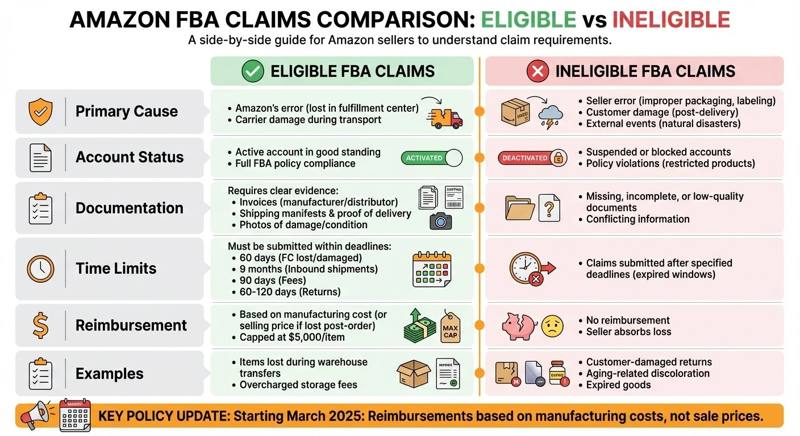
Eligible vs Ineligible FBA Claims Comparison Chart
Eligible claims are tied to losses or damages that fall under Amazon's control, such as items lost in fulfillment centers or damaged by carriers. On the other hand, ineligible claims arise from issues like seller mistakes, customer actions, or events beyond Amazon’s influence, such as natural disasters.
Timing plays a critical role in the claims process. For example, warehouse claims must be submitted within 60 days, while return claims have a window of 60 to 120 days. Missing these deadlines automatically disqualifies a claim. To improve approval chances, sellers should provide detailed documentation, including invoices, shipping manifests, proof of delivery, and timestamped photos - these help establish Amazon’s responsibility.
In March 2025, Amazon revised its reimbursement policy. Now, reimbursements are calculated based on manufacturing costs rather than selling prices, unless the item was lost after purchase. This shift can significantly reduce payouts for products with high markups or operating costs. However, the maximum reimbursement remains capped at $5,000 per item. Below is a table summarizing the key differences between eligible and ineligible claims.
Side-by-Side Comparison Table
Criteria | Eligible FBA Claims | Ineligible FBA Claims |
|---|---|---|
Primary Cause | Amazon's error (e.g., lost in FC, carrier damage) | Seller error, customer damage, or external events (e.g., natural disasters) |
Account Status | Active account in good standing, FBA policy compliant | Suspended or blocked accounts, or those with policy violations |
Documentation | Requires invoices, shipping manifests, proof of delivery, and photos | Missing, low-quality, or conflicting documentation |
Time Limits | 60 days (FC lost/damaged), 9 months (Inbound), 90 days (Fees), 60–120 days (Returns) | Claims submitted after the specified deadlines |
Reimbursement | Based on manufacturing cost (or selling price if lost post-order); capped at $5,000/item | No reimbursement; seller absorbs the loss |
Examples | Items lost during warehouse transfers, overcharged storage fees | Customer-damaged returns, aging-related discoloration, expired goods |
How to File More Eligible FBA Claims
Getting more of your FBA claims approved starts with solid record-keeping and staying on top of deadlines. Sellers who make tracking inventory movements and filing claims a regular part of their operations are more likely to secure reimbursements. Treating this process as an integral part of your business, rather than an afterthought, can make all the difference.
Keep Detailed Shipment and Return Records
Good documentation is your best friend when it comes to filing claims. Keep everything - shipping manifests, invoices, proofs of delivery, and even pre-handoff photos. These records act as proof of what you sent and when Amazon took possession. If there’s ever a discrepancy, like missing units or damaged items, this evidence can back up your claim.
For returns, it’s just as important to track the condition of items when they come back. Let’s say a customer returns an item in perfect condition, but Amazon marks it as damaged. Having timestamped photos of the product’s condition when it arrived can be the evidence you need to challenge that. These records are especially important as deadlines for filing claims are becoming tighter.
Submit Claims Before Deadlines
Upcoming policy changes mean timing is more critical than ever. Starting February 16, 2026, the filing window for SAFE-T claims on seller-fulfilled orders will shrink from 60 days to just 30 days. This 30-day countdown begins from either the return delivery scan or the refund date, whichever comes later.
Another key change kicks in on January 26, 2026. Sellers will only have 4 calendar days to process refunds after receiving a return. Missing this window will make you ineligible for SAFE-T claims. So, if you don’t process refunds within that tight timeframe, you risk losing out on reimbursements.
To stay ahead, consider doing weekly reviews of returns and discrepancies. This routine can help you catch issues early and file claims before it’s too late.
How Refunzo Simplifies the Claim Process
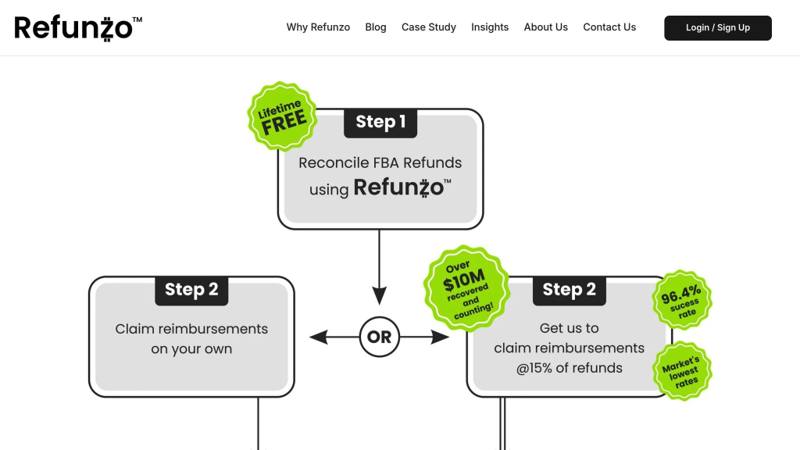
Filing claims manually can eat up hours every week - time better spent on growing your business. Instead of digging through shipment records and inventory reports, Refunzo automates the entire process, making it faster and easier.
What Refunzo Brings to the Table
Refunzo checks 21 different criteria to uncover discrepancies in shipments, inventory, payments, and returns. This means it can spot issues like fee overcharges, miscounted returns, or missing inventory - problems that are easy to miss when done manually. Once identified, it generates detailed reports that categorize potential reimbursements.
You can use these lifetime free reconciliation reports to file claims on your own, or you can let Refunzo handle everything for you. If you choose their managed service, their team ensures each claim meets Amazon's documentation and policy standards before submission. They charge 15% of the refunded amount or $5,000, whichever is less, and only after Amazon credits the reimbursement to your account.
Refunzo also keeps track of claim deadlines and sends you alerts so you never miss important filing dates.
Why Sellers Turn to Refunzo
The main benefit? Saving time. Manual reconciliation can take two to three full days every month, but Refunzo works in real time to monitor your account. Its automated documentation system avoids common mistakes like mismatched shipment IDs or wrong date ranges, helping achieve a 90% claim success rate.
For busy sellers juggling multiple tasks, Refunzo’s automated discrepancy detection means you can focus on scaling your business instead of chasing refunds. The free reconciliation reports offer clear insights into what Amazon owes you, while the optional claim service makes recovering your money hassle-free.
Conclusion
Filing FBA claims successfully depends on your account's status, meeting deadlines, and providing thorough documentation. To qualify, your account must be active, claims must be filed on time, and all required records need to be in order. Claims may be denied if accounts are suspended, deadlines are missed, errors are caused by the seller, or damage is attributed to the customer.
Amazon may reimburse up to $5,000 per item, calculated using the estimated sales price minus fees. This means a well-prepared claim could result in recovering substantial amounts. However, your claim’s success hinges on submitting the right documentation and adhering to timelines.
Managing various claim types - whether for shipments, returns, or fees - can quickly become overwhelming. That’s where Refunzo’s 21-point system comes in. It identifies issues like miscounted returns or fee overcharges, ensures documentation is accurate, and simplifies the entire claim process.
FAQs
What documents do I need to submit an eligible FBA claim?
To file an eligible FBA claim, you'll need to gather and submit specific documentation that proves your losses and strengthens your case. These documents typically include:
Purchase invoices: Proof of the original purchase to verify costs.
Shipment IDs: Details to track and confirm the shipment in question.
Product photos: Visual evidence of the product's condition or issues.
Inventory records: Accurate records to support your claim.
Keeping these records organized and complete can help ensure your claim is processed efficiently and improve your chances of receiving reimbursement.
How will the new reimbursement policies impact FBA claims?
Starting November 1, 2024, Amazon is updating its reimbursement policies, which will impact how FBA claims are managed. One major change is that Amazon will now automatically reimburse sellers for specific inventory issues, such as items lost or damaged in fulfillment centers. This means fewer manual claims for sellers in these scenarios. However, sellers will still need to manually file claims for other issues, like removal problems or certain customer returns.
Another key update is the introduction of stricter deadlines for filing claims. For example:
Claims for lost or damaged inventory must be submitted within 60 days.
Customer return claims need to be filed within 45 to 105 days, depending on the specific situation.
To avoid missing these deadlines, staying organized is essential. Tools like Refunzo can simplify this process by automating account reconciliation and helping sellers stay compliant with the new rules.
What are the main reasons an FBA claim might be rejected?
Filing FBA claims can be tricky, and there are several reasons why they might get rejected. Some of the most frequent issues include:
Missing required documentation: Without the proper paperwork, your claim may not even be considered.
Submitting claims too late: Amazon has strict timeframes for filing claims, and missing the deadline can result in automatic denial.
Incorrect or incomplete information: Even small errors or missing details can cause your claim to be rejected.
Non-qualifying issues: If your claim doesn’t align with Amazon’s policies, it won’t be approved.
Insufficient proof: Claims need to be backed by solid evidence; without it, approval is unlikely.
Another common pitfall is using the wrong process or not following Amazon’s specific guidelines. To avoid these issues, focus on accuracy, provide all necessary documentation, and ensure you’re filing within the allowed timeframe. Attention to detail can make all the difference.