
What Are Incorrect Refund Amounts in FBA?


When Amazon processes refunds, mistakes can cost sellers money. These errors include over-refunding customers, issuing multiple refunds for one order, or not reimbursing unreturned items. For example, you might sell a $9.99 item but see a $123.33 deduction due to system glitches or customer service overrides. If unnoticed, such issues can quietly drain profits - potentially up to $60,000 annually for a $2 million business.
Amazon’s 60-day claims window adds urgency, making regular audits vital. Use tools like the Transaction View in Seller Central to track refunds and catch discrepancies. Automated services, such as Refunzo, can simplify error detection and claims filing, ensuring you recover lost funds. Stay proactive to protect your margins and cash flow.
Amazon FBA Returns & Refunds How to Lose Less Money
What Are Incorrect Refund Amounts?
An incorrect refund amount happens when Amazon refunds more than the original sale price of an item, taking the extra amount directly from your seller account.
These errors can hit your account hard. Imagine selling an item for $9.99, only to see a $123.33 deduction listed as an "other concession" on your transaction report. Such mistakes can quickly eat into your profits and create unexpected cash flow problems, especially if you're handling thousands of transactions. Let’s break down what this looks like with some examples.
Definition and Examples
These errors can involve the product price, fees, taxes, or other unjustified charges.
Here’s a common scenario: You sell an item as part of a multi-item order totaling $123.00. The customer returns only your product, which was priced at $9.99. Instead of refunding just your portion, Amazon processes a refund for the full $123.00 against your account. Another example? A customer returns the wrong item, claiming it’s missing parts, and Amazon still issues a full refund based on your original sale price. In both cases, you’re left covering the difference until you catch the mistake and request reimbursement.
Sometimes, customer service overrides are to blame. These overrides bypass standard refund limits to resolve customer complaints but can result in deductions far exceeding the amount you charged. Unfortunately, this excess comes straight out of your account balance.
While these may seem like isolated incidents, they can add up quickly, leading to significant financial losses. The root causes of these errors are varied and often tied to operational or system glitches.
Why Incorrect Refunds Happen
Several factors contribute to these refund errors:
Multi-item returns: When your product is bundled with items from other sellers or multiple units in one order, Amazon’s system might mistakenly allocate the full refund to your account instead of splitting it proportionally.
Pre-return refunds: Amazon often issues refunds based solely on a customer’s claim before inspecting the returned item. If the item doesn’t match what was sold or isn’t returned at all, you’ve already been charged.
System errors and glitches: Features like Amazon’s “refund at first scan” can miscalculate refunds. For example, there was a documented issue in Colorado where refunds were overpaid by $0.27 per order due to a processing error. While Amazon eventually reimbursed sellers in bulk, the temporary deductions still impacted their balances.
Returns labeled as “damaged” or “unwanted”: In cases where customers claim items are damaged or simply unwanted, Amazon often processes full refunds - including fees - even when the returned item doesn’t meet policy requirements. This leaves you covering costs far beyond your original profit.
These issues, whether from human error or system flaws, can create a frustrating cycle of chasing reimbursements for problems you didn’t cause.
The Financial Impact of Incorrect Refunds
Revenue Loss and Account Deductions
Every incorrect refund directly chips away at your account balance. Imagine this: Amazon deducts $32.49 for a $29.99 sale. After fees, your profit was $14.99, but this mistake leaves you with a $17.50 loss from just one incident.
These deductions often appear as unexpected drops in your balance. One day, your cash flow looks solid; the next, a single error could drain over $100. For high-volume sellers managing thousands of transactions monthly, these losses can quickly eat into already tight FBA margins.
Such immediate hits don’t just disrupt cash flow - they pave the way for more significant cumulative losses over time.
Long-Term Risks of Undetected Errors
While each mistake might seem minor, the real danger lies in their ability to add up. Small over-refunds, repeated frequently, can quietly drain your profits. For instance, if you face 100 such incidents in a year, with an average over-refund of $20, that’s $2,000 in revenue gone.
These losses can force you to make tough choices - raising prices, cutting back on inventory, or operating with less cash on hand. And while Amazon claims to credit excess deductions quickly, many errors go unnoticed unless you conduct manual audits. Without these checks, you’re left shouldering costs that the system fails to address.
How to Identify Incorrect Refund Amounts
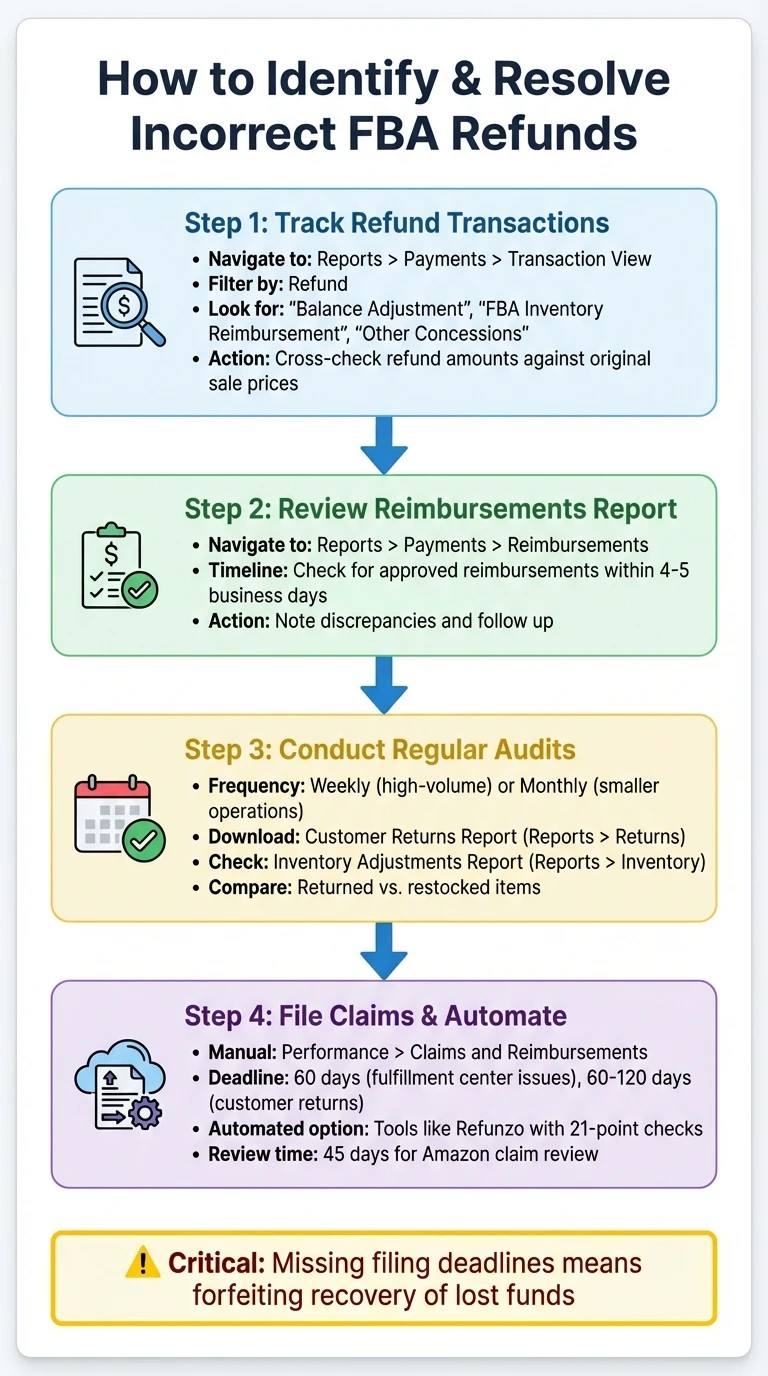
4-Step Process to Identify and Resolve FBA Incorrect Refunds
Tracking Refund Transactions in Seller Central

To keep tabs on refund transactions, head over to your Seller Central dashboard and navigate to Reports > Payments > Transaction View. Use the "Filter view by" dropdown menu and select Refund to focus solely on refund-related entries. Set a custom date range that covers all transactions within the relevant statement periods.
Pay close attention to entries labeled "Balance Adjustment", "FBA Inventory Reimbursement", or "Other Concessions." These often indicate partial refunds or concessions issued by Amazon support, which might not align with standard refund policies. Cross-check these refund amounts against the original sale prices. If something looks off - like a deduction that doesn’t match the sale amount - mark it for further investigation.
Another key step is to review your Reimbursements Report under Reports > Payments > Reimbursements. If you've filed a claim, approved reimbursements should generally show up within 4–5 business days. If they don’t, note the discrepancy and follow up.
After isolating refund transactions, it’s essential to conduct regular audits to catch and address recurring issues.
Performing Regular Audits
Routine audits are your safety net for catching subtle errors that might otherwise slip through.
For high-volume sellers, aim to conduct these audits weekly. Smaller operations may find monthly reviews sufficient. Start by downloading the Customer Returns Report (Reports > Returns) and compare it against your inventory records. Look for items marked as returned but not restocked, or products listed as "damaged" that should be in sellable condition.
Also, check the Inventory Adjustments Report under Reports > Inventory. This report will show whether Amazon has marked returned items as "found" or "damaged." If you spot inconsistencies between these adjustments and your actual inventory, investigate right away to resolve the issue.
Solutions for Resolving Incorrect Refund Amounts
Filing Reimbursement Claims in Seller Central
If you notice an incorrect refund, head to Performance > Claims and Reimbursements in Seller Central and select Request a reimbursement. Be prepared with details like the order ID, ASIN, original sale amount, and the incorrect refund amount. For example, if refund deductions are much higher than the original sale price, include screenshots from your Transactions report that show both the sale and the excessive refund.
Make sure to attach clear evidence to support your claim. For cases involving incorrect item returns, include photos of the return shipping label, the LPN sticker on the returned item, and the unpackaged product. Keep in mind that not all discrepancies are caused by buyer fraud - warehouse errors are also a possibility. Amazon typically reviews claims within 45 days, and verified issues are usually reimbursed without delay.
Remember, you must file claims for fulfillment center issues within 60 days and for customer return discrepancies within 60–120 days. Missing these deadlines means forfeiting your chance to recover those funds.
If filing claims manually feels overwhelming, automated tools can simplify the process.
Using Automated Reconciliation Tools
Manual audits often miss hidden errors, especially if you're managing hundreds or thousands of transactions each month. Tools like Refunzo offer 21-point automated checks to scan your FBA account for issues like over-refunds, duplicate refunds, or unreturned items. These tools generate detailed reports with transaction IDs, SKUs, and pre-prepared evidence, saving you from hours of manual work.
Refunzo’s free reconciliation service runs continuously, flagging errors in real time - well before filing deadlines close. If you’d rather not handle claims yourself, their optional filing service takes care of everything, from opening cases to submitting evidence and following up with Amazon support. The fee is capped at 15% of recovered funds or $5,000, whichever is lower, and you’re only charged once the reimbursement is deposited into your account.
While automation can save time, always double-check that credit updates align with your claims.
Monitoring Auto-Credited Reimbursements
Amazon sometimes issues automatic lump-sum credits for widespread errors. For example, sellers once received automatic reimbursements - typically under $0.27 per order - for excessive refunds on Colorado orders caused by a pricing glitch. These credits appear in your Reimbursements Report under Reports > Payments > Reimbursements and don’t require filing a claim.
However, automatic credits aren’t always accurate. Cross-check them against your Transaction View to ensure the amounts align with your identified errors. If you find a discrepancy - say you documented a $123.33 over-refund but received far less - open a case with your calculations and transaction IDs. Regularly reviewing these credits helps ensure you’re not missing out on funds that should have been reimbursed in full.
Conclusion
Refund errors aren't just minor slip-ups - they directly impact your profits. A single over-refund can erase the earnings from several sales. Multiply that by dozens or even hundreds of transactions each month, and the losses start stacking up fast. For sellers working with slim margins of 10–20%, these mistakes can be the difference between staying afloat and sinking.
Relying solely on manual monitoring isn't practical as your transaction volume grows. Mistakes and discrepancies can easily go unnoticed without a structured system in place. This is where technology steps in to bridge the gap.
Automated tools, like Refunzo's 21-point checks, are designed to catch issues such as over-refunds, duplicate charges, and unreturned items in real time. With Refunzo's lifetime free reconciliation service, you can identify these errors without any upfront cost. Plus, their optional claim filing service only charges after successful reimbursements. This kind of automation works hand-in-hand with regular audits, ensuring no error slips through the cracks.
Protecting your profits means staying proactive. Set up a consistent audit routine, leverage automation to catch hidden discrepancies, and file claims within Amazon's designated time frame. Often, the difference between a profitable product line and one that seems unprofitable boils down to recovering the money you're owed.
Every dollar counts. Start reviewing your refund transactions now - recovering those funds could be the key to turning a loss into a gain.
FAQs
How can I avoid losing profits due to incorrect refund amounts in Amazon FBA?
To safeguard your profits from incorrect refund amounts, staying on top of your Amazon FBA reports is essential. Regularly reviewing reports like inventory adjustments, fees, and returns allows you to spot errors early. Pair this with precise record-keeping to ensure discrepancies don’t slip through the cracks.
Amazon’s reimbursement policies can shift frequently. For example, updates like shortened claim windows or changes in how reimbursements are calculated (e.g., based on manufacturing costs) can impact your claims. Staying informed and acting promptly within these updated timeframes can help you avoid missing out on refunds.
If manual tracking feels overwhelming, automated tools like Refunzo can make your life easier. These tools streamline the reconciliation process by analyzing multiple factors and generating detailed reports, reducing the chances of errors. Plus, they ensure your claims are submitted accurately and on time. By combining regular audits, staying informed, and leveraging automation, you can protect your profits and keep your margins in check.
What should I do if I notice an over-refund in my Amazon FBA account?
If you notice an over-refund in your Amazon FBA account, the first step is to carefully review your reports. Look into areas like inventory adjustments or reimbursement summaries to confirm the mistake. Once verified, gather all relevant documents, such as invoices or shipment records, to support your case. Then, promptly file a reimbursement request with Amazon, keeping their strict deadlines in mind - most claims need to be submitted within 60 days. To avoid similar issues down the line, make it a habit to monitor your account regularly and perform periodic audits.
Why does Amazon process refunds before checking returned items?
Amazon prioritizes customer satisfaction by processing refunds before inspecting returned items. This approach ensures refunds are handled quickly, reducing delays for customers, even if the returned product hasn’t been evaluated yet.
However, for sellers, this practice can occasionally result in issues like incorrect refund amounts or inventory discrepancies. Keeping a close eye on these transactions is essential to spot potential reimbursement opportunities and reduce any financial losses.