
How Amazon Transaction Reports Help with Reimbursements


Amazon transaction reports are essential for tracking your seller account's financial and inventory activities. They detail orders, refunds, fees, and credits, helping you reconcile your account and recover funds for lost or damaged inventory. With Amazon reducing the claims window to just 60 days, staying on top of these reports is more critical than ever. Sellers risk losing 40-60% of reimbursements if they don’t monitor these reports closely.
Key points:
Reimbursements Report: Tracks automatic and manual credits.
Common Issues: Lost inventory, damaged goods, fee errors, and unreturned customer items.
Claims Filing Deadlines: Most are now limited to 60 days.
Automation Tools: Services like Refunzo simplify reconciliation and claims.
How to Access and Read Amazon Transaction Reports
Finding and Downloading Transaction Reports
To access your transaction reports, log into Seller Central and navigate to Reports > Payments. From there, select Transaction View to see all account activity. If you need to download a report, head to the Statements tab, choose your desired date range, and remember that inventory claims must be filed within 60 days.
For tracking reimbursements, locate the Reimbursements Report by going to Reports > Fulfillment > Reimbursements. This report outlines all credits Amazon has issued - whether automatic or based on claims you’ve submitted. You can export it as a CSV or Excel file. Alternatively, you can filter the Transaction View by keywords like "Balance Adjustment" or "FBA Inventory Reimbursement" to narrow down relevant entries.
Important Columns and Data Points to Check
When reviewing these reports, focus on specific columns that provide critical information. For instance, the Reason/Type column explains why credits were issued, with codes like "Lost - Warehouse", "Damaged - Warehouse", or "Customer Service Issue" helping you identify potential errors. The Quantity Reimbursed and Amount Total columns show whether you received full compensation, so it’s smart to compare these figures with your expected recovery value.
For product identification, check the SKU, FNSKU, and ASIN columns. To track specific transactions, use the Amazon Order ID or Case ID - the latter is especially useful for monitoring claims you’ve manually submitted. Pay attention to entries marked as "Reversal" or those with an Original Reimbursement ID, as these indicate Amazon found previously lost inventory and reversed earlier reimbursements. Industry insights suggest that 1-3% of FBA inventory typically encounters reimbursable issues, making regular checks a must for safeguarding your earnings.
Column Header | What It Tells You |
|---|---|
Reason / Type | Explains why reimbursement was issued (e.g., Damaged: Warehouse) |
Quantity | Total units reimbursed; check for partial or full recovery |
Amount Total | Cash credit received; compare with your expected value |
Case ID | Tracks your submitted claims and their approval status |
Original Reimbursement ID | Indicates if a prior reimbursement was reversed |
How to Request Reimbursements 🐅 from Amazon FBA for Lost & Damaged Units (Free Tutorial)
Finding Reimbursement Opportunities in Transaction Reports
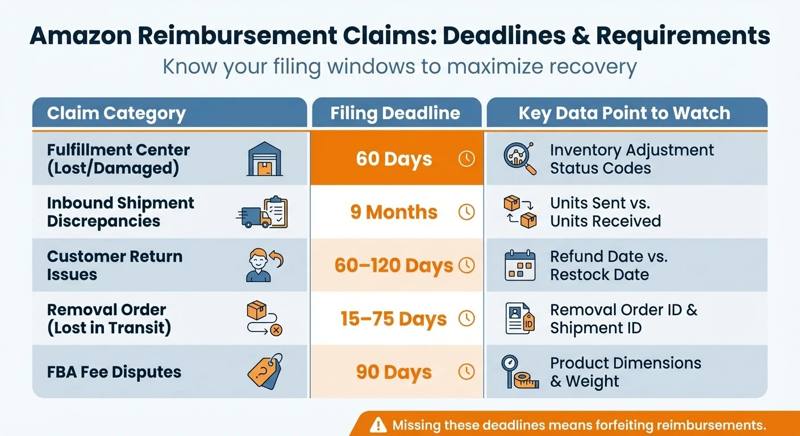
Amazon Reimbursement Claims Filing Deadlines and Requirements by Category
Common Errors and Discrepancies to Watch For
Start by examining inventory adjustments and fee miscalculations. Use the Inventory Adjustments Report to look for codes like "Lost", "Damaged", "Destroyed", DAMAGED_BY_FC, and DAMAGED_IN_TRANSIT. These codes indicate that Amazon has acknowledged an issue, but it doesn’t necessarily mean you've been reimbursed.
Pay special attention to matched adjustments. For instance, if inventory is marked as "Misplaced" (Code M), it should eventually reappear as "Found" (Code F). If the numbers don’t balance and there’s no reimbursement entry, this signals a claim opportunity. Similarly, review your Inbound Shipment Reports by comparing "Units Sent" to "Units Received." Any discrepancies here could point to inventory lost during the receiving process at Amazon's fulfillment centers.
Once inventory inconsistencies are addressed, shift your focus to fee errors. Pull your FBA Fee Details Report and verify the dimensions (length, width, height) and weight listed against your product's actual specifications. Errors in size tier classifications can lead to significant overcharges. Lastly, check your Settlement Reports for duplicate storage or fulfillment fees that shouldn't appear.
Identifying these discrepancies allows for better tracking of lost or damaged inventory, paving the way for reimbursement claims.
How to Track Lost or Damaged Inventory
The Customer Returns Report can help you spot another common issue: refunds issued to customers for items that never made it back to your inventory. Compare refunded orders with your inventory restock logs. If a refund was issued but the item wasn’t returned to either sellable or unsellable stock, you’ve found another claim opportunity. For inter-warehouse transfers, use the Inventory Event Detail Report to track units marked as "in transfer." If products stay in this status for over 30 days, they might be lost in transit.
Be proactive when filing claims for items lost or damaged at fulfillment centers - claims must be submitted within 60 days. Perform monthly audits to stay on top of these issues. Note that since March 2025, Amazon calculates reimbursements based on manufacturing costs rather than sale price, so make sure your "Manage Your Sourcing Cost" page reflects accurate figures to maximize your claims.
Claim Category | Filing Deadline | Key Data Point to Watch |
|---|---|---|
Fulfillment Center (Lost/Damaged) | 60 Days | Inventory Adjustment Status Codes |
Inbound Shipment Discrepancies | 9 Months | Units Sent vs. Units Received |
Customer Return Issues | 60–120 Days | Refund Date vs. Restock Date |
Removal Order (Lost in Transit) | 15–75 Days | Removal Order ID & Shipment ID |
FBA Fee Disputes | 90 Days | Product Dimensions & Weight |
How to File and Track Amazon Reimbursement Claims
Steps to Submit a Reimbursement Claim
To start a reimbursement claim, head to Seller Central > Reports > Fulfillment > Reimbursements or use the Payments Dashboard's Transaction View, filtering for "Other" transaction types. Choose the issue type - whether it's lost inventory, damaged goods, or fee overcharges - and make sure to attach the necessary evidence. For damaged items, include photos, customer emails, and condition notes. For fee-related disputes, attach invoices that clearly show the correct dimensions and weight of the product, along with screenshots or PDFs from your FBA Fee Details Report that highlight the discrepancies.
Once submitted, Amazon will review your claim and may ask for additional documentation. If they do, respond within 24 hours to avoid delays or the risk of an automatic denial. You can keep track of your claim's progress through the Reimbursements report in Seller Central, which provides itemized details for both automatic and manually filed claims. Approved reimbursements typically show up in your account within five days, though cases requiring supervisor review might take a bit longer.
Following these steps can help make the process smoother and increase the likelihood of claim approval.
How to Improve Your Claim Approval Rate
Timeliness is key - late claims won’t be processed. For customer return claims, you need to file them between the 60th day after the return and up to 18 months later. For fulfillment center issues, the window is typically 60 days. Keep your records organized, including sales data, fee details, and bank statements, categorized by claim type. Be specific when describing issues. For example, instead of saying "missing items", write something like: "Lost warehouse inventory: 15 units of ASIN B08XYZ123 per Inventory Adjustment Report dated 2/1/2026."
Avoid filing duplicate claims, as they can cause delays and even warnings from Amazon. Check your Case Log to ensure you haven’t already submitted the claim. Also, verify that product identifiers match Amazon’s records to prevent rejection.
Here’s a handy table to help you understand claim statuses and what actions you might need to take:
Case Status | What It Means | Your Next Step |
|---|---|---|
Open | Amazon is reviewing your claim | Wait for their response; avoid filing duplicates |
Pending | Amazon needs more documentation | Submit the requested details within 24 hours |
Resolved | A decision has been made and the case is closed | Check the reimbursement amount in the Transaction View |
Escalated | The case has been sent for supervisor review | Keep an eye on updates; expect longer processing times |
Denied | The claim was rejected based on evidence | Review the denial reason and appeal if it’s valid |
Using Refunzo for Automated Reconciliation and Reimbursement Help
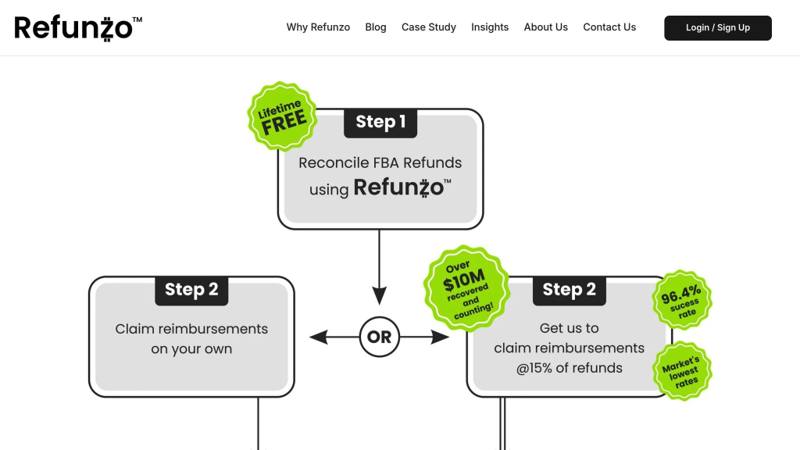
How Refunzo Automates Amazon FBA Reconciliation
Manually combing through transaction reports can take hours every week - downloading files, checking adjustments, and hunting for discrepancies in spreadsheets. Refunzo takes this hassle off your plate by securely linking to your Seller Central account and running a 21-point reconciliation system that scans your FBA data in real time.
It keeps a constant eye on your account for issues like lost or damaged inventory, incorrect fees due to wrong dimensions, shipment mismatches, and unreturned customer orders. Detailed reports highlight reimbursement opportunities and flag errors during shipment closure or fulfillment center reporting. The best part? The reconciliation service is completely free for life, with no credit card required.
Refunzo ensures a 90% claim approval rate by catching discrepancies within Amazon's strict 60-day claim window, so you don’t lose money to expired deadlines. This automation makes reimbursement claims simpler and faster.
Refunzo's Optional Reimbursement Claim Service
Once discrepancies are flagged, Refunzo makes it easy to recover your money. You can use their reports to file claims yourself or let their team handle everything. Their service manages support cases, submits evidence, and follows up with Amazon until your refund is processed.
This hands-off solution is especially helpful for high-volume sellers dealing with complex claims that require persistence. Refunzo charges a 15% commission, capped at $5,000, with no upfront costs or hidden fees.
"They have done a great job finding money which was owed to me by Amazon due to lost and damaged inventory. Their fees are reasonable especially considering the fact that they have literally recovered thousands of dollars on my behalf."
Rob C., Amazon seller
Conclusion
Amazon transaction reports can help sellers recover funds that might otherwise slip through the cracks. By carefully reviewing reports like Inventory Adjustments, Customer Returns, and Fee Previews, you can uncover issues such as lost shipments, warehouse damage, overcharged fees, and return processing errors - problems that Amazon's automated systems often overlook. For instance, one seller managed to recover $1,000 from a single lost shipment by submitting a claim with the right documentation.
However, manual reconciliation can be a tedious process, and Amazon’s strict 60-day claim window makes it even more challenging. Without consistent tracking, sellers risk missing out on reimbursements that directly affect their bottom line.
This is where automation steps in to make life easier. Refunzo simplifies the process with 21-point automated checks that continuously monitor shipments, inventory, fees, and returns. This free-for-life service saves you valuable time while ensuring no reimbursement opportunity goes unnoticed. Whether you prefer to file claims yourself using these reports or let Refunzo’s team handle everything for a 15% commission (capped at $5,000) - only billed after refunds are deposited into your account - the service ensures you’re not leaving money on the table.
FAQs
How can I avoid missing Amazon’s 60-day reimbursement deadline?
To stay within Amazon's strict 60-day deadline for reimbursement claims, make it a regular practice to review your transaction reports and keep an eye on inventory adjustments. Quick action is crucial - once you spot any discrepancies, gather all the required documentation immediately and submit your claims without delay.
Being organized and staying on top of these tasks can help you recover funds and avoid losing out due to timing issues.
What types of errors should I watch for in Amazon transaction reports?
When going through Amazon transaction reports, be on the lookout for frequent issues like lost or damaged inventory, incorrectly processed refunds, overcharged FBA fees, and shipment discrepancies. If these errors go unnoticed, you might miss out on opportunities to claim reimbursements.
Diving into reports such as settlement, transaction, and inventory logs regularly can help you catch problems like fee miscalculations, inventory discrepancies, or refund errors. Keeping up with these reviews not only helps you recover funds but also ensures your financial records stay accurate.
How does Refunzo simplify the reimbursement process for Amazon sellers?
Refunzo simplifies the often-complicated reimbursement process by carefully analyzing your transaction reports to spot discrepancies like missing inventory or incorrect fees. The platform takes the hassle out of the process by automating claim submissions and managing follow-ups with Amazon. This means you save both time and effort while recovering lost funds more effectively.
With more than 20 criteria checks in place, Refunzo ensures that no reimbursement opportunity slips through the cracks. It also provides detailed insights, letting you decide whether to handle claims yourself or let Refunzo take care of everything on your behalf.