
How to File Inbound Shipment Claims on Amazon FBA


When sending inventory to Amazon FBA, discrepancies in inbound shipments can lead to significant losses. Amazon may not notify you about missing or damaged items, so it’s up to you to monitor and file claims within strict deadlines. Here’s what you need to know:
Discrepancies Defined: Mismatches between shipped and received units, including shortages, overages, lost, or damaged inventory.
Key Deadlines: File claims for missing units no earlier than 15 days and no later than 60 days from delivery. For inbound losses, you have up to 9 months.
Required Documents: Proof of ownership (invoices, receipts) and proof of delivery (BOL, tracking). Use non-editable formats like PDFs or JPGs.
How to File: Use Seller Central to track shipments, identify issues under the "Contents" tab, and submit claims via the "Research missing units" option.
Automation Tools: Services like Refunzo can simplify the process by identifying discrepancies and managing claims for a fee.
Stay proactive by auditing shipments regularly, meeting deadlines, and ensuring documentation is accurate to recover lost inventory value.
Guide To Get Reimbursed When Amazon Loses Inbound FBA Boxes
What Are Inbound Shipment Discrepancies?
An inbound shipment discrepancy occurs when the number of units you send to Amazon doesn’t match the number Amazon records as received. For instance, if you ship 100 units but Amazon only logs 95, the missing 5 units represent a discrepancy.
These mismatches are fairly common and typically happen during the receiving process at Amazon’s fulfillment centers. They can result from various factors, including receiving errors (like miscounts or duplicate scans), damage during transit or unloading, system glitches (such as delayed updates or incorrect SKU mapping), or documentation issues (like mislabeled boxes or improper FNSKU labels).
The financial consequences go beyond just the missing units. Discrepancies can lead to stock shortages, which hurt your Buy Box eligibility, increase storage fees, and negatively affect your Inventory Performance Index (IPI). For sellers handling large volumes, these issues can result in losses amounting to hundreds of thousands - or even millions - of dollars each year if not addressed.
"Think of shipment reconciliation as your safety net for recovering lost inventory and getting reimbursed for Amazon's receiving errors." - Angela Apolonio, Threecolts
Amazon won’t notify you about missing units, so it’s on you to track your shipments. You have only 9 months from the shipment date to file a claim. Miss that window, and you lose the chance to recover any losses.
Common Types of Discrepancies
There are four main types of discrepancies, each requiring a specific approach to identify and resolve:
Shortages: Amazon receives fewer units than you shipped, shown as a negative number (e.g., -2) in the discrepancy column. This could be due to lost items, miscounts during receiving, or damaged units removed without proper documentation.
Overages: Amazon logs more units than you sent, displayed as a positive number (e.g., +5). While this might seem like a bonus, it’s often a counting error or misallocated units from another shipment. Amazon may automatically use these extras to offset shortages elsewhere.
Lost inventory: The carrier confirms delivery, but Amazon doesn’t check in all the units. Even weeks after delivery, your inventory might not show up in your available count.
Damaged inventory: Units damaged during transit, unloading, or transfers between fulfillment centers. While Amazon is supposed to reimburse you for such items, they sometimes mark them as damaged without processing the refund, requiring you to file a manual claim.
To better understand the reconciliation process, it helps to review shipment status codes:
Shipment Status | Meaning |
|---|---|
Received | Units were processed correctly |
Reconciled | Amazon investigated and resolved the discrepancy |
Reimbursed | Amazon acknowledged responsibility and issued a reimbursement |
Action Required | A discrepancy exists, and you need to provide additional information |
Investigation Completed | Amazon finalized counts after a physical inventory check |
How to Spot Discrepancies in Your Shipments
Identifying discrepancies means regularly monitoring your shipments in Seller Central - Amazon won’t do it for you. Start by heading to the "Manage FBA Shipments" page under the Inventory menu, where you can track all your shipments.
Focus on the "Discrepancy" column in the Shipping Queue. A "0" indicates everything was received as expected. Any other number - positive or negative - signals a mismatch. Make sure to check shipments marked as "Closed", as Amazon won’t investigate shipments still listed as "Receiving" or "Delivered" since their counts aren’t final yet.
For more details, click on a specific shipment and open the "Contents" tab. This section breaks down expected versus received units for each SKU, not just the shipment total. You can pinpoint which products are short and by how many units. By selecting the "Units Located" number, you can see if Amazon has already reconciled or reimbursed any missing items.
Set up a monthly audit schedule to review closed shipments. For high-volume sellers, a weekly review might be more practical. This ensures you catch discrepancies before the 9-month deadline for filing claims. Keep in mind that the reconciliation process typically takes anywhere from 2 to 30 days, though more complicated cases can take up to 60 days. The sooner you identify and report issues, the faster you can recover your losses.
Once discrepancies are identified, the next step is to understand claim eligibility and ensure you meet filing deadlines.
Claim Eligibility and Filing Deadlines
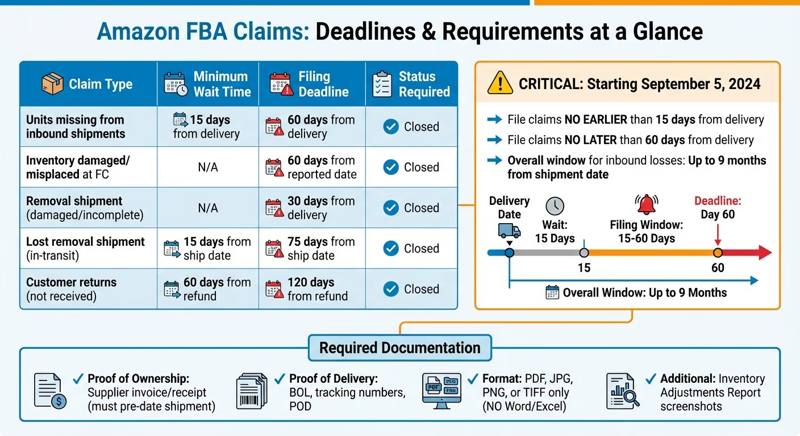
Amazon FBA Inbound Shipment Claims Deadlines and Requirements Guide
Starting September 5, 2024, Amazon updated its claim windows for missing inbound units. Sellers now need to file manual claims no earlier than 15 days and no later than 60 days from the delivery date. Before you file, ensure your shipment status meets Amazon's requirements.
"Starting September 5, 2024, we are updating our claim window eligibility. All manual claims must now be submitted within... 15 calendar days from the shipment delivery date but no later than 60 calendar days [for units missing from shipments]." - News_Amazon, Amazon Seller Forums
To file a claim, your shipment must show a "Closed" status in Seller Central. If it’s still labeled as "Receiving" or "Delivered", Amazon won’t accept your claim since the processing isn't complete. Use the "Contents" tab in your shipment details to verify eligibility at the SKU level:
Items marked "Action required" are ready for investigation.
Items marked "Investigation completed" indicate Amazon has already finalized their count.
Once your shipment is confirmed as "Closed", you can move forward with your claim.
Timing is critical. Filing too early results in automatic rejection, while waiting past 60 days means your claim will expire. For high-volume sellers, missing these windows could lead to significant financial losses. Ensure all supporting documents are submitted in non-editable formats like PDF, JPG, or PNG - Amazon will not accept Word or Excel files.
Claim Type | Minimum Wait Time | Filing Deadline |
|---|---|---|
Units missing from inbound shipments | 15 days from delivery | 60 days from delivery |
Inventory damaged/misplaced at FC | N/A | 60 days from reported date |
Removal shipment (damaged/incomplete) | N/A | 30 days from delivery |
Lost removal shipment (in-transit) | 15 days from ship date | 75 days from ship date |
Customer returns (not received) | 60 days from refund | 120 days from refund |
Required Documentation for Your Claim
Before diving into the claim submission process, make sure you’ve confirmed your eligibility and deadlines. Once that’s squared away, the next step is gathering the right documents. Proper documentation is the backbone of successfully recovering any lost or damaged inventory.
Amazon has strict requirements for documentation, particularly proof of ownership and proof of delivery. Without both, your claim will be automatically rejected. As Bryce_Amazon, an Amazon Community Manager, explains:
"You MUST provide TWO types of documentation: 1. Proof of Inventory Ownership... 2. Proof of Delivery."
All submissions must be in non-editable formats such as PDF, JPG, PNG, or TIFF. Word or Excel files won’t be accepted. If your invoices cover multiple products, be sure to highlight the relevant line items to streamline the review process. You can obscure pricing details to protect sensitive manufacturer costs, but product names and quantities must remain visible.
Documents for Lost Inventory Claims
For lost inventory claims, you’ll need to provide:
Your original supplier invoice or receipt. This must pre-date the shipment and match the ASIN quantities exactly.
The Shipment ID from Seller Central and tracking numbers for all packages.
For LTL or FTL shipments, a signed Bill of Lading (BOL) or Proof of Delivery (POD), showing the box count and total weight.
Additionally, include screenshots from your Inventory Adjustments report that show items marked as "Lost Inbound" or "Inventory Difference." The Inventory Event Detail report can also help by documenting when the discrepancy occurred. If you manufacture your own products and are enrolled in Brand Registry, Amazon allows a signed and stamped packing slip as an alternative to a manufacturer invoice. This tip has proven invaluable - one seller recovered $1.6 million in refunds after realizing they didn’t need to provide manufacturer invoices.
Documents for Damaged Inventory Claims
For damaged inventory claims, make sure to include:
High-resolution photos of the damaged items and their packaging. Capture multiple angles to clearly show the extent of the damage.
Documentation from your Inventory Adjustments Report with the status code "DAMAGED_BY_FC", which indicates the damage occurred at Amazon's fulfillment center.
If the carrier noted any issues on the BOL during delivery, include that as well.
Proof of Ownership Documents
Amazon does not accept pro forma invoices. Instead, you’ll need final invoices, receipts, or manufacturer packing slips. These documents must include the delivery date, exact product titles, and quantities. For private label sellers with Brand Registry, a signed packing list is also acceptable as proof of purchase.
To stay organized, use a consistent naming format for your files, like [ASIN]_[Document Type]_[Date]. This makes it easier to respond quickly if Amazon requests additional information. Starting March 31, 2025, reimbursements will be based on your manufacturing or sourcing costs instead of the sales price. To maximize your recovery, ensure your invoices include a detailed cost breakdown.
Once all your paperwork is in order, you’re ready to move on to the claim submission process in Amazon Seller Central.
How to File Claims in Amazon Seller Central

Filing a claim in Amazon Seller Central is a simple process, but it requires following Amazon's specific steps and ensuring the shipment status is correct before proceeding.
Finding the Claim Submission Page
Begin by logging into Seller Central and navigating to the Inventory tab. From there, click on Manage FBA Shipments. This section lists all your shipments along with their current status.
Find the shipment with the issue. The status must show as "Closed" before you can file a claim. Click on the shipment name or ID, then go to the Contents tab. Here, you’ll see the "Shipped" and "Received" columns. If there’s a shortage, the "Status/Action Required" column will show a dropdown menu for each affected SKU. Select "Research missing units" from the dropdown to access the claim form. Repeat this step for every missing SKU, as Amazon processes each claim separately. Once you’ve identified the missing units, proceed to complete the claim form.
Completing the Claim Form
You’ll need to provide the following details in the form: SKU, FNSKU, ASIN, Shipment ID, and the exact number of missing or damaged units. Additionally, include the transaction ID from your reconciliation reports and the date of the incident.
For documentation, upload files in non-editable formats like PDF, JPG, PNG, or TIFF. Word or Excel files are not accepted. If your claim involves lost inventory, include your supplier invoice, tracking numbers, and a signed Bill of Lading that shows the total box count and weight. For damaged items, provide clear, high-resolution photos from multiple angles that show the damage.
Double-check that all product codes (UPC, EAN, or JAN) match the details in your Seller Central account. If your invoice lists multiple products, highlight the relevant items to make the review process quicker. Once everything is verified, submit your claim.
Tracking Your Claim Status
Keeping an eye on your claim is essential to ensure it gets resolved within the filing deadlines. After submission, Amazon generates a support case, which you can track through the Case Log in Seller Central. You can find this on the home page or under the Help menu. Investigations usually take 2 to 30 days, but more complex cases may take up to 60 days.
Check the Case Log regularly for updates and respond promptly if Amazon requests additional documentation. Delays in your response could result in your claim being closed. As TaylorR_Amazon, an Amazon Moderator, explains:
"You can view updates and communicate with the team via your case log."
If your claim is approved, confirm that the reimbursement appears in your Refund Report within 30 days. If the amount is incorrect or doesn’t show up, file a follow-up claim using your original Case ID. Remember, you have a 9-month window from the shipment date to file claims for inbound inventory losses. To avoid missing any discrepancies, review your recently closed shipments at least once a month.
Using Automated Tools to Simplify Claims
How Automated Reconciliation Works
Automated tools integrate directly with Amazon Seller Central via API, providing real-time analysis of your account. They comb through multiple reports simultaneously - like Inventory Adjustments, FBA Returns, and Settlement Reports - to uncover discrepancies that manual checks often overlook.
These tools perform over 20 checks to pinpoint issues. For example, they can identify "in-transit" blind spots where items vanish between the carrier and the fulfillment center or flag stock deductions made right after a shipment closes. Since automation works 24/7, it immediately highlights problems as soon as shipments are marked "Closed" in Seller Central. This ensures you meet Amazon's strict deadlines - 60 days for lost or damaged items and up to 9 months for inbound inventory losses.
When discrepancies are found, these tools generate detailed reimbursement reports, breaking down data by SKU, estimated dollar amounts, and the specific criteria for each claim. By removing guesswork, they save time and simplify the process. These automated systems pave the way for platforms that not only identify reimbursements but also manage claims start-to-finish.
Refunzo: Free Reconciliation and Claim Support
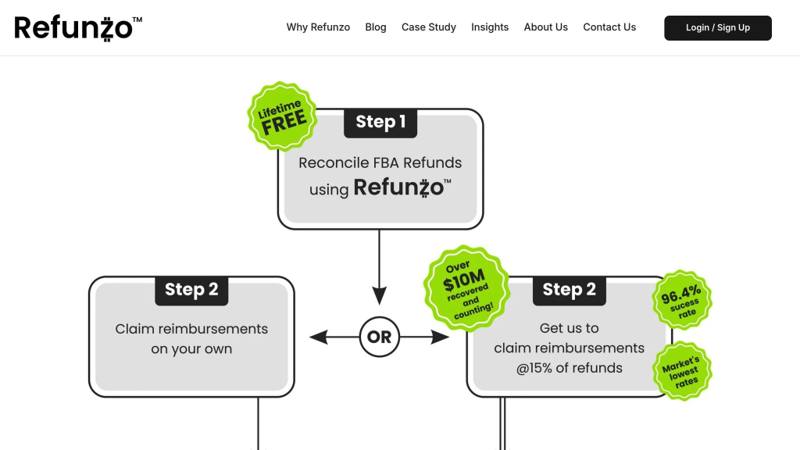
If manual claims feel overwhelming, specialized tools can take the hassle out of the process. One such service, Refunzo, offers a lifetime free reconciliation service that conducts 21-point checks on your Amazon FBA account. It identifies reimbursement opportunities, showing which SKUs qualify, how much you’re owed, and the required documentation.
You can either use the free reports to file claims on your own, following earlier outlined steps, or let Refunzo handle everything for you. With their managed claim service, Refunzo takes care of case creation, evidence submission, and follow-ups with Amazon. The service charges a 15% commission or $5,000 (whichever is lower), and the fee is only applied after the reimbursement is credited to your account. That means no upfront costs or risks.
Conclusion
Filing inbound shipment claims on Amazon FBA can be straightforward if you follow the right steps. Always wait until your shipment status is marked "Closed" in Seller Central before submitting a claim. Filing too early often leads to automatic rejections. Make sure your documentation is well-organized and submitted in non-editable formats like PDF, JPG, or PNG, as incomplete or editable files can result in claim denials.
In addition to proper documentation, timing is key. For most lost or damaged items, you have 60 days to file a claim, while inbound inventory losses allow up to 9 months. Regularly reviewing closed shipments ensures you don’t miss these windows. As Angela Apolonio advises, "The more specific information you provide, the faster Amazon can resolve your case." Highlight relevant line items on invoices and include clear photos of any damage to strengthen your claim.
If you’re handling multiple shipments each month, manual tracking can quickly become overwhelming. Automated reconciliation tools can save significant time and effort by continuously scanning for discrepancies and generating detailed reimbursement reports. For instance, Refunzo offers a lifetime free reconciliation service, performing 21-point checks to ensure accuracy. You can either use their reports to file claims yourself or let them handle the process for a capped commission. By combining manual attention to detail with automated tools, you can optimize your claim success rate.
FAQs
What happens if I miss the deadline to file a claim for an Amazon FBA shipment?
If you miss the deadline to file a claim for an Amazon FBA shipment, you risk losing the opportunity to recover reimbursements for discrepancies. Amazon enforces strict timeframes for submitting claims - like 15–75 days for removal order issues or 60 days for damaged inventory. After the deadline, your right to compensation is forfeited. Acting quickly and keeping track of these deadlines is essential to avoid missing out.
What documents do I need to file a claim for inbound shipment discrepancies on Amazon FBA?
To address inbound shipment discrepancies on Amazon FBA, you’ll need to provide solid documentation to back up your claim. Essential documents include purchase invoices, shipping records, inventory reports, and, when relevant, product photos. Organizing these files systematically - using a format like [ASIN]_[Type]_[Date] - can make the review process much smoother.
Keeping a close eye on your inventory and fee reports is also crucial. Spotting issues early can save you a lot of hassle. Tools such as Refunzo can help identify discrepancies and simplify the reconciliation process. By staying organized and proactive, you’ll boost your chances of resolving claims successfully.
How can I automate the detection of shipment discrepancies in Amazon FBA?
To make spotting shipment discrepancies in Amazon FBA easier, tools like Refunzo can handle the heavy lifting. These tools automate the process by scanning for over 20 types of errors - things like missing units, damaged inventory, or incorrect counts. By analyzing your inventory reports and shipment data, they can quickly highlight potential problems, saving you time and cutting down on tedious manual checks.
On top of that, using automated software to regularly review key reports - such as inventory health, shipment status, and inventory adjustments - helps catch discrepancies early. This means you can file claims faster and recover reimbursements more efficiently.