
How Refunzo identifies that you lost inbound inventory automatically
Jan 23, 2026
Jan 23, 2026
TL;DR
Lost inbound inventory happens when shipments are delivered, but units go missing during Amazon’s receiving, handling, or internal transfers.
Amazon rarely alerts sellers about missing inbound units, so losses often go unnoticed unless reports are checked carefully.
Manual inbound reconciliation is slow, error-prone, and easy to miss claim deadlines, especially as shipment volume grows.
Automated tools like Refunzo continuously track shipments, flag missing units, and identify reimbursements as soon as they become eligible.
Refunzo audits inbound inventory using advanced criteria, prepares claims, and follows up with Amazon until reimbursement is issued.
Automating inbound inventory recovery helps sellers reclaim lost revenue, save time, and prevent small discrepancies from turning into major profit leaks.
You shipped your products weeks ago. Tracking confirms delivery. You're expecting those units to hit your inventory any day now.
But when you finally check Seller Central? Half of them are just gone.
No email. No alert. No explanation. Just missing.
If this sounds familiar, you're dealing with Amazon’s lost inbound inventory. It is one of the most common yet quietly expensive problems sellers face.
Most sellers don't realize how much they're owed until they manually dig through reports. But it is a time-consuming process that's easy to get wrong. But here's the good part. Identifying lost inventory and recovering every dollar doesn't have to be complicated.
This guide shows you how to spot missing units, file successful reimbursement claims, and automate recovery using tools like Refunzo. So you can get back to running your business instead of chasing Amazon for what's already yours.
Why is my Amazon inbound inventory missing?
If you notice units missing after sending a shipment, it can be confusing and frustrating. Amazon lost inbound inventory issues are more common than most sellers expect, especially for new accounts. Below are the most common reasons this happens, explained in simple terms.
Amazon is still receiving your shipment: During busy periods like Prime Day or Q4, shipments can stay in “Receiving” or “Checked-in” status for weeks before all units appear.
Labeling or packaging problems: Wrong or damaged FNSKU labels, poor barcode placement, or incorrect prep can cause units to be held, rejected, or misrouted.
Lost or damaged during transit: Carriers may lose packages, deliver to the wrong location, or damage boxes so badly that Amazon cannot accept them.
Amazon misplaced inventory internally: Units can be scanned incorrectly, sent to the wrong warehouse, or lost during internal transfers.
Incorrect shipment plan or box contents: Mismatched quantities or wrong SKUs can stop receiving entirely.
Inventory stuck in reserved or stranded status: Units arrive but cannot be sold due to checks or listing issues.
Disposed of or returned without clear notice: Damaged, expired, or restricted items may disappear from reports.
System delays or reporting glitches: Sometimes, inventory is received but not reflected immediately in your dashboard.
How do I know if Amazon lost my inbound inventory?
Determining whether Amazon actually lost your shipment depends on clear signals inside Seller Central. If you notice any of the signs below, it is a strong indication that Amazon inbound inventory reconciliation is required.
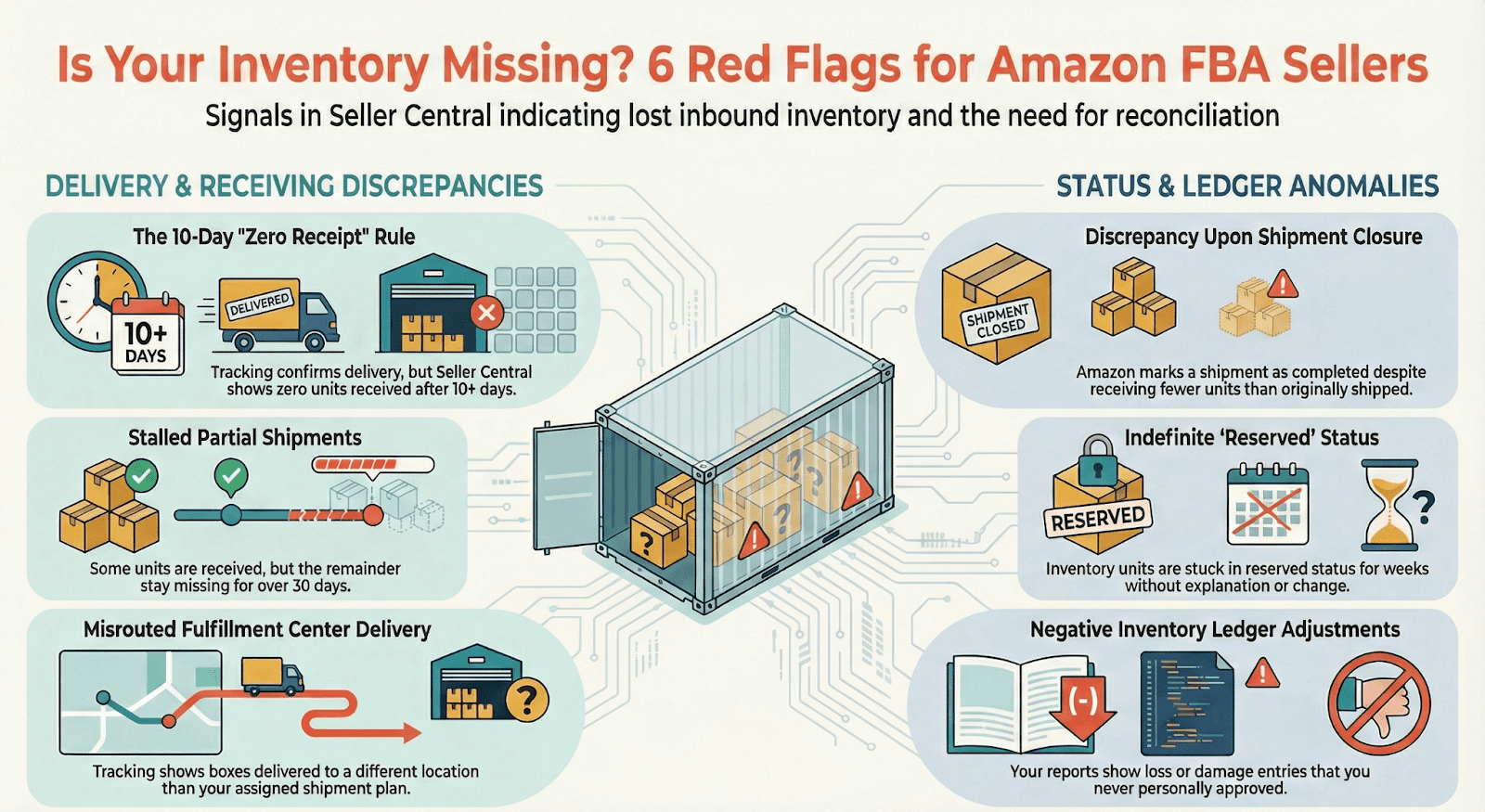
Shipment marked delivered, but zero units received after 10+ days: Tracking confirms delivery, but Seller Central still shows 0 units received long after normal processing time.
Partial quantities received with no movement for 30+ days: Some units appear, but the rest stay missing with no receiving or processing updates.
Shipment closed, but quantities do not match: Amazon marks the shipment as completed, yet fewer units are received than you shipped.
Delivery to the wrong fulfillment center: Tracking shows boxes delivered to a different FC than the one assigned in your shipment plan.
Missing boxes despite confirmed delivery: All boxes were shipped and delivered, but Amazon logs fewer boxes than expected.
Inventory stuck in “Reserved” status for weeks: Units show as reserved with no explanation or status change.
Unexpected damage or disposal notices: Amazon flags units as damaged or disposed of even though they were shipped in good condition.
Negative inventory adjustments in reports: The Inventory Ledger shows loss or damage entries you never approved.
How to file reimbursement claims for lost inbound inventory
In 2026, recovering money from Amazon FBA lost inbound claims comes down to how much time and effort you are willing to invest. Sellers usually choose between filing claims manually in Seller Central or using automated Amazon reimbursement software that tracks and files claims for them.
Here is a simple comparison to help you understand the difference.
Aspect | Manual filing in Seller Central | Automation using software |
How missing units are detected | You have to manually check closed shipments and spot quantity mismatches yourself. | Software continuously monitors shipment reports and inventory data to flag missing units automatically. |
How claims are filed | Each claim is opened one by one through Seller Support, with details added manually. | Claims are generated and submitted automatically, with tools often tracking the case until closure. |
Document handling | You collect and upload invoices and proof of delivery for every single claim. | You upload master invoices once, and the system attaches them wherever required. |
Timing and deadlines | Easy to miss claim windows, as eligibility dates must be tracked manually. | Software flagged claims the moment they become eligible, reducing missed recoveries. |
Depth of investigation | Usually limited to obvious shortages at receiving. | Tracks deeper issues like FC transfers and inventory that disappears later. |
Reimbursement accuracy | Payouts depend on how well you argue the case. | Tools use historical data to push for the highest eligible reimbursement. |
So, which option should you choose?
If you are a new seller or managing a growing account, automated tracking is usually the safer and more practical choice. It saves time, catches losses you might never notice, and ensures your Amazon lost inbound reimbursement claims are filed on time without constant manual checks.
Manual filing can work if you handle very few shipments and have time to monitor every report closely. But for most sellers, automation removes stress, reduces missed reimbursements, and makes inventory recovery far more predictable.
How to recover money for lost inbound inventory on Amazon using Refunzo
Lost inbound inventory is one of the most silent profit killers of selling on Amazon. You ship products, Amazon receives them, but somewhere in their warehouse, units just disappear. You know Amazon owes you money, but filing Amazon reimbursement claims manually eats up your time, especially when you're juggling multiple shipments and SKUs.
That's exactly where Refunzo changes the game for lost inbound inventory recovery.
Step 1: Reconcile using Refunzo web app
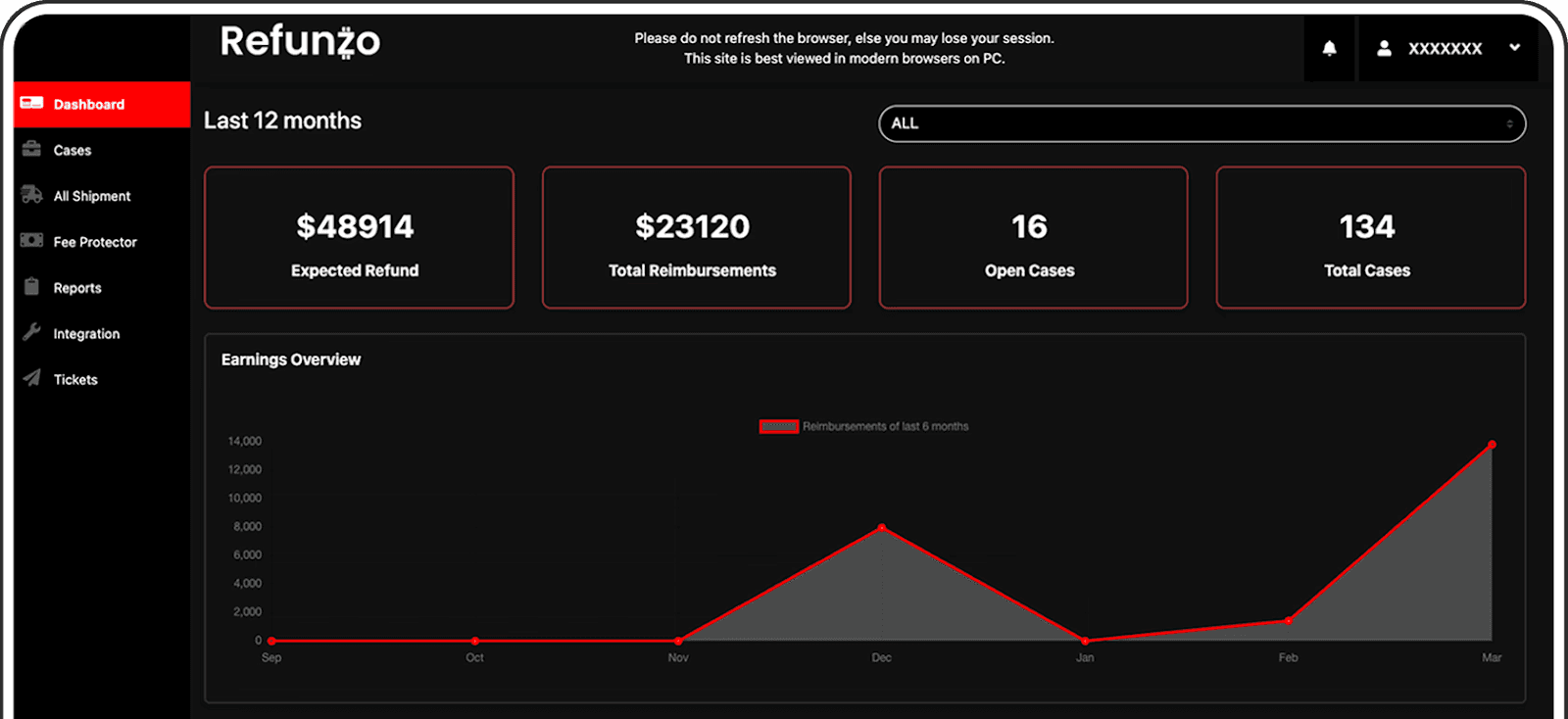
Start by connecting your Amazon Seller Central account to Refunzo. The platform immediately runs a comprehensive audit using over 20 specialized criteria that are specifically designed to catch lost inbound inventory that manual checks often miss.
Within minutes, you receive a detailed report showing exactly which shipments have discrepancies, how many units are missing, and most importantly, how much Amazon owes you for those lost units. No more comparing spreadsheets or hunting through shipment reports yourself.
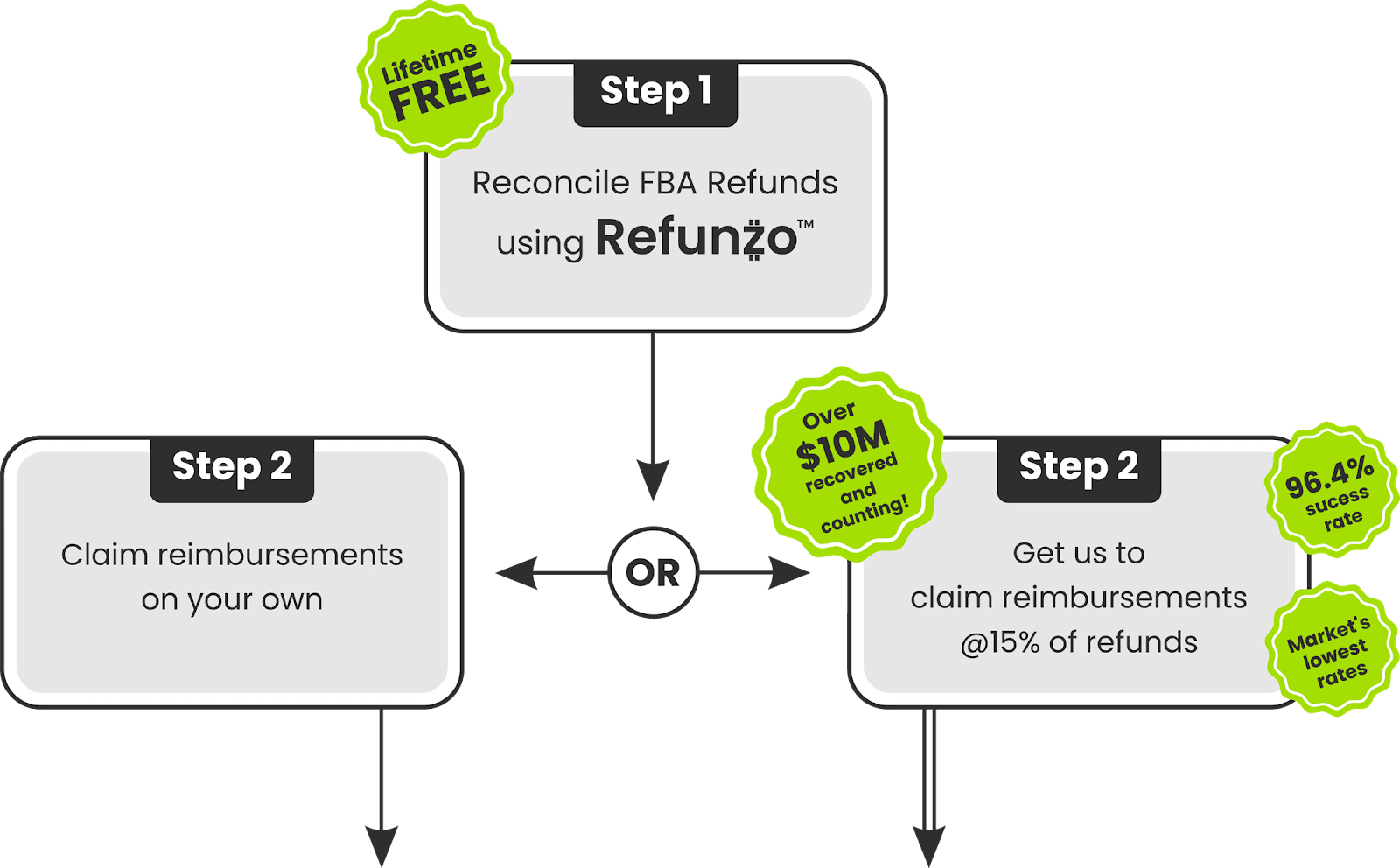
From there, you have two options: create support cases with Amazon yourself using Refunzo's pre-filled templates, or let Refunzo handle everything for you.
Step 2: Get Refunzo to claim reimbursement
If you choose the hands-off approach, simply authenticate your credit card (no charge upfront). Refunzo's Amazon reimbursement specialist takes over completely. They log support cases for your lost inbound inventory, providing all necessary documentation to Amazon, and following up persistently until you get paid.
Refunds go directly into your bank account, and you only pay 15% of what's recovered or $5,000, whichever is lower.
Why sellers trust Refunzo for lost inbound inventory:
96.4% success rate on claims filed
$10M+ recovered and counting for Amazon sellers
Free reconciliation for life with no hidden fees, no credit card required to start
Real-time tracking of every missing unit and claim status
Whether you're missing 10 units or 1,000, Refunzo catches what Amazon lost and gets your money back.
Ready to recover what Amazon owes you?
Lost inbound inventory doesn't have to be a guessing game or a monthly headache. The difference between sellers who recover thousands and those who don't often comes down to one thing: tracking.
Manual Amazon inbound inventory reconciliation might work when you're just starting out, but as your business grows, those small missed units turn into serious profit leaks. That's where automated Amazon inbound inventory tracking software becomes essential.
With a 96.4% success rate, Refunzo has already proven what's possible when you stop chasing spreadsheets and start automating recovery. Your missing inventory isn't gone forever; it's just waiting to be claimed.
FAQs
Is manual inbound reconciliation reliable for large sellers?
No, once you're shipping 10+ shipments monthly, you'll miss 30 to 40% of losses due to time constraints and human error. The Amazon reimbursement tool is essential for accuracy and catching every discrepancy.
Does Amazon notify sellers about lost inbound units?
No, you only get alerts for damaged or disposed units. It's completely sellers' responsibility to compare what you shipped versus what Amazon received and file claims yourself.
How to find lost inbound inventory on Amazon?
go to Reports > Fulfillment > Inventory Ledger in Seller Central and download the report. Compare the units you shipped with what Amazon actually received. If the numbers don't match, those missing units are your lost inventory that you can claim reimbursement for.
How long does it take to detect lost inbound inventory automatically?
Automated Amazon reimbursement software like Refunzo detects lost inventory within 2 to 3 days of Amazon closing your shipment.
TL;DR
Lost inbound inventory happens when shipments are delivered, but units go missing during Amazon’s receiving, handling, or internal transfers.
Amazon rarely alerts sellers about missing inbound units, so losses often go unnoticed unless reports are checked carefully.
Manual inbound reconciliation is slow, error-prone, and easy to miss claim deadlines, especially as shipment volume grows.
Automated tools like Refunzo continuously track shipments, flag missing units, and identify reimbursements as soon as they become eligible.
Refunzo audits inbound inventory using advanced criteria, prepares claims, and follows up with Amazon until reimbursement is issued.
Automating inbound inventory recovery helps sellers reclaim lost revenue, save time, and prevent small discrepancies from turning into major profit leaks.
You shipped your products weeks ago. Tracking confirms delivery. You're expecting those units to hit your inventory any day now.
But when you finally check Seller Central? Half of them are just gone.
No email. No alert. No explanation. Just missing.
If this sounds familiar, you're dealing with Amazon’s lost inbound inventory. It is one of the most common yet quietly expensive problems sellers face.
Most sellers don't realize how much they're owed until they manually dig through reports. But it is a time-consuming process that's easy to get wrong. But here's the good part. Identifying lost inventory and recovering every dollar doesn't have to be complicated.
This guide shows you how to spot missing units, file successful reimbursement claims, and automate recovery using tools like Refunzo. So you can get back to running your business instead of chasing Amazon for what's already yours.
Why is my Amazon inbound inventory missing?
If you notice units missing after sending a shipment, it can be confusing and frustrating. Amazon lost inbound inventory issues are more common than most sellers expect, especially for new accounts. Below are the most common reasons this happens, explained in simple terms.
Amazon is still receiving your shipment: During busy periods like Prime Day or Q4, shipments can stay in “Receiving” or “Checked-in” status for weeks before all units appear.
Labeling or packaging problems: Wrong or damaged FNSKU labels, poor barcode placement, or incorrect prep can cause units to be held, rejected, or misrouted.
Lost or damaged during transit: Carriers may lose packages, deliver to the wrong location, or damage boxes so badly that Amazon cannot accept them.
Amazon misplaced inventory internally: Units can be scanned incorrectly, sent to the wrong warehouse, or lost during internal transfers.
Incorrect shipment plan or box contents: Mismatched quantities or wrong SKUs can stop receiving entirely.
Inventory stuck in reserved or stranded status: Units arrive but cannot be sold due to checks or listing issues.
Disposed of or returned without clear notice: Damaged, expired, or restricted items may disappear from reports.
System delays or reporting glitches: Sometimes, inventory is received but not reflected immediately in your dashboard.
How do I know if Amazon lost my inbound inventory?
Determining whether Amazon actually lost your shipment depends on clear signals inside Seller Central. If you notice any of the signs below, it is a strong indication that Amazon inbound inventory reconciliation is required.
Shipment marked delivered, but zero units received after 10+ days: Tracking confirms delivery, but Seller Central still shows 0 units received long after normal processing time.
Partial quantities received with no movement for 30+ days: Some units appear, but the rest stay missing with no receiving or processing updates.
Shipment closed, but quantities do not match: Amazon marks the shipment as completed, yet fewer units are received than you shipped.
Delivery to the wrong fulfillment center: Tracking shows boxes delivered to a different FC than the one assigned in your shipment plan.
Missing boxes despite confirmed delivery: All boxes were shipped and delivered, but Amazon logs fewer boxes than expected.
Inventory stuck in “Reserved” status for weeks: Units show as reserved with no explanation or status change.
Unexpected damage or disposal notices: Amazon flags units as damaged or disposed of even though they were shipped in good condition.
Negative inventory adjustments in reports: The Inventory Ledger shows loss or damage entries you never approved.
How to file reimbursement claims for lost inbound inventory
In 2026, recovering money from Amazon FBA lost inbound claims comes down to how much time and effort you are willing to invest. Sellers usually choose between filing claims manually in Seller Central or using automated Amazon reimbursement software that tracks and files claims for them.
Here is a simple comparison to help you understand the difference.
Aspect | Manual filing in Seller Central | Automation using software |
How missing units are detected | You have to manually check closed shipments and spot quantity mismatches yourself. | Software continuously monitors shipment reports and inventory data to flag missing units automatically. |
How claims are filed | Each claim is opened one by one through Seller Support, with details added manually. | Claims are generated and submitted automatically, with tools often tracking the case until closure. |
Document handling | You collect and upload invoices and proof of delivery for every single claim. | You upload master invoices once, and the system attaches them wherever required. |
Timing and deadlines | Easy to miss claim windows, as eligibility dates must be tracked manually. | Software flagged claims the moment they become eligible, reducing missed recoveries. |
Depth of investigation | Usually limited to obvious shortages at receiving. | Tracks deeper issues like FC transfers and inventory that disappears later. |
Reimbursement accuracy | Payouts depend on how well you argue the case. | Tools use historical data to push for the highest eligible reimbursement. |
So, which option should you choose?
If you are a new seller or managing a growing account, automated tracking is usually the safer and more practical choice. It saves time, catches losses you might never notice, and ensures your Amazon lost inbound reimbursement claims are filed on time without constant manual checks.
Manual filing can work if you handle very few shipments and have time to monitor every report closely. But for most sellers, automation removes stress, reduces missed reimbursements, and makes inventory recovery far more predictable.
How to recover money for lost inbound inventory on Amazon using Refunzo
Lost inbound inventory is one of the most silent profit killers of selling on Amazon. You ship products, Amazon receives them, but somewhere in their warehouse, units just disappear. You know Amazon owes you money, but filing Amazon reimbursement claims manually eats up your time, especially when you're juggling multiple shipments and SKUs.
That's exactly where Refunzo changes the game for lost inbound inventory recovery.
Step 1: Reconcile using Refunzo web app
Start by connecting your Amazon Seller Central account to Refunzo. The platform immediately runs a comprehensive audit using over 20 specialized criteria that are specifically designed to catch lost inbound inventory that manual checks often miss.
Within minutes, you receive a detailed report showing exactly which shipments have discrepancies, how many units are missing, and most importantly, how much Amazon owes you for those lost units. No more comparing spreadsheets or hunting through shipment reports yourself.
From there, you have two options: create support cases with Amazon yourself using Refunzo's pre-filled templates, or let Refunzo handle everything for you.
Step 2: Get Refunzo to claim reimbursement
If you choose the hands-off approach, simply authenticate your credit card (no charge upfront). Refunzo's Amazon reimbursement specialist takes over completely. They log support cases for your lost inbound inventory, providing all necessary documentation to Amazon, and following up persistently until you get paid.
Refunds go directly into your bank account, and you only pay 15% of what's recovered or $5,000, whichever is lower.
Why sellers trust Refunzo for lost inbound inventory:
96.4% success rate on claims filed
$10M+ recovered and counting for Amazon sellers
Free reconciliation for life with no hidden fees, no credit card required to start
Real-time tracking of every missing unit and claim status
Whether you're missing 10 units or 1,000, Refunzo catches what Amazon lost and gets your money back.
Ready to recover what Amazon owes you?
Lost inbound inventory doesn't have to be a guessing game or a monthly headache. The difference between sellers who recover thousands and those who don't often comes down to one thing: tracking.
Manual Amazon inbound inventory reconciliation might work when you're just starting out, but as your business grows, those small missed units turn into serious profit leaks. That's where automated Amazon inbound inventory tracking software becomes essential.
With a 96.4% success rate, Refunzo has already proven what's possible when you stop chasing spreadsheets and start automating recovery. Your missing inventory isn't gone forever; it's just waiting to be claimed.
FAQs
Is manual inbound reconciliation reliable for large sellers?
No, once you're shipping 10+ shipments monthly, you'll miss 30 to 40% of losses due to time constraints and human error. The Amazon reimbursement tool is essential for accuracy and catching every discrepancy.
Does Amazon notify sellers about lost inbound units?
No, you only get alerts for damaged or disposed units. It's completely sellers' responsibility to compare what you shipped versus what Amazon received and file claims yourself.
How to find lost inbound inventory on Amazon?
go to Reports > Fulfillment > Inventory Ledger in Seller Central and download the report. Compare the units you shipped with what Amazon actually received. If the numbers don't match, those missing units are your lost inventory that you can claim reimbursement for.
How long does it take to detect lost inbound inventory automatically?
Automated Amazon reimbursement software like Refunzo detects lost inventory within 2 to 3 days of Amazon closing your shipment.
Related post
Amazon FBA Reimbursements
Stop revenue loss: Handle Amazon reversed reimbursement like a pro
Stop revenue loss: Handle Amazon reversed reimbursement like a pro
Stop revenue loss: Handle Amazon reversed reimbursement like a pro
Stop revenue loss: Handle Amazon reversed reimbursement like a pro
Mar 7, 2026
|
12mins
Amazon FBA Reimbursements
Amazon reimbursement report every seller must check to claim missing reimbursements
Amazon reimbursement report every seller must check to claim missing reimbursements
Amazon reimbursement report every seller must check to claim missing reimbursements
Amazon reimbursement report every seller must check to claim missing reimbursements
Mar 2, 2026
|
12 mins
Amazon FBA Reimbursements
Refunded But Never Returned: The Amazon Missing Return Reimbursement Guide Every FBA Seller Needs
Refunded But Never Returned: The Amazon Missing Return Reimbursement Guide Every FBA Seller Needs
Refunded But Never Returned: The Amazon Missing Return Reimbursement Guide Every FBA Seller Needs
Refunded But Never Returned: The Amazon Missing Return Reimbursement Guide Every FBA Seller Needs
Feb 19, 2026
|
15 mins

Stay updated by subscribing
to our newsletter.
Stay updated by subscribing
to our newsletter.
Stay informed and up-to-date with the latest news and updates
from our company by subscribing to our newsletter.
Stay informed and up-to-date
with the latest news and updates
from our company by subscribing to
our newsletter.