
FBA reimbursements unlocked: 2026 FAQ every seller can’t ignore
Jan 9, 2026
Jan 9, 2026
Jan 9, 2026
Losing money on FBA returns?
Don’t let Amazon quietly eat your profit margins. Missed deadlines, lost inventory, or a confusing Amazon reimbursement claim process can drain your revenue fast. This FAQ guide cuts through the chaos, showing you exactly how to claim, dispute, and recover every dollar you’re owed.
1. How do I file a claim for FBA returns reimbursement?
When a customer returns an FBA order, and Amazon fails to return the item to sellable inventory or reimburse you correctly, you can file a reimbursement claim directly from Amazon Seller Central. Filing for FBA return reimbursements in 2026 is all about correct timing, documentation, and using the right tools.
Key windows to remember:
For FBA customer returns, you can file claims between 60 and 120 days after the refund or replacement date.
For items lost or damaged in the fulfillment center, the claim must be submitted within 60 days.
Step-by-step process for FBA reimbursement claim
Start by checking the Inventory Defect and Reimbursement portal in Seller Central for eligible items. Check the "Eligible for claim" tab to find customer-related defects.
Verify if Amazon has already reimbursed you in Reports > Fulfillment > Payments > Reimbursement.
Collect evidence such as Order ID, FNSKU, quantity, and photos for damaged items.
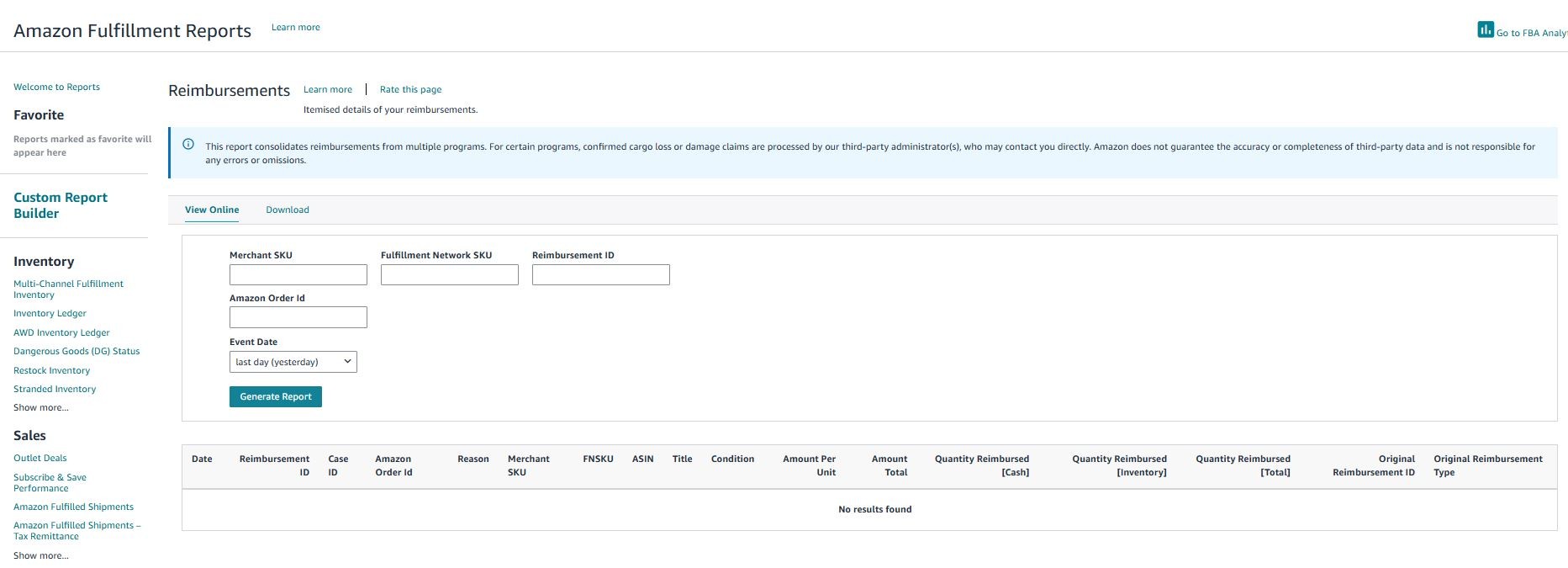
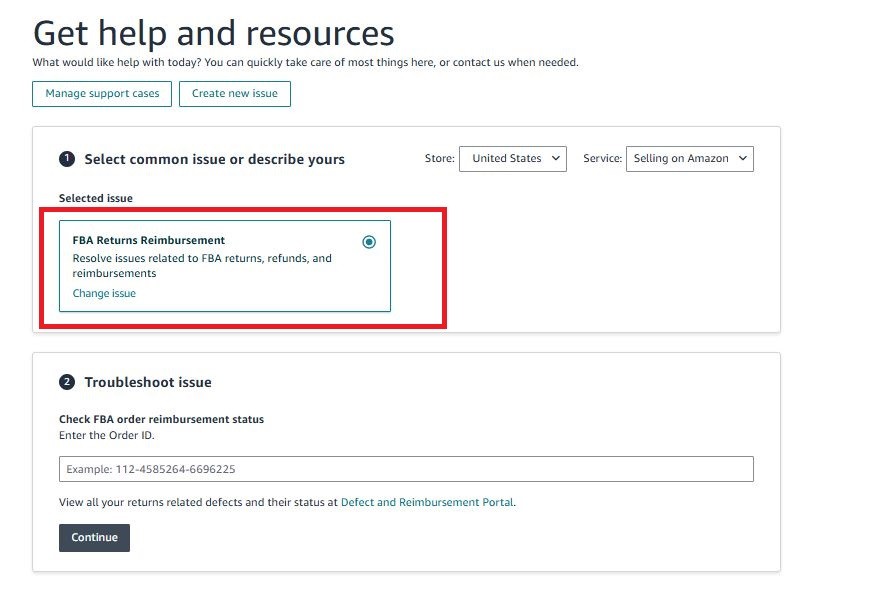
Then, submit the claim via Help > Contact Us > FBA Returns Reimbursement and track it in your Case Log.
Pro tip: Use reports like Customer Returns, Inventory Ledger, and Refund Report to cross-check discrepancies. Remember, according to the Amazon reimbursement policy 2025, Amazon reimburses you based on manufacturing cost, not full retail price. It is only for items damaged by Amazon, not customers.
2. What are common reasons FBA returns reimbursements get denied?
Amazon has tightened rules for FBA claims in 2026. Here you find the most common reasons for FBA return reimbursement denial and how to fix them.
Missing deadlines: Your customer-damaged FBA returns must be filed within 60 to 120 days after the refund; too early or too late leads to automatic denial. Lost or damaged items must be claimed within 60 days. For removal orders, you have a shorter window, usually 15 to 75 days.
Proof-of-value errors: If you submit incomplete evidence, such as missing invoices, shipment manifests, or proof of delivery, it gets rejected. You must provide verified manufacturing cost data; Amazon reimburses based on production cost, not retail price. Wrong or outdated SKUs, ASINs, or FNSKUs are also the reason for your claim denial.
Customer-damaged classification: Amazon generally does not reimburse items damaged by the buyer (used, tested, or remorse). Claims may be denied if carrier damage is misclassified as customer-damaged.
Eligibility & compliance issues: Shipments without proper labeling/prep are ineligible. Suspended, blocked, or not in good standing is the cause of automatic rejection. If you are claiming for non-returnable items like certain hazardous or personal care products cannot be reimbursed.
Procedural mistakes: Submitting a second claim while one is pending/resolved triggers denial. Filing “Damaged” for an item marked “Lost” can cause a mismatch and claim rejection.
3. How to dispute an incorrect FBA returns reimbursement amount?
If you ever get an FBA reimbursement that looks wrong, don’t panic. Amazon’s 2026 rules just mean you need to follow the right steps. The first thing is to understand the valuation method Amazon used:
Customer returns: Amazon reimbursements should match the original refund or replacement price minus fees.
Warehouse lost & damaged: Reimbursed based on your verified manufacturing or sourcing cost, not at your selling price.
Customer-damaged items: Amazon often pays about 50% because the item isn’t “new” anymore. Make sure this percentage is applied correctly.
How to file a dispute
1. Gather evidence: For value disputes, provide the median sale price you’ve sold the item for or the current lowest FBA offer to show what the item is truly worth. For cost disputes, gather verified invoices from your suppliers to prove your actual sourcing cost. For damage-related disputes, include clear photos of the returned item, along with the LPN label and the return shipping information, to give Amazon full context for your claim.2. Submit a case via Help > Contact Us > Fulfillment by Amazon, then claim using the FBA reimbursement claim dispute window.
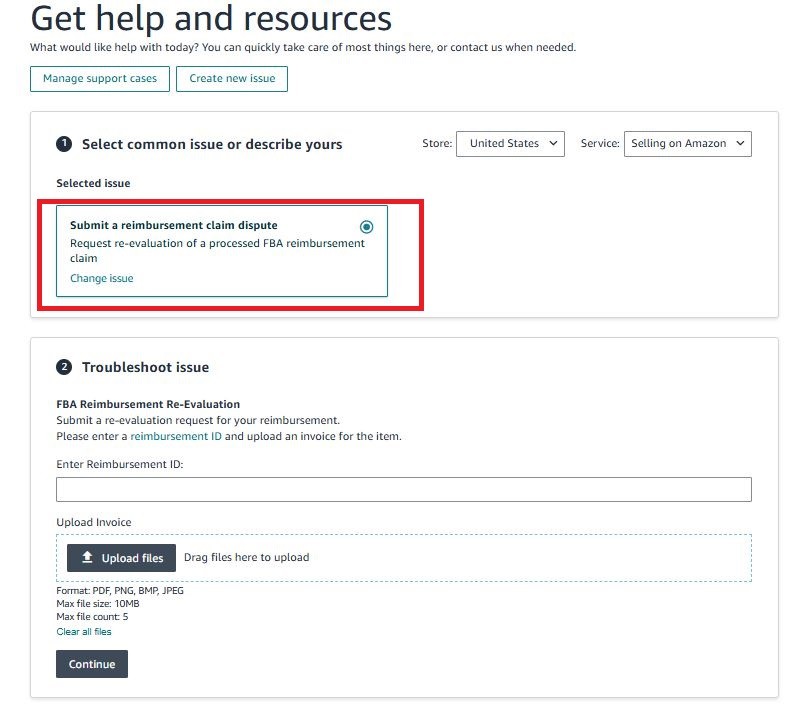
3. Make a clear request: Show the amount Amazon paid, the amount you expect, your calculations, and proof from the FBA Revenue Calculator.
4. What documentation is required to request FBA returns reimbursement?
For the Amazon reimbursement claim process, having the right documentation is key to getting your FBA returns reimbursed quickly.
First, you need to identify the type of reimbursement, such as customer returns, warehouse lost/damaged, or customer-damaged items. Each requires slightly different proof.
For value disputes, gather the median sale price or the current lowest FBA offer to show the true worth of the product.
For cost disputes, provide verified supplier invoices showing your actual manufacturing or sourcing cost. For damage claims, include clear photos of the returned item, the LPN label, and the return shipping details.
It’s also important that you check your reports in Seller Central. Cross-checking your Customer Returns Report, Inventory Ledger, and Refund Report ensures your claim matches Amazon’s records. Make sure you have complete, accurate documentation to avoid delays and reduce the chance of automatic denial.
5. How to fix lost or damaged inventory claims on Amazon using software
Currently, sellers are struggling to recover lost or damaged inventory reimbursements on Amazon. The main problems include:
Short claim windows: Amazon typically allows only 60 days to file for warehouse losses, so delays can lead to lost money.
Missed reimbursements: Even when Amazon automatically issues some refunds, discrepancies often slip through unnoticed.
Manual tracking challenges: Cross-checking returns, inventory reports, and reimbursements manually is time-consuming and error-prone.
These issues can directly impact cash flow and profitability, especially for sellers managing multiple SKUs or high-volume inventory.
How Amazon reimbursement software can fix these issues:
Inventory reconciliation tools automate the process. They quickly identify discrepancies, estimate potential reimbursements, and flag claims before deadlines expire. This reduces human error, and speeds up the recovery of your claim process.
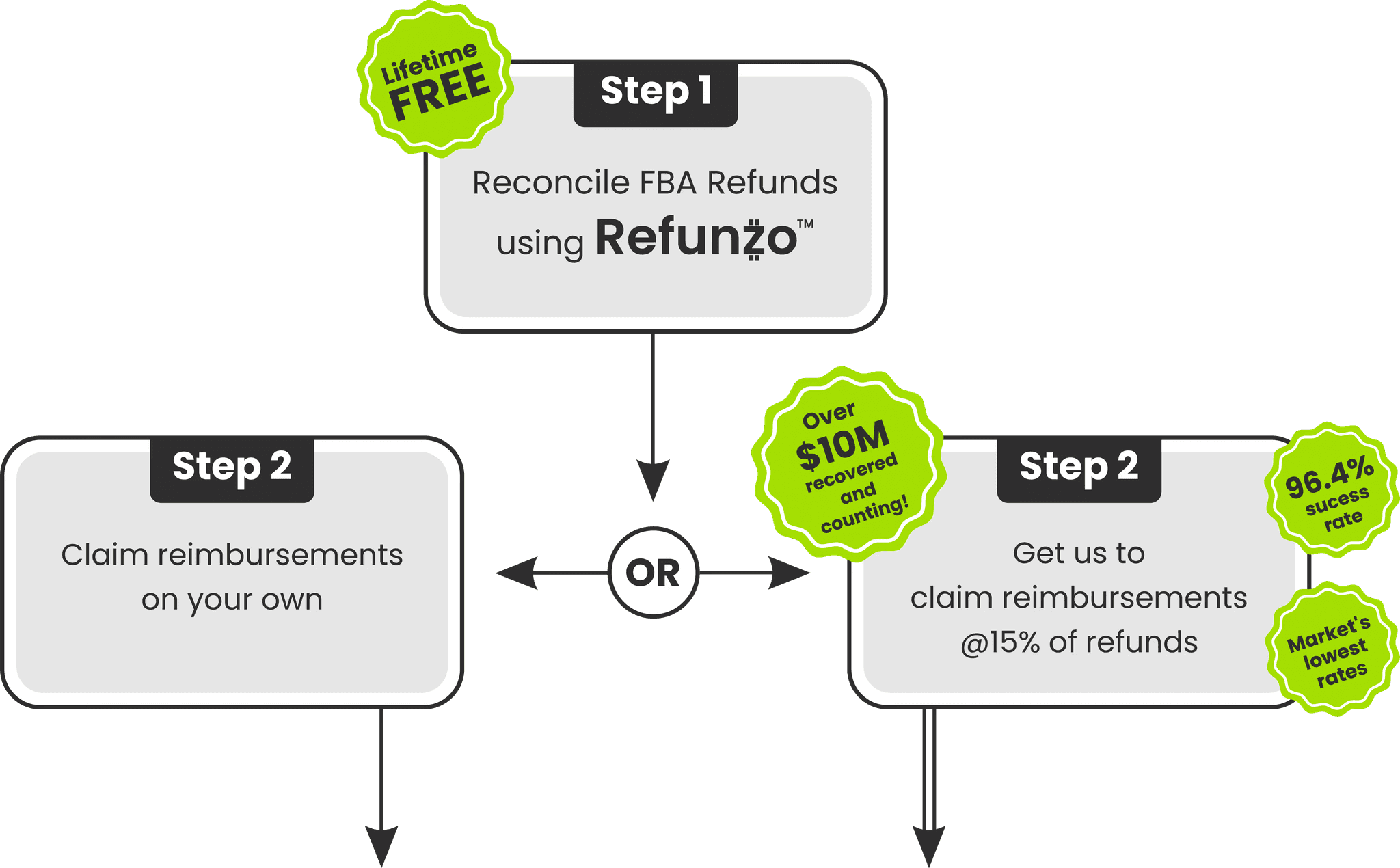
One of the most effective tools for this is Refunzo. It is an Amazon FBA reconciliation tool that you need to connect to your Amazon account. It runs a full audit and gets a clear report of reimbursements you may be owed. You can choose to claim yourself or let Refunzo handle the cases, ensuring refunds go directly to your bank.
Losing money on FBA returns?
Don’t let Amazon quietly eat your profit margins. Missed deadlines, lost inventory, or a confusing Amazon reimbursement claim process can drain your revenue fast. This FAQ guide cuts through the chaos, showing you exactly how to claim, dispute, and recover every dollar you’re owed.
1. How do I file a claim for FBA returns reimbursement?
When a customer returns an FBA order, and Amazon fails to return the item to sellable inventory or reimburse you correctly, you can file a reimbursement claim directly from Amazon Seller Central. Filing for FBA return reimbursements in 2026 is all about correct timing, documentation, and using the right tools.
Key windows to remember:
For FBA customer returns, you can file claims between 60 and 120 days after the refund or replacement date.
For items lost or damaged in the fulfillment center, the claim must be submitted within 60 days.
Step-by-step process for FBA reimbursement claim
Start by checking the Inventory Defect and Reimbursement portal in Seller Central for eligible items. Check the "Eligible for claim" tab to find customer-related defects.
Verify if Amazon has already reimbursed you in Reports > Fulfillment > Payments > Reimbursement.
Collect evidence such as Order ID, FNSKU, quantity, and photos for damaged items.
Then, submit the claim via Help > Contact Us > FBA Returns Reimbursement and track it in your Case Log.
Pro tip: Use reports like Customer Returns, Inventory Ledger, and Refund Report to cross-check discrepancies. Remember, according to the Amazon reimbursement policy 2025, Amazon reimburses you based on manufacturing cost, not full retail price. It is only for items damaged by Amazon, not customers.
2. What are common reasons FBA returns reimbursements get denied?
Amazon has tightened rules for FBA claims in 2026. Here you find the most common reasons for FBA return reimbursement denial and how to fix them.
Missing deadlines: Your customer-damaged FBA returns must be filed within 60 to 120 days after the refund; too early or too late leads to automatic denial. Lost or damaged items must be claimed within 60 days. For removal orders, you have a shorter window, usually 15 to 75 days.
Proof-of-value errors: If you submit incomplete evidence, such as missing invoices, shipment manifests, or proof of delivery, it gets rejected. You must provide verified manufacturing cost data; Amazon reimburses based on production cost, not retail price. Wrong or outdated SKUs, ASINs, or FNSKUs are also the reason for your claim denial.
Customer-damaged classification: Amazon generally does not reimburse items damaged by the buyer (used, tested, or remorse). Claims may be denied if carrier damage is misclassified as customer-damaged.
Eligibility & compliance issues: Shipments without proper labeling/prep are ineligible. Suspended, blocked, or not in good standing is the cause of automatic rejection. If you are claiming for non-returnable items like certain hazardous or personal care products cannot be reimbursed.
Procedural mistakes: Submitting a second claim while one is pending/resolved triggers denial. Filing “Damaged” for an item marked “Lost” can cause a mismatch and claim rejection.
3. How to dispute an incorrect FBA returns reimbursement amount?
If you ever get an FBA reimbursement that looks wrong, don’t panic. Amazon’s 2026 rules just mean you need to follow the right steps. The first thing is to understand the valuation method Amazon used:
Customer returns: Amazon reimbursements should match the original refund or replacement price minus fees.
Warehouse lost & damaged: Reimbursed based on your verified manufacturing or sourcing cost, not at your selling price.
Customer-damaged items: Amazon often pays about 50% because the item isn’t “new” anymore. Make sure this percentage is applied correctly.
How to file a dispute
1. Gather evidence: For value disputes, provide the median sale price you’ve sold the item for or the current lowest FBA offer to show what the item is truly worth. For cost disputes, gather verified invoices from your suppliers to prove your actual sourcing cost. For damage-related disputes, include clear photos of the returned item, along with the LPN label and the return shipping information, to give Amazon full context for your claim.2. Submit a case via Help > Contact Us > Fulfillment by Amazon, then claim using the FBA reimbursement claim dispute window.
3. Make a clear request: Show the amount Amazon paid, the amount you expect, your calculations, and proof from the FBA Revenue Calculator.
4. What documentation is required to request FBA returns reimbursement?
For the Amazon reimbursement claim process, having the right documentation is key to getting your FBA returns reimbursed quickly.
First, you need to identify the type of reimbursement, such as customer returns, warehouse lost/damaged, or customer-damaged items. Each requires slightly different proof.
For value disputes, gather the median sale price or the current lowest FBA offer to show the true worth of the product.
For cost disputes, provide verified supplier invoices showing your actual manufacturing or sourcing cost. For damage claims, include clear photos of the returned item, the LPN label, and the return shipping details.
It’s also important that you check your reports in Seller Central. Cross-checking your Customer Returns Report, Inventory Ledger, and Refund Report ensures your claim matches Amazon’s records. Make sure you have complete, accurate documentation to avoid delays and reduce the chance of automatic denial.
5. How to fix lost or damaged inventory claims on Amazon using software
Currently, sellers are struggling to recover lost or damaged inventory reimbursements on Amazon. The main problems include:
Short claim windows: Amazon typically allows only 60 days to file for warehouse losses, so delays can lead to lost money.
Missed reimbursements: Even when Amazon automatically issues some refunds, discrepancies often slip through unnoticed.
Manual tracking challenges: Cross-checking returns, inventory reports, and reimbursements manually is time-consuming and error-prone.
These issues can directly impact cash flow and profitability, especially for sellers managing multiple SKUs or high-volume inventory.
How Amazon reimbursement software can fix these issues:
Inventory reconciliation tools automate the process. They quickly identify discrepancies, estimate potential reimbursements, and flag claims before deadlines expire. This reduces human error, and speeds up the recovery of your claim process.
One of the most effective tools for this is Refunzo. It is an Amazon FBA reconciliation tool that you need to connect to your Amazon account. It runs a full audit and gets a clear report of reimbursements you may be owed. You can choose to claim yourself or let Refunzo handle the cases, ensuring refunds go directly to your bank.
Losing money on FBA returns?
Don’t let Amazon quietly eat your profit margins. Missed deadlines, lost inventory, or a confusing Amazon reimbursement claim process can drain your revenue fast. This FAQ guide cuts through the chaos, showing you exactly how to claim, dispute, and recover every dollar you’re owed.
1. How do I file a claim for FBA returns reimbursement?
When a customer returns an FBA order, and Amazon fails to return the item to sellable inventory or reimburse you correctly, you can file a reimbursement claim directly from Amazon Seller Central. Filing for FBA return reimbursements in 2026 is all about correct timing, documentation, and using the right tools.
Key windows to remember:
For FBA customer returns, you can file claims between 60 and 120 days after the refund or replacement date.
For items lost or damaged in the fulfillment center, the claim must be submitted within 60 days.
Step-by-step process for FBA reimbursement claim
Start by checking the Inventory Defect and Reimbursement portal in Seller Central for eligible items. Check the "Eligible for claim" tab to find customer-related defects.
Verify if Amazon has already reimbursed you in Reports > Fulfillment > Payments > Reimbursement.
Collect evidence such as Order ID, FNSKU, quantity, and photos for damaged items.
Then, submit the claim via Help > Contact Us > FBA Returns Reimbursement and track it in your Case Log.
Pro tip: Use reports like Customer Returns, Inventory Ledger, and Refund Report to cross-check discrepancies. Remember, according to the Amazon reimbursement policy 2025, Amazon reimburses you based on manufacturing cost, not full retail price. It is only for items damaged by Amazon, not customers.
2. What are common reasons FBA returns reimbursements get denied?
Amazon has tightened rules for FBA claims in 2026. Here you find the most common reasons for FBA return reimbursement denial and how to fix them.
Missing deadlines: Your customer-damaged FBA returns must be filed within 60 to 120 days after the refund; too early or too late leads to automatic denial. Lost or damaged items must be claimed within 60 days. For removal orders, you have a shorter window, usually 15 to 75 days.
Proof-of-value errors: If you submit incomplete evidence, such as missing invoices, shipment manifests, or proof of delivery, it gets rejected. You must provide verified manufacturing cost data; Amazon reimburses based on production cost, not retail price. Wrong or outdated SKUs, ASINs, or FNSKUs are also the reason for your claim denial.
Customer-damaged classification: Amazon generally does not reimburse items damaged by the buyer (used, tested, or remorse). Claims may be denied if carrier damage is misclassified as customer-damaged.
Eligibility & compliance issues: Shipments without proper labeling/prep are ineligible. Suspended, blocked, or not in good standing is the cause of automatic rejection. If you are claiming for non-returnable items like certain hazardous or personal care products cannot be reimbursed.
Procedural mistakes: Submitting a second claim while one is pending/resolved triggers denial. Filing “Damaged” for an item marked “Lost” can cause a mismatch and claim rejection.
3. How to dispute an incorrect FBA returns reimbursement amount?
If you ever get an FBA reimbursement that looks wrong, don’t panic. Amazon’s 2026 rules just mean you need to follow the right steps. The first thing is to understand the valuation method Amazon used:
Customer returns: Amazon reimbursements should match the original refund or replacement price minus fees.
Warehouse lost & damaged: Reimbursed based on your verified manufacturing or sourcing cost, not at your selling price.
Customer-damaged items: Amazon often pays about 50% because the item isn’t “new” anymore. Make sure this percentage is applied correctly.
How to file a dispute
1. Gather evidence: For value disputes, provide the median sale price you’ve sold the item for or the current lowest FBA offer to show what the item is truly worth. For cost disputes, gather verified invoices from your suppliers to prove your actual sourcing cost. For damage-related disputes, include clear photos of the returned item, along with the LPN label and the return shipping information, to give Amazon full context for your claim.2. Submit a case via Help > Contact Us > Fulfillment by Amazon, then claim using the FBA reimbursement claim dispute window.
3. Make a clear request: Show the amount Amazon paid, the amount you expect, your calculations, and proof from the FBA Revenue Calculator.
4. What documentation is required to request FBA returns reimbursement?
For the Amazon reimbursement claim process, having the right documentation is key to getting your FBA returns reimbursed quickly.
First, you need to identify the type of reimbursement, such as customer returns, warehouse lost/damaged, or customer-damaged items. Each requires slightly different proof.
For value disputes, gather the median sale price or the current lowest FBA offer to show the true worth of the product.
For cost disputes, provide verified supplier invoices showing your actual manufacturing or sourcing cost. For damage claims, include clear photos of the returned item, the LPN label, and the return shipping details.
It’s also important that you check your reports in Seller Central. Cross-checking your Customer Returns Report, Inventory Ledger, and Refund Report ensures your claim matches Amazon’s records. Make sure you have complete, accurate documentation to avoid delays and reduce the chance of automatic denial.
5. How to fix lost or damaged inventory claims on Amazon using software
Currently, sellers are struggling to recover lost or damaged inventory reimbursements on Amazon. The main problems include:
Short claim windows: Amazon typically allows only 60 days to file for warehouse losses, so delays can lead to lost money.
Missed reimbursements: Even when Amazon automatically issues some refunds, discrepancies often slip through unnoticed.
Manual tracking challenges: Cross-checking returns, inventory reports, and reimbursements manually is time-consuming and error-prone.
These issues can directly impact cash flow and profitability, especially for sellers managing multiple SKUs or high-volume inventory.
How Amazon reimbursement software can fix these issues:
Inventory reconciliation tools automate the process. They quickly identify discrepancies, estimate potential reimbursements, and flag claims before deadlines expire. This reduces human error, and speeds up the recovery of your claim process.
One of the most effective tools for this is Refunzo. It is an Amazon FBA reconciliation tool that you need to connect to your Amazon account. It runs a full audit and gets a clear report of reimbursements you may be owed. You can choose to claim yourself or let Refunzo handle the cases, ensuring refunds go directly to your bank.
Related post
FBA Rembursement
FBA reimbursements unlocked: 2026 FAQ every seller can’t ignore
FBA reimbursements unlocked: 2026 FAQ every seller can’t ignore
FBA reimbursements unlocked: 2026 FAQ every seller can’t ignore
FBA reimbursements unlocked: 2026 FAQ every seller can’t ignore
Jan 9, 2026
|
15min
Amazon Tool
How Amazon FBA audit tools uncover hidden fee losses in 2026
How Amazon FBA audit tools uncover hidden fee losses in 2026
How Amazon FBA audit tools uncover hidden fee losses in 2026
How Amazon FBA audit tools uncover hidden fee losses in 2026
Jan 1, 2026
|
9 min
Amazon FBA Reclaim
How to Audit and Reclaim Amazon FBA Overcharges on Weight and Dimension Fees?
How to Audit and Reclaim Amazon FBA Overcharges on Weight and Dimension Fees?
How to Audit and Reclaim Amazon FBA Overcharges on Weight and Dimension Fees?
How to Audit and Reclaim Amazon FBA Overcharges on Weight and Dimension Fees?
Dec 23, 2025
|
12 min

Stay updated by subscribing
to our newsletter.
Stay updated by subscribing
to our newsletter.
Stay informed and up-to-date with the latest news and updates
from our company by subscribing to our newsletter.
Stay informed and up-to-date
with the latest news and updates
from our company by subscribing to
our newsletter.