
Amazon reimbursement report every seller must check to claim missing reimbursements
Mar 2, 2026
Mar 2, 2026
TL;DR
Most Amazon FBA sellers have unclaimed reimbursements sitting in their accounts simply because they are not reviewing the right Seller Central reports regularly.
The key reports to check are the Reimbursement Report, Inventory Adjustment Report, Inventory Ledger, Received Inventory, Refund Report, and FBA Transaction Report; each one detects a different type of financial gap.
The real money is found by reconciling what went wrong, like lost, damaged, or missing units, against what Amazon actually reimbursed, and identifying the gap between the two.
Manual reconciliation is possible but time-consuming, especially for sellers with large catalogs or frequent shipments.
Tools like Refunzo automate the reconciliation process, identify unclaimed reimbursements across multiple checkpoints, and help sellers file stronger claims with proper documentation.
If you're selling on Amazon FBA and haven't checked your Seller Central reports lately, there's a good chance Amazon owes you money right now. Studies from reimbursement recovery services suggest that most FBA sellers are owed the majority of their money annually in unclaimed reimbursements, simply because they didn't know where to look.
This beginner guide gives you a clear walkthrough of which Amazon reimbursement reports matter, what they show, and how to use them to recover money that's rightfully yours.
What reports do I need to check for Amazon FBA reimbursements?
The Amazon reimbursement report, Inventory Adjustment Report, Inventory Ledger Report, Received Inventory Report, Refund Report, and FBA Transaction Report are available inside Seller Central under Reports → Fulfillment.
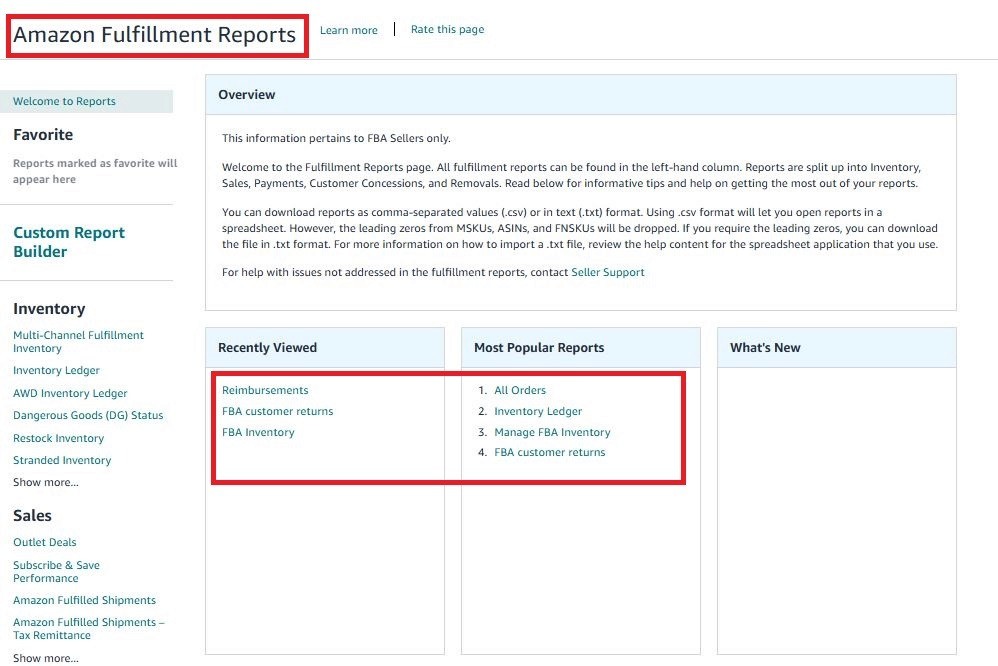
Knowing which Seller Central reports to check for reimbursements is the first step most sellers skip. Each report catches a different type of error. Think of them as six different detectors, each scanning for a specific way Amazon could have underpaid you. You need all six working together to get the full picture.
What is the Amazon FBA reimbursement report?
The Amazon reimbursement report is your baseline. It lists every reimbursement Amazon has already processed for your account within a date range you select. This is the report that tells you what Amazon has paid, and which then helps you figure out what Amazon hasn't paid.
Where to find it: Seller Central → Reports → Payments → Reimbursements
How to read Amazon reimbursement report:
Reason: Why Amazon reimbursed you for lost, damaged, or customer return
ASIN/FNSKU: Which product was involved
Quantity Reimbursed (Cash) units paid out in money
Quantity Reimbursed (Inventory) units replaced physically
Amount Per Unit: What Amazon valued your item at
Total Amount: What landed in your account
The most important thing beginners miss is a low "Amount Per Unit" value. Amazon calculates reimbursements based on your average 90-day sale price or its own estimated fair market value, not your retail price. According to Amazon's reimbursement policy changes in 2025, it will reimburse you based on the manufacturing cost, or they will assign a value based on similar products. Always check whether the amount per unit is fair before accepting it.
Pro tip: Export the Amazon reimbursement report as a CSV, open it in Google Sheets or Excel, and filter the "Reason" column. Group by type, like lost, damaged, and customer return, so you can spot patterns and gaps fast.
The inventory adjustment report is the one most Amazon sellers ignore, and it is usually where the largest unclaimed reimbursements are found. This report tracks every single unit gain or loss inside Amazon's fulfillment centers, using inventory adjustment report codes, including missing and found units, that tell you exactly what happened to each unit and whether you are owed compensation for it.
Where to find it: Seller Central → Reports → Fulfillment → Inventory → Inventory Adjustments
Code | What It Means | What You Should Do |
D | Lost in fulfillment center | File claim if not reimbursed |
F | Damaged by Amazon | File claim immediately |
E | Found / Recovered | Check if reimbursement was already issued |
M | Misplaced / Missing | Monitor 30 days, then file |
Q | Warehouse transfer | Usually auto-resolves |
Filter this report for codes D and F first. These are the clearest cases where Amazon caused a loss and owes you compensation. Any unit flagged with code D or F that doesn't appear in your Amazon reimbursement report is an unclaimed reimbursement.
This is the core of reconciliation and comparing what went wrong (Inventory Adjustment Report) against what was paid back (Reimbursement Report). The gap between the two is your missing money.
What is the inventory ledger report on Amazon, and why does it matter?
If the Inventory Adjustment Report is a highlighter, the Inventory Ledger Report is the full textbook. It gives you a complete transaction-level history of every unit that moved in or out of Amazon's fulfillment network during your selected date range.
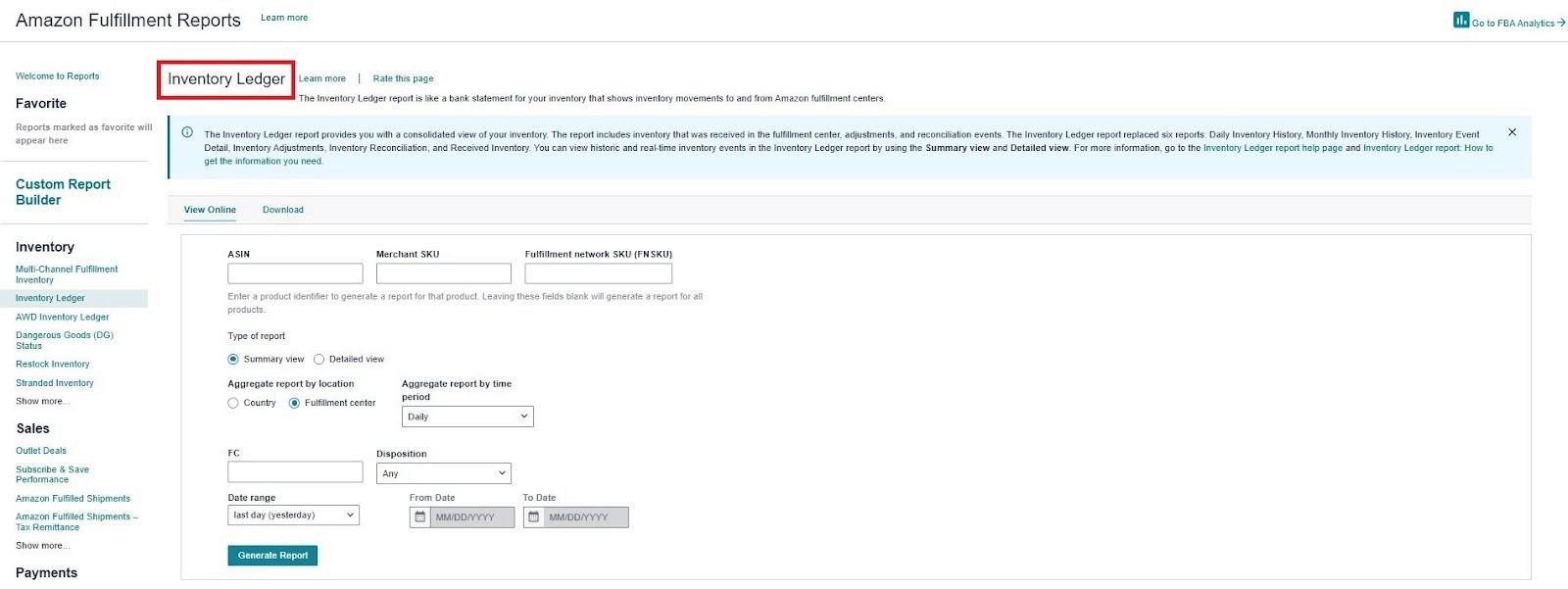
Where to find it: Seller Central → Reports → Fulfillment → Inventory Ledger
Why beginners need this report:
It lets you run what is called a reconciliation check, a simple formula where you add your starting inventory, incoming receipts, and customer returns, then subtract the orders shipped and any removals. The number you are left with should match your ending inventory. If it does not, units are unaccounted for, and that gap is your reimbursement opportunity.
If Amazon's ending inventory number doesn't match your calculation, units are unaccounted for. Those missing units are your reimbursement opportunity. The Inventory Ledger is also where you catch inbound shipment discrepancies.
If you shipped 200 units but Amazon only showed 190 received, that 10-unit gap needs to be investigated through the reconciliation reports in Seller Central before the 9-month filing window closes.
How do I use the Amazon refund report to find missing reimbursements?
This is one of the most consistently overlooked reimbursement opportunities for beginners. Here's how it works:
When a customer requests a refund, Amazon refunds them immediately. The customer then has 45 days to physically return the product. If they don't return it, Amazon is supposed to reimburse you for that unit. According to Amazon's updated policy (effective October 2024), the filing window for these cases runs from day 60 after the refund up to 120 days.
Where to find the Refund Report: Seller Central → Reports → Payments → Refunds
Step-by-step process:
Download the Refund Report for the last 60 to 90 days
List every order where a refund was issued
Open the FBA Customer Returns report (Reports → Fulfillment → Customer Returns)
Cross-reference for each refunded order, check whether a return was logged
If no return appears after 45 days, and you are eligible to file a reimbursement claim using the Order ID as evidence
This process also works in reverse. Sometimes a customer returns a product, but Amazon marks it as "Unsellable" without issuing you a damage reimbursement. The FBA transaction report helps you catch these; it shows every financial transaction, including refunds, reversals, and fee adjustments, so you can identify cases where units dropped out of your sellable inventory without any compensation.
How often should I check my Amazon reimbursement reports?
Most Amazon sellers make the mistake of checking once every few months. By then, some filing windows have already closed.
Report | How Often | Why |
Amazon Reimbursement Report | Weekly | Catch low-value payouts and delayed credits |
Inventory Adjustment Report | Weekly | Spot lost/damaged units before claim windows close |
Inventory Ledger Report | Monthly | Full reconciliation check |
Received Inventory Report | After every inbound shipment | Verify Amazon received all your units |
Refund Report | Every 45 to 60 days | Catch unreturned customer items |
FBA Transaction Report | Monthly | Identify fee errors and refund gaps |
Key deadlines that matter (per Amazon's current policy):
Lost/damaged inventory in fulfillment centers: up to 18 months to file
Customer returns not received: 60 days to 120 days after refund (updated Oct 2024)
Inbound shipment shortages: 9 months from the shipment check-in date
Missing these windows means losing the money permanently. Weekly report reviews are a small time investment compared to what you stand to recover.
How to skip the manual work and reconcile faster using Refunzo
Going through six different reports, cross-referencing takes time. For sellers managing hundreds of ASINs or multiple shipments a month, doing this manually every week isn't realistic. This is where a tool like Refunzo changes the workflow entirely.
It acts as an Amazon reconciliation audit system. Instead of pulling reports one by one, you connect your Amazon account to Refunzo, and it runs a comprehensive reconciliation check across individual criteria covering everything from lost inventory and damaged units to unreturned customer refunds and FBA fee discrepancies. The process is straightforward:
Connect your Amazon account to Refunzo takes a few minutes
Run the reconciliation check across 21 checkpoints covering every major reimbursement category
Receive a detailed report showing exactly what discrepancies exist and an estimate of what Amazon owes you
File support cases with Amazon yourself using the report as your evidence — or let Refunzo handle the entire claims process for you
What makes this different from just downloading a spreadsheet is how claims are handled after the report. Each case logged with Amazon is treated individually. For beginners, Refunzo removes the steepest part of the learning curve: knowing what to look for is one thing, but knowing how to present a claim so Amazon approves it is another skill entirely.
Refunzo gives you a detailed report, gives you the documentation you need to back every claim, and the individual case handling from their Amazon reimbursement specialist.
Final insights
The Amazon reimbursement report alone will not tell you the full story. It only shows what Amazon has already paid. The real work and the real money are in the gap between what the Inventory Adjustment Report reveals and what the Reimbursement Report confirms.
Most sellers are losing money, not because Amazon is intentionally withholding it, but because no one is checking. But the manual process feels like too much to manage alongside running your business. Refunzo does the heavy lifting for you.
It runs a comprehensive reconciliation check, flags every unclaimed reimbursement, and handles the claims process with Amazon on your behalf.
Run your free reconciliation check with Refunzo today and get a clear picture of exactly what is sitting unclaimed in your account.
FAQs
How do I find lost inventory reimbursements on Amazon Seller Central?
Go to Reports → Fulfillment → Inventory Adjustments. Filter for reason codes D (Lost) and F (Damaged). Then open your Amazon reimbursement report under Reports → Payments → Reimbursements and check whether those same ASINs appear with a matching reimbursement.
Does Amazon automatically reimburse sellers for lost inventory?
Amazon automatically reimburses sellers for items lost or damaged inside fulfillment centers, but not all. Many cases, including inbound shipment shortages, unreturned customer refunds, and fee overcharges, require you to manually file a claim through Seller Central with supporting evidence.
What is the difference between the reimbursement report and the inventory adjustment report on Amazon?
The Reimbursement Report shows what Amazon has already paid you back. The inventory adjustment report Amazon provides shows every unit change gain and losses inside fulfillment centers, including losses Amazon hasn't compensated yet. Running them side by side is how you find the money that was lost but never returned to you.
TL;DR
Most Amazon FBA sellers have unclaimed reimbursements sitting in their accounts simply because they are not reviewing the right Seller Central reports regularly.
The key reports to check are the Reimbursement Report, Inventory Adjustment Report, Inventory Ledger, Received Inventory, Refund Report, and FBA Transaction Report; each one detects a different type of financial gap.
The real money is found by reconciling what went wrong, like lost, damaged, or missing units, against what Amazon actually reimbursed, and identifying the gap between the two.
Manual reconciliation is possible but time-consuming, especially for sellers with large catalogs or frequent shipments.
Tools like Refunzo automate the reconciliation process, identify unclaimed reimbursements across multiple checkpoints, and help sellers file stronger claims with proper documentation.
If you're selling on Amazon FBA and haven't checked your Seller Central reports lately, there's a good chance Amazon owes you money right now. Studies from reimbursement recovery services suggest that most FBA sellers are owed the majority of their money annually in unclaimed reimbursements, simply because they didn't know where to look.
This beginner guide gives you a clear walkthrough of which Amazon reimbursement reports matter, what they show, and how to use them to recover money that's rightfully yours.
What reports do I need to check for Amazon FBA reimbursements?
The Amazon reimbursement report, Inventory Adjustment Report, Inventory Ledger Report, Received Inventory Report, Refund Report, and FBA Transaction Report are available inside Seller Central under Reports → Fulfillment.
Knowing which Seller Central reports to check for reimbursements is the first step most sellers skip. Each report catches a different type of error. Think of them as six different detectors, each scanning for a specific way Amazon could have underpaid you. You need all six working together to get the full picture.
What is the Amazon FBA reimbursement report?
The Amazon reimbursement report is your baseline. It lists every reimbursement Amazon has already processed for your account within a date range you select. This is the report that tells you what Amazon has paid, and which then helps you figure out what Amazon hasn't paid.
Where to find it: Seller Central → Reports → Payments → Reimbursements
How to read Amazon reimbursement report:
Reason: Why Amazon reimbursed you for lost, damaged, or customer return
ASIN/FNSKU: Which product was involved
Quantity Reimbursed (Cash) units paid out in money
Quantity Reimbursed (Inventory) units replaced physically
Amount Per Unit: What Amazon valued your item at
Total Amount: What landed in your account
The most important thing beginners miss is a low "Amount Per Unit" value. Amazon calculates reimbursements based on your average 90-day sale price or its own estimated fair market value, not your retail price. According to Amazon's reimbursement policy changes in 2025, it will reimburse you based on the manufacturing cost, or they will assign a value based on similar products. Always check whether the amount per unit is fair before accepting it.
Pro tip: Export the Amazon reimbursement report as a CSV, open it in Google Sheets or Excel, and filter the "Reason" column. Group by type, like lost, damaged, and customer return, so you can spot patterns and gaps fast.
The inventory adjustment report is the one most Amazon sellers ignore, and it is usually where the largest unclaimed reimbursements are found. This report tracks every single unit gain or loss inside Amazon's fulfillment centers, using inventory adjustment report codes, including missing and found units, that tell you exactly what happened to each unit and whether you are owed compensation for it.
Where to find it: Seller Central → Reports → Fulfillment → Inventory → Inventory Adjustments
Code | What It Means | What You Should Do |
D | Lost in fulfillment center | File claim if not reimbursed |
F | Damaged by Amazon | File claim immediately |
E | Found / Recovered | Check if reimbursement was already issued |
M | Misplaced / Missing | Monitor 30 days, then file |
Q | Warehouse transfer | Usually auto-resolves |
Filter this report for codes D and F first. These are the clearest cases where Amazon caused a loss and owes you compensation. Any unit flagged with code D or F that doesn't appear in your Amazon reimbursement report is an unclaimed reimbursement.
This is the core of reconciliation and comparing what went wrong (Inventory Adjustment Report) against what was paid back (Reimbursement Report). The gap between the two is your missing money.
What is the inventory ledger report on Amazon, and why does it matter?
If the Inventory Adjustment Report is a highlighter, the Inventory Ledger Report is the full textbook. It gives you a complete transaction-level history of every unit that moved in or out of Amazon's fulfillment network during your selected date range.
Where to find it: Seller Central → Reports → Fulfillment → Inventory Ledger
Why beginners need this report:
It lets you run what is called a reconciliation check, a simple formula where you add your starting inventory, incoming receipts, and customer returns, then subtract the orders shipped and any removals. The number you are left with should match your ending inventory. If it does not, units are unaccounted for, and that gap is your reimbursement opportunity.
If Amazon's ending inventory number doesn't match your calculation, units are unaccounted for. Those missing units are your reimbursement opportunity. The Inventory Ledger is also where you catch inbound shipment discrepancies.
If you shipped 200 units but Amazon only showed 190 received, that 10-unit gap needs to be investigated through the reconciliation reports in Seller Central before the 9-month filing window closes.
How do I use the Amazon refund report to find missing reimbursements?
This is one of the most consistently overlooked reimbursement opportunities for beginners. Here's how it works:
When a customer requests a refund, Amazon refunds them immediately. The customer then has 45 days to physically return the product. If they don't return it, Amazon is supposed to reimburse you for that unit. According to Amazon's updated policy (effective October 2024), the filing window for these cases runs from day 60 after the refund up to 120 days.
Where to find the Refund Report: Seller Central → Reports → Payments → Refunds
Step-by-step process:
Download the Refund Report for the last 60 to 90 days
List every order where a refund was issued
Open the FBA Customer Returns report (Reports → Fulfillment → Customer Returns)
Cross-reference for each refunded order, check whether a return was logged
If no return appears after 45 days, and you are eligible to file a reimbursement claim using the Order ID as evidence
This process also works in reverse. Sometimes a customer returns a product, but Amazon marks it as "Unsellable" without issuing you a damage reimbursement. The FBA transaction report helps you catch these; it shows every financial transaction, including refunds, reversals, and fee adjustments, so you can identify cases where units dropped out of your sellable inventory without any compensation.
How often should I check my Amazon reimbursement reports?
Most Amazon sellers make the mistake of checking once every few months. By then, some filing windows have already closed.
Report | How Often | Why |
Amazon Reimbursement Report | Weekly | Catch low-value payouts and delayed credits |
Inventory Adjustment Report | Weekly | Spot lost/damaged units before claim windows close |
Inventory Ledger Report | Monthly | Full reconciliation check |
Received Inventory Report | After every inbound shipment | Verify Amazon received all your units |
Refund Report | Every 45 to 60 days | Catch unreturned customer items |
FBA Transaction Report | Monthly | Identify fee errors and refund gaps |
Key deadlines that matter (per Amazon's current policy):
Lost/damaged inventory in fulfillment centers: up to 18 months to file
Customer returns not received: 60 days to 120 days after refund (updated Oct 2024)
Inbound shipment shortages: 9 months from the shipment check-in date
Missing these windows means losing the money permanently. Weekly report reviews are a small time investment compared to what you stand to recover.
How to skip the manual work and reconcile faster using Refunzo
Going through six different reports, cross-referencing takes time. For sellers managing hundreds of ASINs or multiple shipments a month, doing this manually every week isn't realistic. This is where a tool like Refunzo changes the workflow entirely.
It acts as an Amazon reconciliation audit system. Instead of pulling reports one by one, you connect your Amazon account to Refunzo, and it runs a comprehensive reconciliation check across individual criteria covering everything from lost inventory and damaged units to unreturned customer refunds and FBA fee discrepancies. The process is straightforward:
Connect your Amazon account to Refunzo takes a few minutes
Run the reconciliation check across 21 checkpoints covering every major reimbursement category
Receive a detailed report showing exactly what discrepancies exist and an estimate of what Amazon owes you
File support cases with Amazon yourself using the report as your evidence — or let Refunzo handle the entire claims process for you
What makes this different from just downloading a spreadsheet is how claims are handled after the report. Each case logged with Amazon is treated individually. For beginners, Refunzo removes the steepest part of the learning curve: knowing what to look for is one thing, but knowing how to present a claim so Amazon approves it is another skill entirely.
Refunzo gives you a detailed report, gives you the documentation you need to back every claim, and the individual case handling from their Amazon reimbursement specialist.
Final insights
The Amazon reimbursement report alone will not tell you the full story. It only shows what Amazon has already paid. The real work and the real money are in the gap between what the Inventory Adjustment Report reveals and what the Reimbursement Report confirms.
Most sellers are losing money, not because Amazon is intentionally withholding it, but because no one is checking. But the manual process feels like too much to manage alongside running your business. Refunzo does the heavy lifting for you.
It runs a comprehensive reconciliation check, flags every unclaimed reimbursement, and handles the claims process with Amazon on your behalf.
Run your free reconciliation check with Refunzo today and get a clear picture of exactly what is sitting unclaimed in your account.
FAQs
How do I find lost inventory reimbursements on Amazon Seller Central?
Go to Reports → Fulfillment → Inventory Adjustments. Filter for reason codes D (Lost) and F (Damaged). Then open your Amazon reimbursement report under Reports → Payments → Reimbursements and check whether those same ASINs appear with a matching reimbursement.
Does Amazon automatically reimburse sellers for lost inventory?
Amazon automatically reimburses sellers for items lost or damaged inside fulfillment centers, but not all. Many cases, including inbound shipment shortages, unreturned customer refunds, and fee overcharges, require you to manually file a claim through Seller Central with supporting evidence.
What is the difference between the reimbursement report and the inventory adjustment report on Amazon?
The Reimbursement Report shows what Amazon has already paid you back. The inventory adjustment report Amazon provides shows every unit change gain and losses inside fulfillment centers, including losses Amazon hasn't compensated yet. Running them side by side is how you find the money that was lost but never returned to you.
Related post
Amazon FBA Reimbursements
Amazon reimbursement report every seller must check to claim missing reimbursements
Amazon reimbursement report every seller must check to claim missing reimbursements
Amazon reimbursement report every seller must check to claim missing reimbursements
Amazon reimbursement report every seller must check to claim missing reimbursements
Mar 2, 2026
|
12 mins
Amazon FBA Reimbursements
Refunded But Never Returned: The Amazon Missing Return Reimbursement Guide Every FBA Seller Needs
Refunded But Never Returned: The Amazon Missing Return Reimbursement Guide Every FBA Seller Needs
Refunded But Never Returned: The Amazon Missing Return Reimbursement Guide Every FBA Seller Needs
Refunded But Never Returned: The Amazon Missing Return Reimbursement Guide Every FBA Seller Needs
Feb 19, 2026
|
15 mins
Amazon FBA Reimbursements
Amazon underpaid your reimbursement? Refunzo finds your missing money automatically
Amazon underpaid your reimbursement? Refunzo finds your missing money automatically
Amazon underpaid your reimbursement? Refunzo finds your missing money automatically
Amazon underpaid your reimbursement? Refunzo finds your missing money automatically
Feb 12, 2026
|
12min

Stay updated by subscribing
to our newsletter.
Stay updated by subscribing
to our newsletter.
Stay informed and up-to-date with the latest news and updates
from our company by subscribing to our newsletter.
Stay informed and up-to-date
with the latest news and updates
from our company by subscribing to
our newsletter.