
Refunded But Never Returned: The Amazon Missing Return Reimbursement Guide Every FBA Seller Needs
Feb 19, 2026
Feb 19, 2026
TL;DR
Amazon often refunds customers without receiving the returned item, and unless you audit your account, sellers experience both the product loss and the revenue loss silently.
Amazon tracks return labels, carrier scans, and warehouse check-ins, but it does not automatically cross-reference refunds with actual returns or initiate reimbursement on your behalf.
You can claim Amazon missing return reimbursement if an FBA order was refunded and the item was not returned within the allowed return window, but you must act within the 60- to 120-day claim period.
Since late 2024, Amazon auto-reimburses some unreturned items, yet the system frequently misses cases, making regular audits in Seller Central essential.
Cross-checking the FBA Customer Returns report, Inventory Adjustments report, and Reimbursements report helps identify refunded but not returned orders.
Automation tools like Refunzo simplify the process by auditing your account, identifying eligible claims, and handling reimbursement filing before the 120-day deadline expires.
A customer requests a refund. Amazon approves it. The money leaves your account. But the product? It never comes back.
If you're an FBA seller, this scenario is more common than Amazon lets on. Every month, refunds are issued to customers who never return the item, and in most cases, your account absorbs the loss silently. No alert. No automatic fix. No reimbursement unless you go looking for it.
This is what's known as an unreturned refund on Amazon, and it's one of the most overlooked profit leaks in FBA businesses. The good news is that Amazon's reimbursement policy in 2025 covers these cases. The challenge is that Amazon’s missing return reimbursement claims don't happen automatically; you have to find them and file them yourself.
This guide walks you through everything you need to know, from understanding returnless refunds to filing claims and automating the entire process.
What is a returnless refund on Amazon?
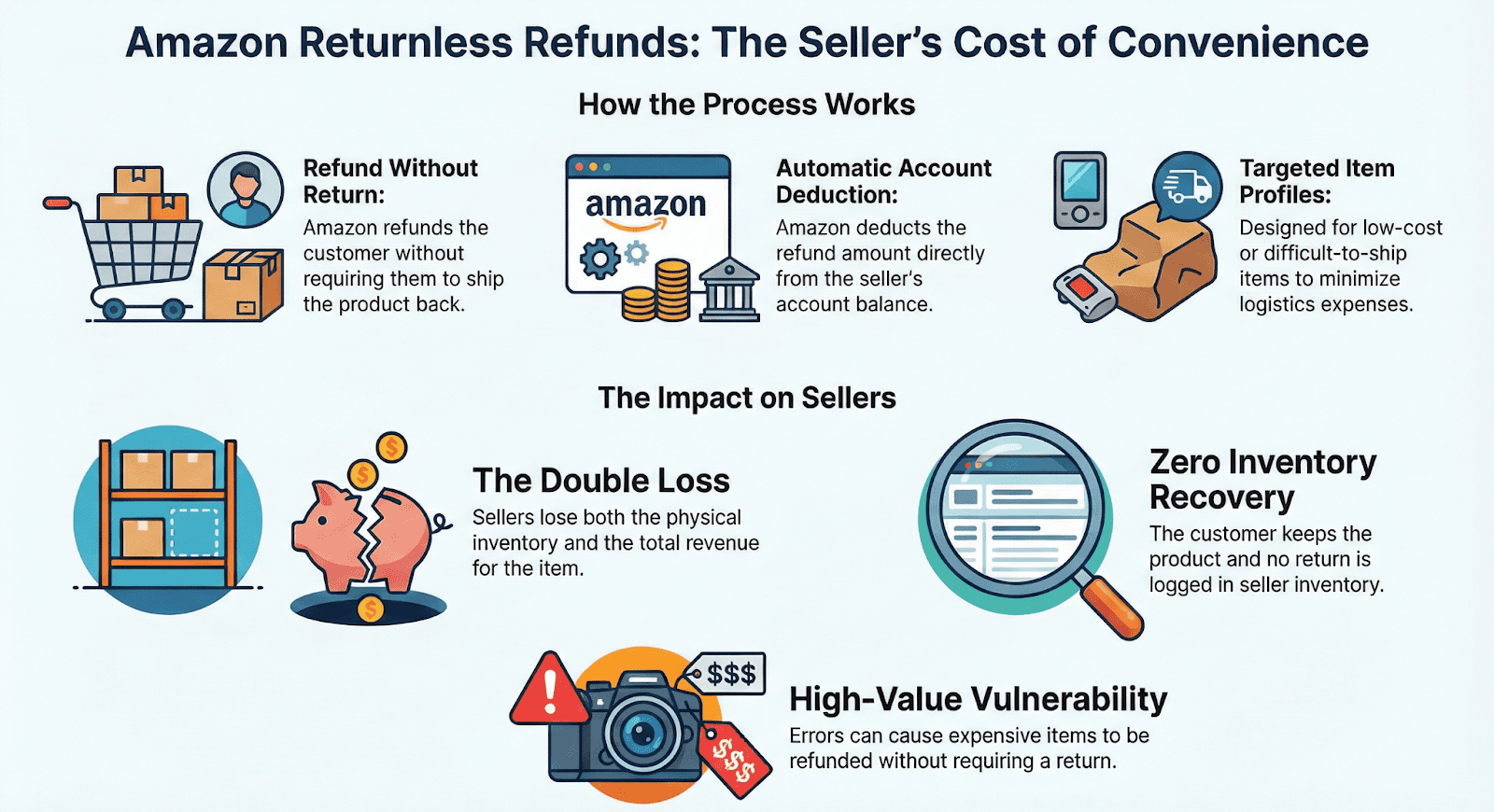
A returnless refund is when Amazon refunds a customer without requiring them to send the product back. Amazon introduced this policy to reduce shipping costs and streamline the return experience for low-cost or difficult-to-ship items.
From a seller's perspective:
The customer keeps the product
Amazon deducts the refund from your account
No return is ever logged in your inventory
You lose both the item and the revenue
Returnless refunds are part of Amazon's customer experience model. The problem isn't the policy itself; it's when high-value items get caught in the same process, or when Amazon issues refunds that should have required a return but didn't.
What are the most common reasons Amazon issues returnless refunds?
Knowing what triggers refunded but not returned FBA cases helps you identify which products in your catalog are most at risk.
Low item value: Products priced under a certain threshold (often around $25, though this varies) are frequently refunded without requiring a return.
High return shipping costs: Oversized, heavy, or international return shipments may trigger this policy.
Product condition concerns: Items reported as damaged, defective, or unsanitary may not be worth receiving back.
Customer convenience: Amazon prioritizes the buyer experience, and returnless refunds reduce friction.
Seller-configured returnless refund rules are set up in your return settings and sometimes enabled unintentionally.
Automated customer service concessions are issued by Amazon on your behalf without notification.
Hazardous materials: Products classified as hazmat cannot always be returned through standard shipping channels.
Each of these scenarios represents a potential case where you are owed money. Identifying the pattern across your catalog helps you understand where the financial leaks are and where to focus your Amazon return not received reimbursement efforts.
How does Amazon verify returnless refund claims?
Amazon uses a combination of automated systems and internal policies to determine whether a returnless refund is appropriate. For the majority of returnless refunds, Amazon does not independently verify the buyer's claim. The customer reports a problem, Amazon's algorithm or a support team makes a judgment call, and the refund is processed. You are not notified in real time.
What Amazon tracks | What Amazon does not do automatically |
Return label generation | Cross-reference refunded orders with actual returns received |
Carrier scan confirmation | Notify you when a refund is issued but no return is logged |
Check-in at fulfillment center | Initiate reimbursement on your behalf |
This gap between what Amazon tracks and what it acts on is the reason Amazon’s missing return reimbursement audits matter. The data exists and Amazon just won't connect the dots for you.
How do I track missing returns in Amazon Seller Central?
Amazon provides several reports within Seller Central that help you monitor whether returned items have actually been received at the warehouse. Here is how to conduct a missing return audit in Seller Central:
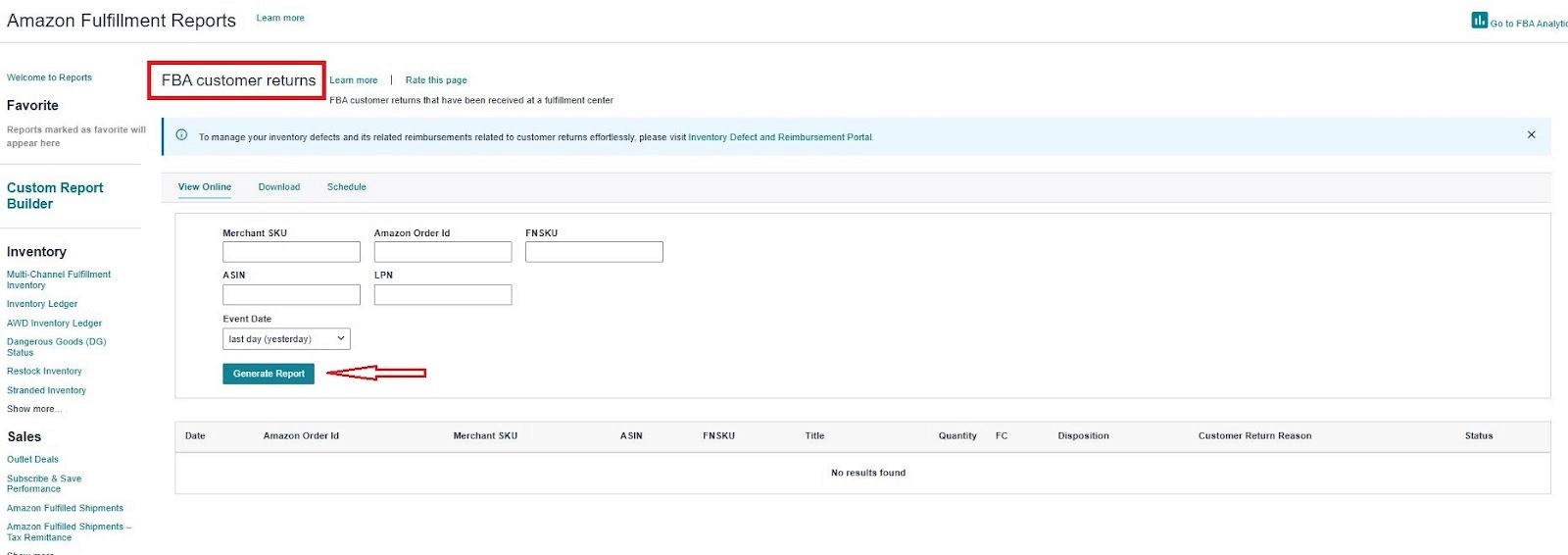
#1 FBA customer returns report
Navigate to Reports > Fulfillment > FBA Customer Returns. This report shows all items that customers have initiated returns for, including the return status and resolution.
#2 Manage returns page
Under Orders > Manage Returns, you can track individual return requests and see if the item has been scanned back into inventory.

#3 Inventory adjustments report
This report captures changes to your inventory, including items that were removed, found, or adjusted by Amazon's warehouse team. Look for discrepancies between refunds issued and items received.
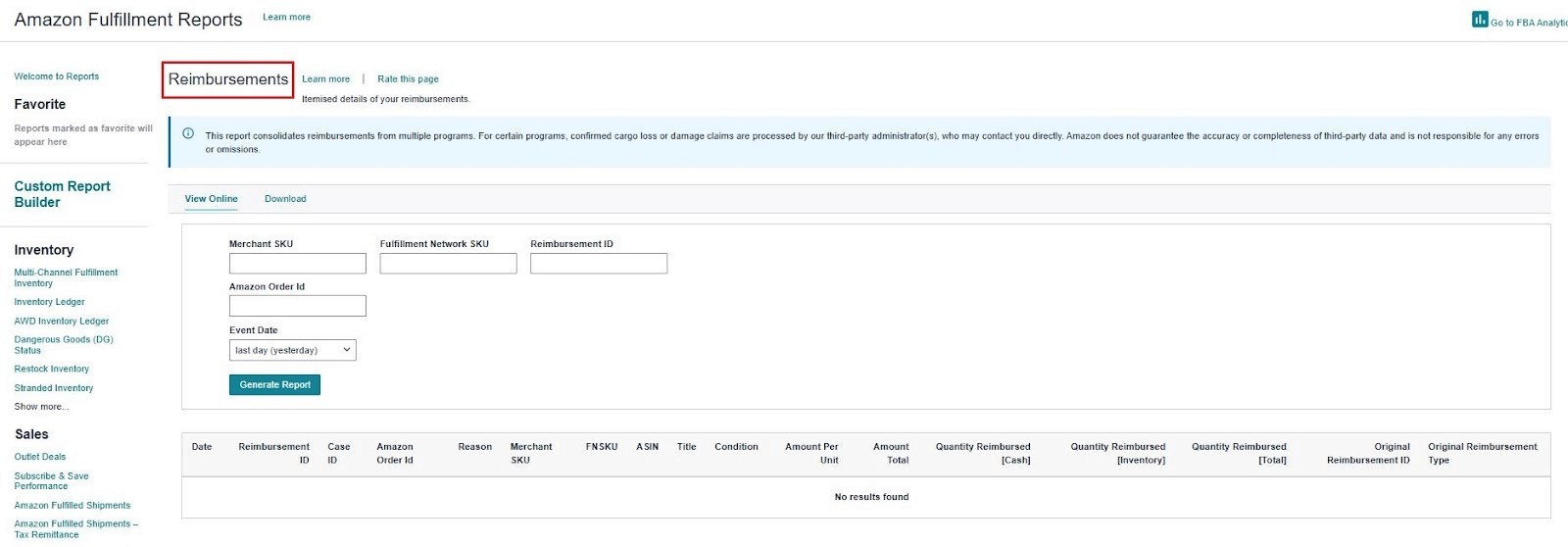
#4 Reimbursements report
Under Reports > Fulfillment > Reimbursements, you can verify whether Amazon has already issued a reimbursement for a missing item.
Cross-referencing these reports is the most reliable way to identify cases where a customer refunded, but the item was not returned. If a refund was issued more than 45 days ago and the item has not been returned or reimbursed, you likely have a valid claim.
What is Amazon's returnless refund policy for FBA sellers?
Under Amazon's current FBA reimbursement policy, you are eligible for reimbursement when a customer is refunded, but the item is never returned to a fulfillment center within the eligible return window.
Key conditions for eligibility:
The order was fulfilled by Amazon (FBA)
A refund was issued to the customer
The item was not returned, received, or restocked within the return window
The claim is filed within the 60 to 120 day window after the customer refund date (per the October 2024 policy update)
Important 2025 updates to know:
Amazon now auto-reimburses many cases: Since November 1, 2024, Amazon proactively processes reimbursements for certain lost and unreturned items. However, the system is imperfect and frequently misses claims; regular auditing is still essential.
Cost-based reimbursements: Since March 31, 2025, reimbursements for inventory not tied to a placed customer order are calculated on manufacturing cost, not the selling price. Submit your sourcing costs via the Inventory Defect and Reimbursement portal to avoid undervaluation.
The 120-day hard stop: If you have not received an automatic reimbursement or filed a manual claim within the eligible window, you forfeit that money permanently.
Important note: This applies to cases where the customer was supposed to return the item but did not. If you opted into Amazon's FBA Returnless Resolutions program and authorized the customer to keep the item, you cannot claim reimbursement; you agreed to that outcome.
How to claim reimbursement for an unreturned return
Since November 2024, Amazon automatically reimburses many unreturned items. If a customer does not return the product within 60 days of the refund, Amazon typically charges them and credits your account. However, this system is not perfect and frequently misses cases. For claims Amazon does not resolve automatically, follow these steps:
Respect the claim window. You can file a customer return claim no sooner than 60 days and no later than 120 days after the customer refund date. Filing before 60 days will result in rejection.
Check the IDR portal. Navigate to the Inventory Defect and Reimbursement portal in Seller Central. Click the "Eligible for claim" tab to view qualifying defects listed by Order ID, FNSKU, and quantity.
Submit your claim. Enter the Order ID from the portal, attach supporting documentation such as invoices or sourcing cost records, and file directly.
Follow up and track. Monitor your case status and the reimbursements Report to confirm the credit has been applied. Note that reimbursements may now be calculated on manufacturing cost rather than selling price under the March 2025 policy update.
The 120-day deadline is absolute. If Amazon has not automatically reimbursed you and you have not filed within that window, the money is gone permanently.
How Refunzo automates your reimbursement claims
Filing for an Amazon missing return reimbursement manually across hundreds of orders is not a productive use of your time. Refunzo was built to solve this exact problem, helping Amazon sellers identify discrepancies, quantify what they are owed, and recover their money efficiently. Here is how the process works:
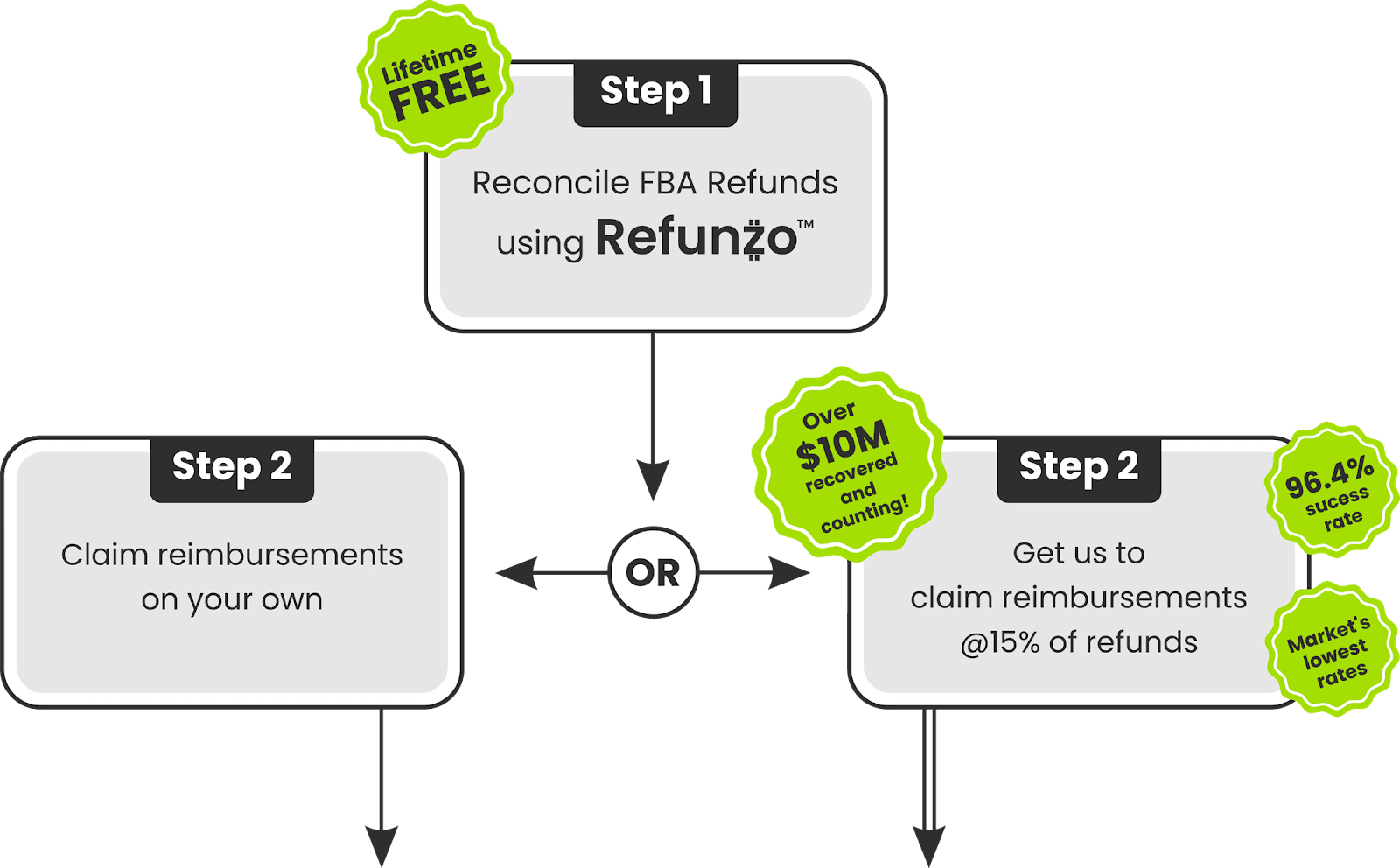
#1 Connect your account and reconcile
Sign up for the Refunzo web app and connect your Amazon Seller Central account. The setup is straightforward and takes just a few minutes. Your reconciliation is lifetime free, no credit card required.
#2 Run a comprehensive audit
Refunzo's Automatic Amazon reconciliation audit system runs an automated check across more than 20 reconciliation criteria, covering shipments, inventory adjustments, payments, fee overcharges, and refunds. This goes far beyond what most sellers can accomplish with manual report analysis.
#3 Get a detailed report
You receive a clear, detailed report showing exactly where discrepancies exist and a precise estimate of the total amount Amazon owes you.
#4 Claim your money back
At this point, you have two options. You can use the data from the report to create support cases with Amazon yourself. Or, you can let Refunzo's team of Amazon reimbursement specialists handle it. They file the claims, substantiate them with evidence, and follow up until the refunds are credited directly to your bank account.
Ready to stop losing money to lost returns? Sign up for a free trial of Refunzo today.
The bottom line
Every month you skip your Amazon missing return reimbursement audit is a month of unclaimed money sitting in Amazon's system that rightfully belongs to you. The process is straightforward once you know the steps. But the challenge at scale is volume. Manual audits are slow, and missed filing windows mean lost reimbursements permanently.
Refunzo eliminates that risk. Automated audits, 20-plus reconciliation criteria, and claim-ready reporting mean you recover what you are owed without the manual grind.
Book your demo call today and let Refunzo handle your missing return reimbursement recovery.
FAQs
How does Amazon verify returnless refund claims?
Amazon does not independently verify most returnless refund claims. Refunds are processed based on the customer's reported issue, with no physical inspection before your account is debited.
Does Amazon automatically reimburse sellers for unreturned items?
As of November 2024, Amazon started, but the system regularly misses claims. You still need to audit your account and file manually for anything the Amazon system skips.
Does a returnless refund affect product reviews?
No, it does not directly impact your product reviews or seller feedback. However, a consistently high return rate on a specific ASIN can negatively affect your listing's visibility over time.
What are the risks of returnless refunds for sellers?
Direct revenue loss, inventory shrinkage, and less profit margin, especially on higher-value products where a return should have been required but wasn't.
How do I check if Amazon returns were actually received back?
Go to Seller Central → Reports → Fulfillment → Returns and cross-reference with your refund transactions. Any refunded order with no corresponding return entry is a potential missing return reimbursement case worth filing.
TL;DR
Amazon often refunds customers without receiving the returned item, and unless you audit your account, sellers experience both the product loss and the revenue loss silently.
Amazon tracks return labels, carrier scans, and warehouse check-ins, but it does not automatically cross-reference refunds with actual returns or initiate reimbursement on your behalf.
You can claim Amazon missing return reimbursement if an FBA order was refunded and the item was not returned within the allowed return window, but you must act within the 60- to 120-day claim period.
Since late 2024, Amazon auto-reimburses some unreturned items, yet the system frequently misses cases, making regular audits in Seller Central essential.
Cross-checking the FBA Customer Returns report, Inventory Adjustments report, and Reimbursements report helps identify refunded but not returned orders.
Automation tools like Refunzo simplify the process by auditing your account, identifying eligible claims, and handling reimbursement filing before the 120-day deadline expires.
A customer requests a refund. Amazon approves it. The money leaves your account. But the product? It never comes back.
If you're an FBA seller, this scenario is more common than Amazon lets on. Every month, refunds are issued to customers who never return the item, and in most cases, your account absorbs the loss silently. No alert. No automatic fix. No reimbursement unless you go looking for it.
This is what's known as an unreturned refund on Amazon, and it's one of the most overlooked profit leaks in FBA businesses. The good news is that Amazon's reimbursement policy in 2025 covers these cases. The challenge is that Amazon’s missing return reimbursement claims don't happen automatically; you have to find them and file them yourself.
This guide walks you through everything you need to know, from understanding returnless refunds to filing claims and automating the entire process.
What is a returnless refund on Amazon?
A returnless refund is when Amazon refunds a customer without requiring them to send the product back. Amazon introduced this policy to reduce shipping costs and streamline the return experience for low-cost or difficult-to-ship items.
From a seller's perspective:
The customer keeps the product
Amazon deducts the refund from your account
No return is ever logged in your inventory
You lose both the item and the revenue
Returnless refunds are part of Amazon's customer experience model. The problem isn't the policy itself; it's when high-value items get caught in the same process, or when Amazon issues refunds that should have required a return but didn't.
What are the most common reasons Amazon issues returnless refunds?
Knowing what triggers refunded but not returned FBA cases helps you identify which products in your catalog are most at risk.
Low item value: Products priced under a certain threshold (often around $25, though this varies) are frequently refunded without requiring a return.
High return shipping costs: Oversized, heavy, or international return shipments may trigger this policy.
Product condition concerns: Items reported as damaged, defective, or unsanitary may not be worth receiving back.
Customer convenience: Amazon prioritizes the buyer experience, and returnless refunds reduce friction.
Seller-configured returnless refund rules are set up in your return settings and sometimes enabled unintentionally.
Automated customer service concessions are issued by Amazon on your behalf without notification.
Hazardous materials: Products classified as hazmat cannot always be returned through standard shipping channels.
Each of these scenarios represents a potential case where you are owed money. Identifying the pattern across your catalog helps you understand where the financial leaks are and where to focus your Amazon return not received reimbursement efforts.
How does Amazon verify returnless refund claims?
Amazon uses a combination of automated systems and internal policies to determine whether a returnless refund is appropriate. For the majority of returnless refunds, Amazon does not independently verify the buyer's claim. The customer reports a problem, Amazon's algorithm or a support team makes a judgment call, and the refund is processed. You are not notified in real time.
What Amazon tracks | What Amazon does not do automatically |
Return label generation | Cross-reference refunded orders with actual returns received |
Carrier scan confirmation | Notify you when a refund is issued but no return is logged |
Check-in at fulfillment center | Initiate reimbursement on your behalf |
This gap between what Amazon tracks and what it acts on is the reason Amazon’s missing return reimbursement audits matter. The data exists and Amazon just won't connect the dots for you.
How do I track missing returns in Amazon Seller Central?
Amazon provides several reports within Seller Central that help you monitor whether returned items have actually been received at the warehouse. Here is how to conduct a missing return audit in Seller Central:
#1 FBA customer returns report
Navigate to Reports > Fulfillment > FBA Customer Returns. This report shows all items that customers have initiated returns for, including the return status and resolution.
#2 Manage returns page
Under Orders > Manage Returns, you can track individual return requests and see if the item has been scanned back into inventory.
#3 Inventory adjustments report
This report captures changes to your inventory, including items that were removed, found, or adjusted by Amazon's warehouse team. Look for discrepancies between refunds issued and items received.
#4 Reimbursements report
Under Reports > Fulfillment > Reimbursements, you can verify whether Amazon has already issued a reimbursement for a missing item.
Cross-referencing these reports is the most reliable way to identify cases where a customer refunded, but the item was not returned. If a refund was issued more than 45 days ago and the item has not been returned or reimbursed, you likely have a valid claim.
What is Amazon's returnless refund policy for FBA sellers?
Under Amazon's current FBA reimbursement policy, you are eligible for reimbursement when a customer is refunded, but the item is never returned to a fulfillment center within the eligible return window.
Key conditions for eligibility:
The order was fulfilled by Amazon (FBA)
A refund was issued to the customer
The item was not returned, received, or restocked within the return window
The claim is filed within the 60 to 120 day window after the customer refund date (per the October 2024 policy update)
Important 2025 updates to know:
Amazon now auto-reimburses many cases: Since November 1, 2024, Amazon proactively processes reimbursements for certain lost and unreturned items. However, the system is imperfect and frequently misses claims; regular auditing is still essential.
Cost-based reimbursements: Since March 31, 2025, reimbursements for inventory not tied to a placed customer order are calculated on manufacturing cost, not the selling price. Submit your sourcing costs via the Inventory Defect and Reimbursement portal to avoid undervaluation.
The 120-day hard stop: If you have not received an automatic reimbursement or filed a manual claim within the eligible window, you forfeit that money permanently.
Important note: This applies to cases where the customer was supposed to return the item but did not. If you opted into Amazon's FBA Returnless Resolutions program and authorized the customer to keep the item, you cannot claim reimbursement; you agreed to that outcome.
How to claim reimbursement for an unreturned return
Since November 2024, Amazon automatically reimburses many unreturned items. If a customer does not return the product within 60 days of the refund, Amazon typically charges them and credits your account. However, this system is not perfect and frequently misses cases. For claims Amazon does not resolve automatically, follow these steps:
Respect the claim window. You can file a customer return claim no sooner than 60 days and no later than 120 days after the customer refund date. Filing before 60 days will result in rejection.
Check the IDR portal. Navigate to the Inventory Defect and Reimbursement portal in Seller Central. Click the "Eligible for claim" tab to view qualifying defects listed by Order ID, FNSKU, and quantity.
Submit your claim. Enter the Order ID from the portal, attach supporting documentation such as invoices or sourcing cost records, and file directly.
Follow up and track. Monitor your case status and the reimbursements Report to confirm the credit has been applied. Note that reimbursements may now be calculated on manufacturing cost rather than selling price under the March 2025 policy update.
The 120-day deadline is absolute. If Amazon has not automatically reimbursed you and you have not filed within that window, the money is gone permanently.
How Refunzo automates your reimbursement claims
Filing for an Amazon missing return reimbursement manually across hundreds of orders is not a productive use of your time. Refunzo was built to solve this exact problem, helping Amazon sellers identify discrepancies, quantify what they are owed, and recover their money efficiently. Here is how the process works:
#1 Connect your account and reconcile
Sign up for the Refunzo web app and connect your Amazon Seller Central account. The setup is straightforward and takes just a few minutes. Your reconciliation is lifetime free, no credit card required.
#2 Run a comprehensive audit
Refunzo's Automatic Amazon reconciliation audit system runs an automated check across more than 20 reconciliation criteria, covering shipments, inventory adjustments, payments, fee overcharges, and refunds. This goes far beyond what most sellers can accomplish with manual report analysis.
#3 Get a detailed report
You receive a clear, detailed report showing exactly where discrepancies exist and a precise estimate of the total amount Amazon owes you.
#4 Claim your money back
At this point, you have two options. You can use the data from the report to create support cases with Amazon yourself. Or, you can let Refunzo's team of Amazon reimbursement specialists handle it. They file the claims, substantiate them with evidence, and follow up until the refunds are credited directly to your bank account.
Ready to stop losing money to lost returns? Sign up for a free trial of Refunzo today.
The bottom line
Every month you skip your Amazon missing return reimbursement audit is a month of unclaimed money sitting in Amazon's system that rightfully belongs to you. The process is straightforward once you know the steps. But the challenge at scale is volume. Manual audits are slow, and missed filing windows mean lost reimbursements permanently.
Refunzo eliminates that risk. Automated audits, 20-plus reconciliation criteria, and claim-ready reporting mean you recover what you are owed without the manual grind.
Book your demo call today and let Refunzo handle your missing return reimbursement recovery.
FAQs
How does Amazon verify returnless refund claims?
Amazon does not independently verify most returnless refund claims. Refunds are processed based on the customer's reported issue, with no physical inspection before your account is debited.
Does Amazon automatically reimburse sellers for unreturned items?
As of November 2024, Amazon started, but the system regularly misses claims. You still need to audit your account and file manually for anything the Amazon system skips.
Does a returnless refund affect product reviews?
No, it does not directly impact your product reviews or seller feedback. However, a consistently high return rate on a specific ASIN can negatively affect your listing's visibility over time.
What are the risks of returnless refunds for sellers?
Direct revenue loss, inventory shrinkage, and less profit margin, especially on higher-value products where a return should have been required but wasn't.
How do I check if Amazon returns were actually received back?
Go to Seller Central → Reports → Fulfillment → Returns and cross-reference with your refund transactions. Any refunded order with no corresponding return entry is a potential missing return reimbursement case worth filing.
Related post
Amazon FBA
Amazon FBA Warehousing: Costs, Benefits & Hidden Fees
Amazon FBA Warehousing: Costs, Benefits & Hidden Fees
Amazon FBA Warehousing: Costs, Benefits & Hidden Fees
Amazon FBA Warehousing: Costs, Benefits & Hidden Fees
Apr 9, 2026
|
10 min
FBA Reimbursement
Multi-marketplace reconciliation is broken? How Refunzo helps global Amazon sellers get their money back
Multi-marketplace reconciliation is broken? How Refunzo helps global Amazon sellers get their money back
Multi-marketplace reconciliation is broken? How Refunzo helps global Amazon sellers get their money back
Multi-marketplace reconciliation is broken? How Refunzo helps global Amazon sellers get their money back
Mar 25, 2026
|
12 mins
Amazon FBA Reimbursements
Stop revenue loss: Handle Amazon reversed reimbursement like a pro
Stop revenue loss: Handle Amazon reversed reimbursement like a pro
Stop revenue loss: Handle Amazon reversed reimbursement like a pro
Stop revenue loss: Handle Amazon reversed reimbursement like a pro
Mar 7, 2026
|
12mins

Stay updated by subscribing
to our newsletter.
Stay updated by subscribing
to our newsletter.
Stay informed and up-to-date with the latest news and updates
from our company by subscribing to our newsletter.
Stay informed and up-to-date
with the latest news and updates
from our company by subscribing to
our newsletter.