
Amazon lost inbound claims Guide 2026 : How sellers can recover thousands in missing inventory
Jan 18, 2026
Jan 18, 2026
TL;DR
Amazon lost inbound claims apply when inventory is marked delivered to Amazon but never becomes available for sale, causing silent profit loss if not tracked and claimed on time.
Sellers usually have a 60 to 90 day window to file lost inbound claims, and missing deadlines or documents almost always leads to rejection.
Common signs include shipments marked “Closed” with quantity mismatches, delivered shipments that never check in, inventory stuck in processing, or negative ledger entries.
Successful Amazon FBA reimbursement for lost inventory requires accurate shipment IDs, supplier invoices, and proof of delivery that match Amazon’s records exactly.
Many claims are rejected due to late filing, incorrect claim type, mismatched quantities, duplicate submissions, or weak documentation.
Refunzo helps sellers recover lost inbound inventory by automating reconciliation, identifying missed discrepancies, and making reimbursement eligibility clear without manual report tracking.
Have you ever checked an Amazon shipment and thought, “I definitely sent more units than this”? But then you moved on because tracking it felt too messy or time-consuming? You’re thinking right.
In 2026, lost inbound inventory is still one of the biggest silent profit leaks for Amazon sellers. Boxes get delivered, tracking looks fine, but units never show up as sellable stock. Unless you actively follow up, that money is gone.
This Amazon seller inbound shipment lost claims guide is built for sellers who want clarity, not confusion. We’ll break down how Amazon lost inbound claims actually work, how to spot missing inventory before deadlines close, and what to do when claims get rejected.
Whether you’re managing your first FBA shipment or scaling multiple ASINs, this walkthrough shows how sellers recover thousands from lost inbound inventory without spreadsheets, guesswork, or wasted efforts.
What are Amazon’s lost inbound claims?
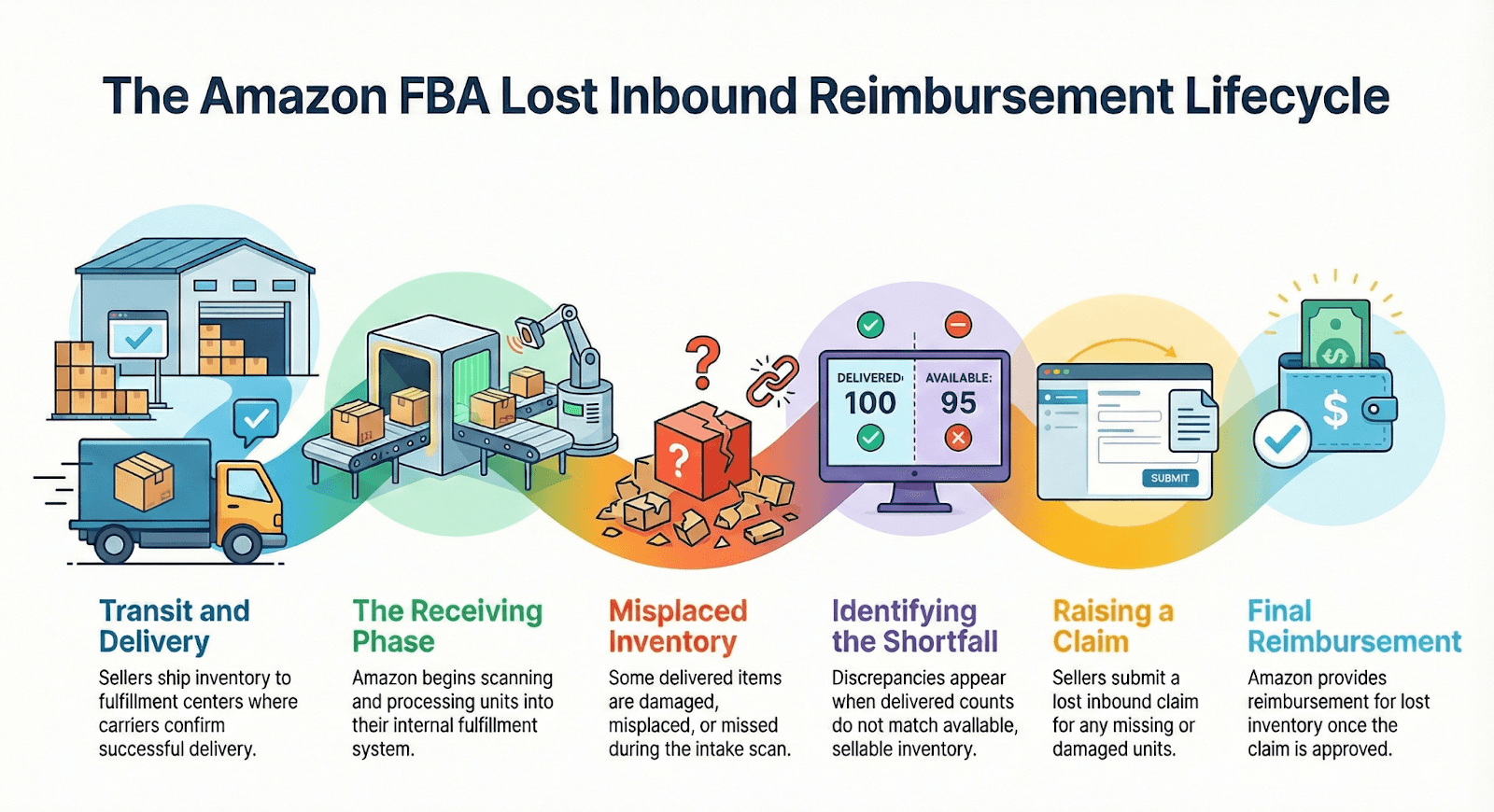
Amazon lost inbound claims apply when inventory is confirmed as delivered to Amazon, but never becomes available for sale. In simple terms, this refers to Amazon FBA lost inbound inventory, which includes items you shipped to Amazon. They received, but misplaced, damaged, or failed to fully process, before they were checked into sellable stock.
As a seller, you have already paid for manufacturing, shipping, and often inbound fees, yet you cannot sell those units.
Common scenarios that qualify for reimbursement claims
Lost inbound issues usually show up during inbound reconciliation, when shipped quantities do not match what Amazon records. These are the common situations, such as:
You ship 100 units, but Amazon logs only 95 (an inventory receiving discrepancy)
Units are misplaced inside the warehouse during receiving
Products are damaged while Amazon processes the shipment
System errors cause incorrect inventory counts
Here’s the easy way to understand it.
A seller ships 200 electronic accessories to an Amazon fulfillment center. Carrier tracking confirms all cartons were delivered. However, only 188 units appear in the available inventory, and the remaining 12 never show up, even after the receiving window closes. Those 12 units qualify as lost inbound inventory.
Why does this matter financially?
Every lost inbound unit represents a sunk cost. You paid for the product, freight, and storage preparation, but earned zero revenue. Without filing claims, those losses quietly reduce profit. Understanding and tracking lost inbound inventory ensures you recover money Amazon owes you and protects your true margins over time.
What is the difference between inbound and warehouse damage claims?
Aspect | Inbound claims | Warehouse damage claims |
When it occurs | During transit or receiving, inventory is shipped to Amazon but goes missing or arrives damaged | After Amazon receives inventory, during storage, picking, packing, or fulfillment center transfers |
Typical examples | Packages lost by the carrier, cartons damaged during unloading or check-in | Units dropped during cycle counts, damage from warehouse equipment, mishandling in storage |
Claim window (2026) | Usually 60–90 days from the delivery date | Up to 18 months for older inventory, reduced to around 60 days for some cases after October 2024 |
Proof required | Shipment ID, packing list, supplier or purchase invoices | Inventory adjustment reports, damage records, photos if available |
Amazon responsibility | Errors during shipment to Amazon and the receiving process | Fulfillment center operational errors after inventory is checked in |
How to identify lost inbound inventory?
Amazon’s warehouses run on automation, but missing inventory still happens in 2026. The key is knowing how to find lost Amazon inventory before the Amazon reimbursement claim window closes. Here are the signs sellers usually notice first.
1. Shipment says “Closed,” but the math doesn’t add up
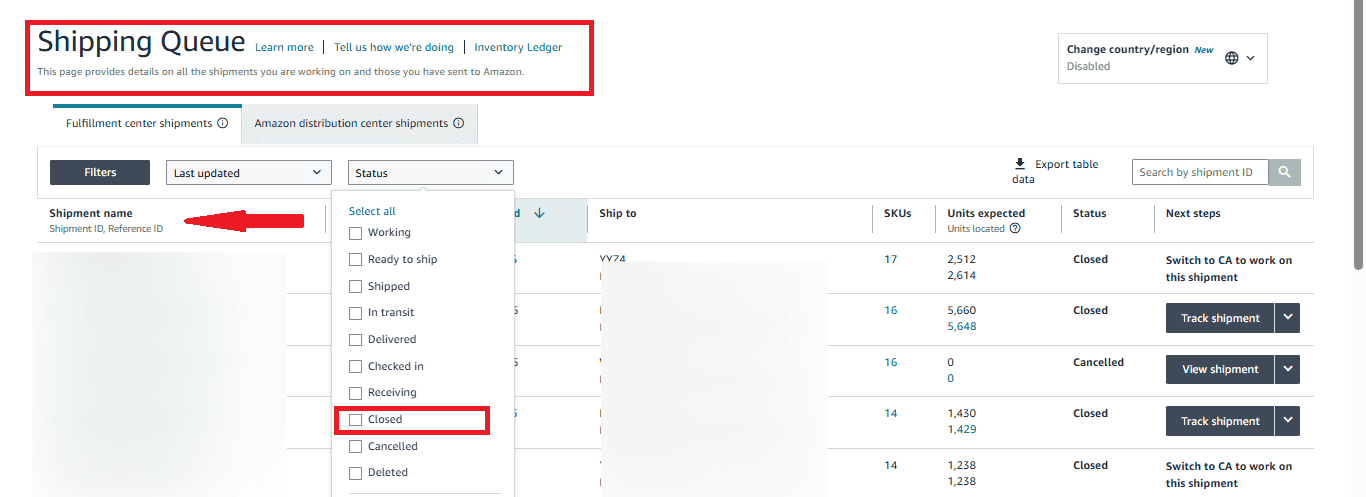
Your shipment is marked “Closed”, yet Amazon received fewer units than you shipped. That yellow warning triangle in the shipping queue is Amazon’s way of saying they have stopped looking. From here, Amazon inventory reconciliation becomes urgent. You usually have 60–90 days to act.
2. Carrier says delivered, Amazon says nothing
Tracking shows your boxes were delivered, but weeks pass, and the shipment never moves to checked-in. This often means cartons were misplaced while unloading or stuck in the receiving queue. If 14 days pass with no progress, it is a red flag.
3. Inbound performance warnings appear
Sometimes Amazon flags problems before inventory disappears. Messages like “Barcode unreadable” or “Unexpected item found” often mean units were set aside during receiving. If those issues are not resolved, the units quietly vanish from the system.
4. Inventory looks stuck in transition
You see units under “Reserved or FC Processing or FC Transfer”, but nothing becomes available for weeks. This usually means items were lost while moving between Amazon facilities. It is a common way sellers identify missing FBA units.
5. Numbers suddenly go negative
A negative “received” entry in your Inventory Ledger means Amazon scanned items in, then removed them later. Here, the units were found and then lost or written off.
Catching these signals early helps sellers recover inventory value and avoid writing off losses that should never have happened.
A step-by-step guide to the Amazon lost inbound claims process for sellers
Filing a lost inbound claim does not have to be complicated, but timing and documentation matter. Here is a clear, seller-friendly way to follow the Amazon FBA reimbursement claim process without confusion.
Step 1: Verify your eligibility
Before doing anything, first confirm that Amazon has stopped searching for your inventory. Go to Inventory, then Manage FBA Shipments, and open the relevant Shipment ID. Make sure the shipment status shows “Closed.”
Next, click the Contents tab and look for the line that says “Eligible for investigation on [date].” You cannot submit a claim before this date, and submitting it early almost always leads to rejection.
Step 2: Gather required documentation (2026 standards)
Amazon will deny claims that are missing documents. You need two things:
Proof of inventory ownership: An itemized supplier invoice showing product name, quantity, and unit cost. Amazon reimburses based on cost, not selling price.
Proof of delivery (POD): Here, for UPS or FedEx shipments, a tracking page marked “Delivered”. For LTL or pallets, a stamped bill of lading or signed freight receipt.
Step 3: Submit the investigation request
Inside the Contents tab, find the missing units and select “Research missing units.” Upload your invoice and POD. In the message box, keep it short and professional. State the delivery date, shipment ID, and missing quantity.
Step 4: Monitor the case log
After you submit the lost inventory reimbursement claim, Amazon creates a case automatically. Most responses arrive within 3 to 5 business days. Amazon will either locate the inventory or approve reimbursement.
Step 5: Verify your reimbursement
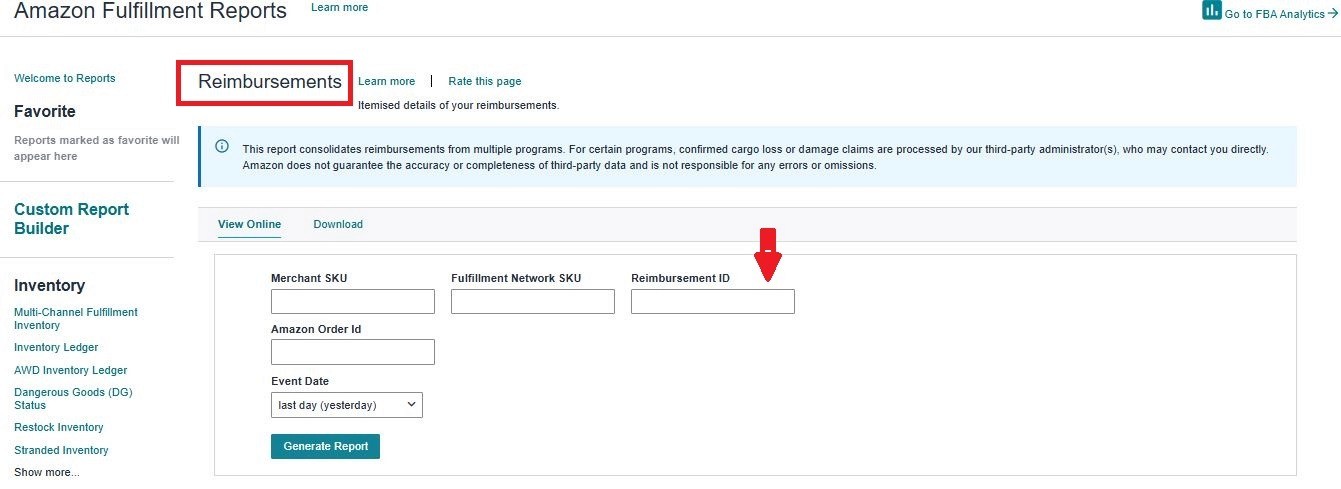
To verify your Amazon reimbursement claim, first check Reports > Fulfillment > Payments > Reimbursements. Then, search by Shipment ID and confirm the per-unit amount matches your invoice.
Following these steps carefully improves approval rates and helps sellers recover money they are rightfully owed.
Common reasons your claims get rejected
Missing or incomplete documents: Reimbursement claims without a proper supplier invoice or proof of delivery are almost always denied. Amazon needs timestamped documents that clearly match the exact ASINs and quantities shipped. If ownership cannot be verified, the claim stops there.
Filed too late: In 2026, timing is strict. Claims submitted after the 60–90 day window from the delivery or closure date are auto-closed. Once this deadline passes, appeals are usually not accepted.
Details don’t match Amazon’s records: Using the wrong Shipment ID, incorrect ASINs, or mismatched quantities triggers instant rejection. Even small differences, like claiming 500 units when Amazon shows 450 shipped, can block approval.
Duplicate submissions: Filing the same claim more than once, or submitting it through multiple channels, causes Amazon’s system to block it automatically. One shipment, one claim.
Wrong claim type selected: Choosing “Damaged Inventory” instead of “Shipment to Amazon” sends the case to the wrong team. These claims are often closed without review.
Weak or unclear evidence: Blurry photos, generic reports, or unrelated documents do not prove anything. Amazon expects clear proof of pre-shipment conditions and carrier handover.
Issues that don’t qualify: Errors like shipping to the wrong fulfillment center or normal product wear are considered the seller’s responsibility and are excluded from reimbursement.
Shipment plan mistakes: Incorrect shipment creation, such as split shipments not handled properly, can make the claim unverifiable.
How Refunzo identifies that you lost inbound automatically
Tracking lost inbound inventory manually is time-consuming and easy to get wrong. That is exactly the gap Refunzo is built to solve. Instead of digging through reports and shipment IDs, Refunzo automates Amazon FBA reimbursement for lost inventory, so sellers always know what Amazon owes them, with complete clarity.
The 4-step recovery process:
Step 1: Securely connect your Amazon Seller Central account to Refunzo. No manual uploads or report downloads are required.
Step 2: Once connected, Refunzo runs a deep reconciliation using over 20 checks across shipments, returns, inventory adjustments, and receiving data.
Step 3: Refunzo identifies the issues sellers often miss, such as receiving discrepancies, units marked delivered but never checked in, inventory lost during internal transfers and refunds that were never credited.
Step 5: Submit Amazon support cases yourself using Refunzo’s data, or let the Refunzo team handle claims on your behalf.
Why does Refunzo work for sellers?
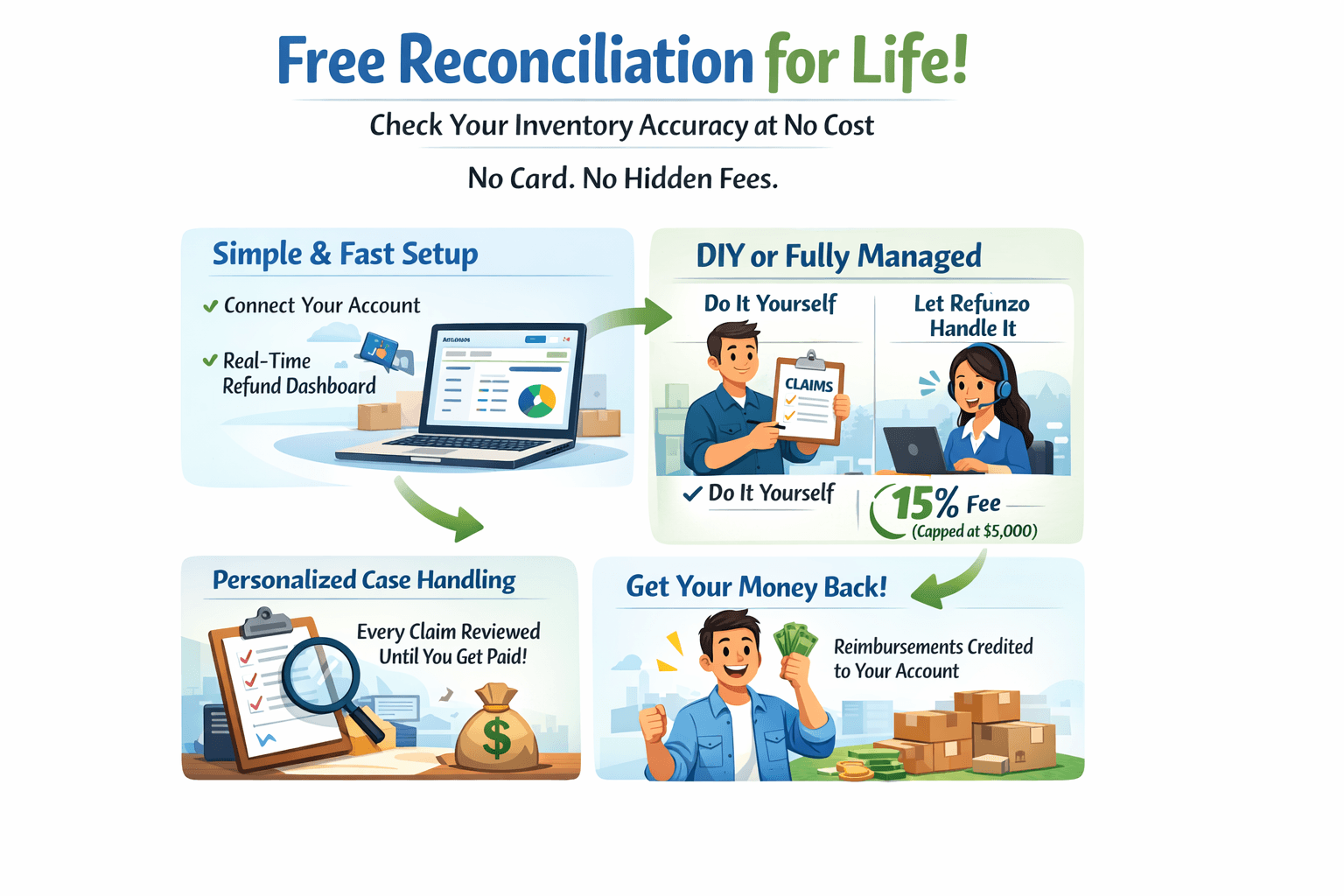
For sellers tired of missing inbound money, Refunzo acts as the best Amazon reconciliation tool to turn a complex problem into a clear, manageable process.
Real seller success stories
Featherlee, a premium wooden kitchenware brand, started noticing a familiar Amazon problem. Inventory was going missing, some units were marked as warehouse damaged, and inbound shipments did not always match what Amazon showed as received.
Sales were happening, but cash flow felt tighter than it should. Like many sellers, Featherlee tried checking FBA reports manually. The process was slow, confusing, and made it hard to tell which losses were actually eligible for reimbursement. That changed when they ran a full Amazon reimbursement audit.
Inbound shipment discrepancies and warehouse-handled damage that had gone unnoticed were clearly identified.
Every eligible case was matched with the right shipment IDs, SKUs, and documentation, then submitted correctly through Seller Central.
Within just four days, Featherlee recovered $16,914 in lost inventory value.
Even better, the brand saved around 30 hours every month that were previously spent reviewing reports and chasing numbers.
Better cash flow, clearer visibility, and confidence that missing inventory was no longer quietly draining profits. For sellers, this shows one thing clearly: Amazon inbound claims reimbursement is recoverable when tracked the right way.
Ready to see what you’re owed?
Look, at the end of the day, those missing units are your hard-earned cash sitting in Amazon’s pocket. It’s a direct hit to your ability to scale. Whether you choose to manually hunt through the shipping queue or lean on an automated Amazon reimbursement software like Refunzo, the goal is the same: secure every eligible reimbursement.
Recovering your profits shouldn't be a full-time job. By staying proactive and handling your Amazon lost inbound claims with the right data, you can stop the silent leaks and focus on growing your brand instead.
Run your free Refunzo audit today and turn those missing boxes back into capital.
TL;DR
Amazon lost inbound claims apply when inventory is marked delivered to Amazon but never becomes available for sale, causing silent profit loss if not tracked and claimed on time.
Sellers usually have a 60 to 90 day window to file lost inbound claims, and missing deadlines or documents almost always leads to rejection.
Common signs include shipments marked “Closed” with quantity mismatches, delivered shipments that never check in, inventory stuck in processing, or negative ledger entries.
Successful Amazon FBA reimbursement for lost inventory requires accurate shipment IDs, supplier invoices, and proof of delivery that match Amazon’s records exactly.
Many claims are rejected due to late filing, incorrect claim type, mismatched quantities, duplicate submissions, or weak documentation.
Refunzo helps sellers recover lost inbound inventory by automating reconciliation, identifying missed discrepancies, and making reimbursement eligibility clear without manual report tracking.
Have you ever checked an Amazon shipment and thought, “I definitely sent more units than this”? But then you moved on because tracking it felt too messy or time-consuming? You’re thinking right.
In 2026, lost inbound inventory is still one of the biggest silent profit leaks for Amazon sellers. Boxes get delivered, tracking looks fine, but units never show up as sellable stock. Unless you actively follow up, that money is gone.
This Amazon seller inbound shipment lost claims guide is built for sellers who want clarity, not confusion. We’ll break down how Amazon lost inbound claims actually work, how to spot missing inventory before deadlines close, and what to do when claims get rejected.
Whether you’re managing your first FBA shipment or scaling multiple ASINs, this walkthrough shows how sellers recover thousands from lost inbound inventory without spreadsheets, guesswork, or wasted efforts.
What are Amazon’s lost inbound claims?
Amazon lost inbound claims apply when inventory is confirmed as delivered to Amazon, but never becomes available for sale. In simple terms, this refers to Amazon FBA lost inbound inventory, which includes items you shipped to Amazon. They received, but misplaced, damaged, or failed to fully process, before they were checked into sellable stock.
As a seller, you have already paid for manufacturing, shipping, and often inbound fees, yet you cannot sell those units.
Common scenarios that qualify for reimbursement claims
Lost inbound issues usually show up during inbound reconciliation, when shipped quantities do not match what Amazon records. These are the common situations, such as:
You ship 100 units, but Amazon logs only 95 (an inventory receiving discrepancy)
Units are misplaced inside the warehouse during receiving
Products are damaged while Amazon processes the shipment
System errors cause incorrect inventory counts
Here’s the easy way to understand it.
A seller ships 200 electronic accessories to an Amazon fulfillment center. Carrier tracking confirms all cartons were delivered. However, only 188 units appear in the available inventory, and the remaining 12 never show up, even after the receiving window closes. Those 12 units qualify as lost inbound inventory.
Why does this matter financially?
Every lost inbound unit represents a sunk cost. You paid for the product, freight, and storage preparation, but earned zero revenue. Without filing claims, those losses quietly reduce profit. Understanding and tracking lost inbound inventory ensures you recover money Amazon owes you and protects your true margins over time.
What is the difference between inbound and warehouse damage claims?
Aspect | Inbound claims | Warehouse damage claims |
When it occurs | During transit or receiving, inventory is shipped to Amazon but goes missing or arrives damaged | After Amazon receives inventory, during storage, picking, packing, or fulfillment center transfers |
Typical examples | Packages lost by the carrier, cartons damaged during unloading or check-in | Units dropped during cycle counts, damage from warehouse equipment, mishandling in storage |
Claim window (2026) | Usually 60–90 days from the delivery date | Up to 18 months for older inventory, reduced to around 60 days for some cases after October 2024 |
Proof required | Shipment ID, packing list, supplier or purchase invoices | Inventory adjustment reports, damage records, photos if available |
Amazon responsibility | Errors during shipment to Amazon and the receiving process | Fulfillment center operational errors after inventory is checked in |
How to identify lost inbound inventory?
Amazon’s warehouses run on automation, but missing inventory still happens in 2026. The key is knowing how to find lost Amazon inventory before the Amazon reimbursement claim window closes. Here are the signs sellers usually notice first.
1. Shipment says “Closed,” but the math doesn’t add up
Your shipment is marked “Closed”, yet Amazon received fewer units than you shipped. That yellow warning triangle in the shipping queue is Amazon’s way of saying they have stopped looking. From here, Amazon inventory reconciliation becomes urgent. You usually have 60–90 days to act.
2. Carrier says delivered, Amazon says nothing
Tracking shows your boxes were delivered, but weeks pass, and the shipment never moves to checked-in. This often means cartons were misplaced while unloading or stuck in the receiving queue. If 14 days pass with no progress, it is a red flag.
3. Inbound performance warnings appear
Sometimes Amazon flags problems before inventory disappears. Messages like “Barcode unreadable” or “Unexpected item found” often mean units were set aside during receiving. If those issues are not resolved, the units quietly vanish from the system.
4. Inventory looks stuck in transition
You see units under “Reserved or FC Processing or FC Transfer”, but nothing becomes available for weeks. This usually means items were lost while moving between Amazon facilities. It is a common way sellers identify missing FBA units.
5. Numbers suddenly go negative
A negative “received” entry in your Inventory Ledger means Amazon scanned items in, then removed them later. Here, the units were found and then lost or written off.
Catching these signals early helps sellers recover inventory value and avoid writing off losses that should never have happened.
A step-by-step guide to the Amazon lost inbound claims process for sellers
Filing a lost inbound claim does not have to be complicated, but timing and documentation matter. Here is a clear, seller-friendly way to follow the Amazon FBA reimbursement claim process without confusion.
Step 1: Verify your eligibility
Before doing anything, first confirm that Amazon has stopped searching for your inventory. Go to Inventory, then Manage FBA Shipments, and open the relevant Shipment ID. Make sure the shipment status shows “Closed.”
Next, click the Contents tab and look for the line that says “Eligible for investigation on [date].” You cannot submit a claim before this date, and submitting it early almost always leads to rejection.
Step 2: Gather required documentation (2026 standards)
Amazon will deny claims that are missing documents. You need two things:
Proof of inventory ownership: An itemized supplier invoice showing product name, quantity, and unit cost. Amazon reimburses based on cost, not selling price.
Proof of delivery (POD): Here, for UPS or FedEx shipments, a tracking page marked “Delivered”. For LTL or pallets, a stamped bill of lading or signed freight receipt.
Step 3: Submit the investigation request
Inside the Contents tab, find the missing units and select “Research missing units.” Upload your invoice and POD. In the message box, keep it short and professional. State the delivery date, shipment ID, and missing quantity.
Step 4: Monitor the case log
After you submit the lost inventory reimbursement claim, Amazon creates a case automatically. Most responses arrive within 3 to 5 business days. Amazon will either locate the inventory or approve reimbursement.
Step 5: Verify your reimbursement
To verify your Amazon reimbursement claim, first check Reports > Fulfillment > Payments > Reimbursements. Then, search by Shipment ID and confirm the per-unit amount matches your invoice.
Following these steps carefully improves approval rates and helps sellers recover money they are rightfully owed.
Common reasons your claims get rejected
Missing or incomplete documents: Reimbursement claims without a proper supplier invoice or proof of delivery are almost always denied. Amazon needs timestamped documents that clearly match the exact ASINs and quantities shipped. If ownership cannot be verified, the claim stops there.
Filed too late: In 2026, timing is strict. Claims submitted after the 60–90 day window from the delivery or closure date are auto-closed. Once this deadline passes, appeals are usually not accepted.
Details don’t match Amazon’s records: Using the wrong Shipment ID, incorrect ASINs, or mismatched quantities triggers instant rejection. Even small differences, like claiming 500 units when Amazon shows 450 shipped, can block approval.
Duplicate submissions: Filing the same claim more than once, or submitting it through multiple channels, causes Amazon’s system to block it automatically. One shipment, one claim.
Wrong claim type selected: Choosing “Damaged Inventory” instead of “Shipment to Amazon” sends the case to the wrong team. These claims are often closed without review.
Weak or unclear evidence: Blurry photos, generic reports, or unrelated documents do not prove anything. Amazon expects clear proof of pre-shipment conditions and carrier handover.
Issues that don’t qualify: Errors like shipping to the wrong fulfillment center or normal product wear are considered the seller’s responsibility and are excluded from reimbursement.
Shipment plan mistakes: Incorrect shipment creation, such as split shipments not handled properly, can make the claim unverifiable.
How Refunzo identifies that you lost inbound automatically
Tracking lost inbound inventory manually is time-consuming and easy to get wrong. That is exactly the gap Refunzo is built to solve. Instead of digging through reports and shipment IDs, Refunzo automates Amazon FBA reimbursement for lost inventory, so sellers always know what Amazon owes them, with complete clarity.
The 4-step recovery process:
Step 1: Securely connect your Amazon Seller Central account to Refunzo. No manual uploads or report downloads are required.
Step 2: Once connected, Refunzo runs a deep reconciliation using over 20 checks across shipments, returns, inventory adjustments, and receiving data.
Step 3: Refunzo identifies the issues sellers often miss, such as receiving discrepancies, units marked delivered but never checked in, inventory lost during internal transfers and refunds that were never credited.
Step 5: Submit Amazon support cases yourself using Refunzo’s data, or let the Refunzo team handle claims on your behalf.
Why does Refunzo work for sellers?
For sellers tired of missing inbound money, Refunzo acts as the best Amazon reconciliation tool to turn a complex problem into a clear, manageable process.
Real seller success stories
Featherlee, a premium wooden kitchenware brand, started noticing a familiar Amazon problem. Inventory was going missing, some units were marked as warehouse damaged, and inbound shipments did not always match what Amazon showed as received.
Sales were happening, but cash flow felt tighter than it should. Like many sellers, Featherlee tried checking FBA reports manually. The process was slow, confusing, and made it hard to tell which losses were actually eligible for reimbursement. That changed when they ran a full Amazon reimbursement audit.
Inbound shipment discrepancies and warehouse-handled damage that had gone unnoticed were clearly identified.
Every eligible case was matched with the right shipment IDs, SKUs, and documentation, then submitted correctly through Seller Central.
Within just four days, Featherlee recovered $16,914 in lost inventory value.
Even better, the brand saved around 30 hours every month that were previously spent reviewing reports and chasing numbers.
Better cash flow, clearer visibility, and confidence that missing inventory was no longer quietly draining profits. For sellers, this shows one thing clearly: Amazon inbound claims reimbursement is recoverable when tracked the right way.
Ready to see what you’re owed?
Look, at the end of the day, those missing units are your hard-earned cash sitting in Amazon’s pocket. It’s a direct hit to your ability to scale. Whether you choose to manually hunt through the shipping queue or lean on an automated Amazon reimbursement software like Refunzo, the goal is the same: secure every eligible reimbursement.
Recovering your profits shouldn't be a full-time job. By staying proactive and handling your Amazon lost inbound claims with the right data, you can stop the silent leaks and focus on growing your brand instead.
Run your free Refunzo audit today and turn those missing boxes back into capital.
Related post
Amazon FBA Reimbursements
Amazon reimbursement report every seller must check to claim missing reimbursements
Amazon reimbursement report every seller must check to claim missing reimbursements
Amazon reimbursement report every seller must check to claim missing reimbursements
Amazon reimbursement report every seller must check to claim missing reimbursements
Mar 2, 2026
|
12 mins
Amazon FBA Reimbursements
Refunded But Never Returned: The Amazon Missing Return Reimbursement Guide Every FBA Seller Needs
Refunded But Never Returned: The Amazon Missing Return Reimbursement Guide Every FBA Seller Needs
Refunded But Never Returned: The Amazon Missing Return Reimbursement Guide Every FBA Seller Needs
Refunded But Never Returned: The Amazon Missing Return Reimbursement Guide Every FBA Seller Needs
Feb 19, 2026
|
15 mins
Amazon FBA Reimbursements
Amazon underpaid your reimbursement? Refunzo finds your missing money automatically
Amazon underpaid your reimbursement? Refunzo finds your missing money automatically
Amazon underpaid your reimbursement? Refunzo finds your missing money automatically
Amazon underpaid your reimbursement? Refunzo finds your missing money automatically
Feb 12, 2026
|
12min

Stay updated by subscribing
to our newsletter.
Stay updated by subscribing
to our newsletter.
Stay informed and up-to-date with the latest news and updates
from our company by subscribing to our newsletter.
Stay informed and up-to-date
with the latest news and updates
from our company by subscribing to
our newsletter.