
How to Audit and Reclaim Amazon FBA Overcharges on Weight and Dimension Fees?
Dec 23, 2025
Dec 23, 2025
TL;DR
Amazon FBA weight and dimension overcharges are one of the most common and least visible margin leaks for US sellers; fees quietly inflate while sales look completely normal.
Even a 1 to 2 cm measurement error during a warehouse re-measurement can push an ASIN into a higher size tier, increasing fulfillment fees on every single unit sold.
The key warning signs are sudden fee increases with no product changes, shrinking margins on stable sales, and different fees on nearly identical ASINs.
Disputing overcharges requires comparing Amazon's recorded measurements against your actual packaged product, submitting photo proof, and opening the right support case in Seller Central under FBA Fees.
Manual audits break down fast as your catalog grows; most overcharged ASINs go undetected for months because sellers can't check every ASIN consistently without a system.
Automated reimbursement tools like Refunzo run continuous fee audits across your entire catalog, catch weight and dimension errors early, and handle the full claims process so margin losses stop compounding silently.
For most US Amazon sellers, FBA fees quietly take up 30 to 40% of every sale. The problem is not the fees themselves; it’s the ones you should never be paying. Amazon FBA fee overcharge for weight and dimension is one of the most common reasons sellers lose margin, and they rarely show up as a clear warning in Seller Central.
Sales can look healthy, ads may be performing, yet profits keep slipping month after month. What makes these errors dangerous is how subtle they are. A small re-measurement, a packaging change, or a system update can push an ASIN into a higher fee tier overnight.
That extra cost then applies to every unit sold, compounding silently at scale. This is why sellers looking to scale faster with an automated FBA reimbursement tool catch these issues earlier, recover hidden losses, and protect margins before the damage spreads.
This guide breaks down how Amazon’s weight and dimension fees errors happen, how to spot them, and how sellers can reclaim money that’s been quietly draining from their FBA margins.
What are Amazon FBA fees overcharge?
Amazon FBA fees overcharges happen when the Amazon bills do not match the actual size or weight of your product. In simple terms, you end up paying more than you should for fulfillment.
The most common reason is incorrect measurements. If Amazon records your product as heavier or larger than it really is, your ASIN can be pushed into a higher fee tier. Even small measurement errors can add up quickly across hundreds or thousands of units.
Overcharges are not limited to weight and dimensions. They can also show up after inbound checks, repackaging at the fulfillment center, or system updates that quietly change how a product is classified.
These Amazon weight and dimension fees errors usually go unnoticed because sales continue, but margins slowly shrink. That is why understanding Amazon FBA fees overcharge is the first step to protecting your profit.
Understand Amazon’s weight and dimension fees
Amazon FBA fees look simple on the surface, but the math behind them catches many sellers off guard. Fees are not based on what you think your product weighs or measures. Amazon assigns every ASIN a size tier using three things: product dimensions, unit weight, and how much space it takes up once packed and handled in the fulfillment network. Three weights matter.
Product weight is the actual item weight.
Dimensional weight is calculated using length × width × height, divided by Amazon’s set divisor.
Shipping weight is the higher of the two, plus packaging. Amazon always charges based on the highest number.
Here is where overcharges happen. Imagine a product that should measure 30 × 20 × 10 cm. If Amazon records it as just 31 × 21 × 11 cm during a warehouse re-measurement, the dimensional weight jumps. That small change can push the ASIN into the next size tier.
The result is a higher fee on every unit sold. A tiny measurement error, repeated hundreds or thousands of times, quietly eats into margins without any alert or warning.
Common reasons for Amazon FBA fee overcharge
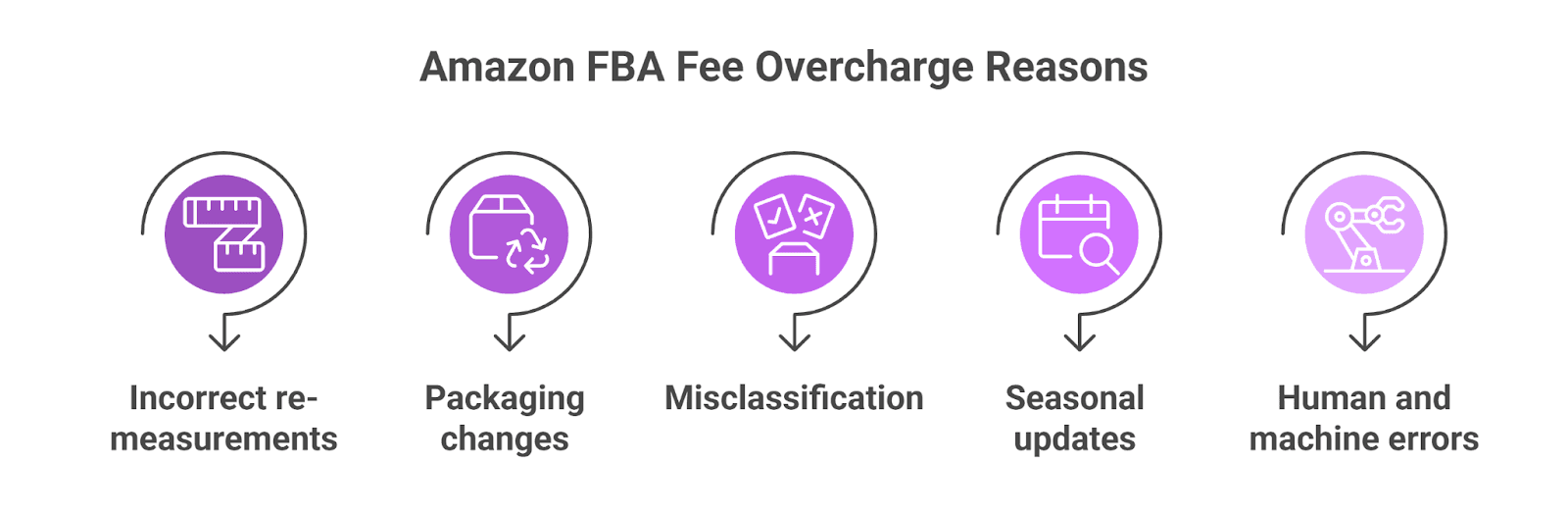
#1 Incorrect re-measurements at fulfillment centers
Amazon periodically re-measures inventory inside its warehouses. These checks are often automated or done quickly, which means dimensions can be rounded up or measured inconsistently. When this happens, many sellers discover their FBA dimensions are wrong, leading to higher storage and fulfillment charges than expected.
#2 Packaging changes after inbound receiving
If your supplier updates packaging or Amazon repacks your product differently during storage, the new dimensions may no longer match what is on file. Fees then adjust automatically based on the updated measurements.
#3 Multi-pack and variation misclassification
Single units can get misread as multi-packs, or variations may inherit incorrect dimensions from another ASIN. This usually leads to higher weight or size tier fees being applied incorrectly.
#4 Seasonal or system-driven measurement updates
During peak periods, Amazon runs bulk system updates and audits. Measurements may be refreshed without manual review, increasing the chances of inflated dimensions.
#5 Human and machine errors during inbound checks
Manual handling, scanner misreads, or sensor errors during inbound processing can all result in incorrectly recorded weights and dimensions that directly affect your FBA fees.
Key signs your ASIN may be overcharged and hurting your margins
Sudden fee increases without any product changes: If your fulfillment fees jump but you have not changed the product, packaging, or supplier, that is a red flag. In most cases, this points to a re-measurement or system update on Amazon’s side, not something you did.
Margins are shrinking even though sales look stable: Your units sold stay consistent, ad spend is under control, but profits keep slipping. This often happens when per-unit FBA fees quietly increase in the background, especially on higher-volume ASINs.
Fee tier does not match your actual packaging: When Amazon shows your product in a larger size tier than what you physically ship, something is off. Sellers often notice this when comparing box dimensions from their supplier against what appears in Seller Central.
Different fees on nearly identical ASINs: If two similar products with the same packaging and weight are being charged different fees, it usually means one ASIN was mis-measured or incorrectly classified. This inconsistency is one of the clearest signals of an overcharge.
How to dispute incorrect dimensions on Amazon FBA
Incorrect package dimensions in Amazon’s system can push an ASIN into a higher size tier, increasing your FBA fulfillment fees. Disputing these errors is straightforward, but only if you follow Amazon’s process carefully, provide clear proof, and follow the right FBA fee discrepancy audit steps to verify the measurements and request a correction.
Step 1: Spot the ASINs that look off
Start with your FBA fee reports, not your listings. Look for ASINs where fulfillment fees suddenly increased, even though the product, packaging, or supplier never changed. For US sellers, this often shows up after a re-measurement or system update.
Step 2: Compare Amazon data with real packaging
Check the dimensions and shipping weight shown in Seller Central against your actual packaged product. Measure the unit yourself, including the box Amazon receives. If Amazon’s numbers are higher, you have a strong case.
Step 3: Prepare clean, clear proof
Before opening a case, take photos of the product on a digital scale, dimensions measured with a ruler or tape, and the full packaged unit. Make sure numbers are readable and match exactly what you are claiming.
Step 4: Open the right support case
Go to Seller Central → Help → Get Support → Fulfillment by Amazon → FBA Fees. Choose the option for incorrect weight or dimensions and include the ASIN and date range affected.
Step 5: Explain the issue clearly and simply
State what Amazon recorded, what your verified measurements show, and how that difference pushed the ASIN into a higher size tier. Avoid vague language; be direct and factual.
Step 6: Monitor and respond fast
Amazon may re-measure the item or ask follow-up questions. Respond quickly and keep the case active until you receive confirmation of a correction or reimbursement.
Step 7: Verify the refund and fee correction
Once approved, check that both the Amazon FBA reimbursement and the future fee tier are corrected. Sometimes Amazon FBA refunds past charges but leaves the ASIN misclassified.
Use This FBA weight/dim dispute template to reclaim overcharged fees
Hi Amazon Support,
I am requesting a review of incorrect weight and dimension measurements on the following ASIN, which has resulted in overcharged FBA fees.
ASIN: [Your ASIN] SKU: [Your SKU] Issue Period: [Start Date] – [End Date]
Amazon's recorded measurements: Weight: [X lbs / oz] | Dimensions: [L × W × H inches]
My actual measurements: Weight: [X lbs / oz] | Dimensions: [L × W × H inches]
Attachments included: ☐ Product on digital scale (photo) ☐ Packaged unit with tape measure (photo) ☐ Packaging spec sheet from supplier
Please re-measure this ASIN and reimburse the overcharged fees for the period above.
Seller Name: [Name] Date: [Date]
Why do manual Amazon reimbursement audits fail at scale?
Manual Amazon FBA fee overcharge audits work when you have one or two ASINs. Once your catalog grows, it quickly breaks down. Each ASIN needs fee history checks, dimension comparisons, proof collection, and case follow-ups.
That time adds up fast, especially for US sellers managing dozens or hundreds of SKUs, particularly when Amazon measures the wrong size tier and the product gets placed into a higher fulfillment fee bracket.
The bigger issue is coverage. Sellers rarely audit every ASIN consistently. Some products get checked, others slip through, and recurring measurement errors go unnoticed for months. By the time margins look “off,” the overcharges have already stacked up.
Spreadsheets get outdated, notes get missed, and it is easy to forget which ASINs were already disputed or re-measured. Without a system, sellers rely on memory and occasional spot checks.
Eventually, most sellers stop auditing regularly. Not because overcharges stop happening, but because the process feels endless, reactive, and hard to maintain alongside daily operations.
How Refunzo automates weight and dimension fee recovery
Refunzo, automated Amazon reimbursement software, changes the game for US sellers. Instead of manually chasing reports and cases, Refunzo turns fee recovery into a structured, repeatable process.
It starts by securely connecting your Amazon account. Once connected, Refunzo runs a deep audit using more than 20 reconciliation checks, including weight and dimension fee accuracy. The reconciliation system compares Amazon’s recorded measurements against expected benchmarks to spot overcharges you would likely miss.
You then receive a clear report showing exactly where Amazon may owe you money, along with an estimated recovery amount. No digging through spreadsheets, no second-guessing. From there, you choose how hands-on you want to be. You can generate ready-to-submit support cases, or let Refunzo handle the entire Amazon reimbursement claim process for you.
After a quick credit card authentication, with no charges upfront, the team logs cases, submits evidence, and follows up until closure. Approved Amazon FBA refunds for cases where Amazon measured wrong size tier are credited directly to your bank account. No chasing, no constant monitoring, no dropped cases.
For sellers scaling in the US marketplace, Refunzo removes the friction from weight and dimension fee recovery and turns missed refunds into a predictable revenue unlock without adding more work to your plate.
Wrap up
Amazon FBA fee overcharges do not hurt all at once. They drain profit quietly, one order at a time, while everything else looks fine on the surface. Sales grow, ads perform, and inventory moves, yet the numbers never add up the way they should.
The difference between sellers who keep control of their margins and those who slowly lose them is not effort; it is awareness. Amazon’s weight and dimension errors repeat unless they are caught and corrected consistently. If Amazon measured the wrong size tier for your product, even one missed re-measurement can affect thousands of units before anyone notices.
That is why a structured Amazon reimbursement service matters. Not as a rescue tool, but as a safeguard running in the background. When fee audits and follow-ups happen automatically, sellers stop reacting to margin losses and start preventing them.
FAQs
What happens if Amazon uses the wrong weight for FBA fees?
That means every unit sold at the incorrect weight costs you more than it should, increasing fulfillment fees, high storage costs and less profit margin.
Can I request a product remeasurement from Amazon FBA?
Yes. Open a support case in Seller Central under FBA Fees, provide your verified measurements and photos as proof, and request a remeasurement.
How to use Amazon's fee preview tool to check for errors?
Compare the Fee Preview Report with your actual product size and weight details. If you notice any differences, use the Fee Explainer tool to check why you were charged extra and identify possible overcharges.
What is the Amazon reimbursement policy for incorrect fees?
Amazon will reimburse overcharged FBA fees if you can prove the measurements on file are wrong. You typically have 90 days from the charge date to open a case, so catching errors early matters.
TL;DR
Amazon FBA weight and dimension overcharges are one of the most common and least visible margin leaks for US sellers; fees quietly inflate while sales look completely normal.
Even a 1 to 2 cm measurement error during a warehouse re-measurement can push an ASIN into a higher size tier, increasing fulfillment fees on every single unit sold.
The key warning signs are sudden fee increases with no product changes, shrinking margins on stable sales, and different fees on nearly identical ASINs.
Disputing overcharges requires comparing Amazon's recorded measurements against your actual packaged product, submitting photo proof, and opening the right support case in Seller Central under FBA Fees.
Manual audits break down fast as your catalog grows; most overcharged ASINs go undetected for months because sellers can't check every ASIN consistently without a system.
Automated reimbursement tools like Refunzo run continuous fee audits across your entire catalog, catch weight and dimension errors early, and handle the full claims process so margin losses stop compounding silently.
For most US Amazon sellers, FBA fees quietly take up 30 to 40% of every sale. The problem is not the fees themselves; it’s the ones you should never be paying. Amazon FBA fee overcharge for weight and dimension is one of the most common reasons sellers lose margin, and they rarely show up as a clear warning in Seller Central.
Sales can look healthy, ads may be performing, yet profits keep slipping month after month. What makes these errors dangerous is how subtle they are. A small re-measurement, a packaging change, or a system update can push an ASIN into a higher fee tier overnight.
That extra cost then applies to every unit sold, compounding silently at scale. This is why sellers looking to scale faster with an automated FBA reimbursement tool catch these issues earlier, recover hidden losses, and protect margins before the damage spreads.
This guide breaks down how Amazon’s weight and dimension fees errors happen, how to spot them, and how sellers can reclaim money that’s been quietly draining from their FBA margins.
What are Amazon FBA fees overcharge?
Amazon FBA fees overcharges happen when the Amazon bills do not match the actual size or weight of your product. In simple terms, you end up paying more than you should for fulfillment.
The most common reason is incorrect measurements. If Amazon records your product as heavier or larger than it really is, your ASIN can be pushed into a higher fee tier. Even small measurement errors can add up quickly across hundreds or thousands of units.
Overcharges are not limited to weight and dimensions. They can also show up after inbound checks, repackaging at the fulfillment center, or system updates that quietly change how a product is classified.
These Amazon weight and dimension fees errors usually go unnoticed because sales continue, but margins slowly shrink. That is why understanding Amazon FBA fees overcharge is the first step to protecting your profit.
Understand Amazon’s weight and dimension fees
Amazon FBA fees look simple on the surface, but the math behind them catches many sellers off guard. Fees are not based on what you think your product weighs or measures. Amazon assigns every ASIN a size tier using three things: product dimensions, unit weight, and how much space it takes up once packed and handled in the fulfillment network. Three weights matter.
Product weight is the actual item weight.
Dimensional weight is calculated using length × width × height, divided by Amazon’s set divisor.
Shipping weight is the higher of the two, plus packaging. Amazon always charges based on the highest number.
Here is where overcharges happen. Imagine a product that should measure 30 × 20 × 10 cm. If Amazon records it as just 31 × 21 × 11 cm during a warehouse re-measurement, the dimensional weight jumps. That small change can push the ASIN into the next size tier.
The result is a higher fee on every unit sold. A tiny measurement error, repeated hundreds or thousands of times, quietly eats into margins without any alert or warning.
Common reasons for Amazon FBA fee overcharge
#1 Incorrect re-measurements at fulfillment centers
Amazon periodically re-measures inventory inside its warehouses. These checks are often automated or done quickly, which means dimensions can be rounded up or measured inconsistently. When this happens, many sellers discover their FBA dimensions are wrong, leading to higher storage and fulfillment charges than expected.
#2 Packaging changes after inbound receiving
If your supplier updates packaging or Amazon repacks your product differently during storage, the new dimensions may no longer match what is on file. Fees then adjust automatically based on the updated measurements.
#3 Multi-pack and variation misclassification
Single units can get misread as multi-packs, or variations may inherit incorrect dimensions from another ASIN. This usually leads to higher weight or size tier fees being applied incorrectly.
#4 Seasonal or system-driven measurement updates
During peak periods, Amazon runs bulk system updates and audits. Measurements may be refreshed without manual review, increasing the chances of inflated dimensions.
#5 Human and machine errors during inbound checks
Manual handling, scanner misreads, or sensor errors during inbound processing can all result in incorrectly recorded weights and dimensions that directly affect your FBA fees.
Key signs your ASIN may be overcharged and hurting your margins
Sudden fee increases without any product changes: If your fulfillment fees jump but you have not changed the product, packaging, or supplier, that is a red flag. In most cases, this points to a re-measurement or system update on Amazon’s side, not something you did.
Margins are shrinking even though sales look stable: Your units sold stay consistent, ad spend is under control, but profits keep slipping. This often happens when per-unit FBA fees quietly increase in the background, especially on higher-volume ASINs.
Fee tier does not match your actual packaging: When Amazon shows your product in a larger size tier than what you physically ship, something is off. Sellers often notice this when comparing box dimensions from their supplier against what appears in Seller Central.
Different fees on nearly identical ASINs: If two similar products with the same packaging and weight are being charged different fees, it usually means one ASIN was mis-measured or incorrectly classified. This inconsistency is one of the clearest signals of an overcharge.
How to dispute incorrect dimensions on Amazon FBA
Incorrect package dimensions in Amazon’s system can push an ASIN into a higher size tier, increasing your FBA fulfillment fees. Disputing these errors is straightforward, but only if you follow Amazon’s process carefully, provide clear proof, and follow the right FBA fee discrepancy audit steps to verify the measurements and request a correction.
Step 1: Spot the ASINs that look off
Start with your FBA fee reports, not your listings. Look for ASINs where fulfillment fees suddenly increased, even though the product, packaging, or supplier never changed. For US sellers, this often shows up after a re-measurement or system update.
Step 2: Compare Amazon data with real packaging
Check the dimensions and shipping weight shown in Seller Central against your actual packaged product. Measure the unit yourself, including the box Amazon receives. If Amazon’s numbers are higher, you have a strong case.
Step 3: Prepare clean, clear proof
Before opening a case, take photos of the product on a digital scale, dimensions measured with a ruler or tape, and the full packaged unit. Make sure numbers are readable and match exactly what you are claiming.
Step 4: Open the right support case
Go to Seller Central → Help → Get Support → Fulfillment by Amazon → FBA Fees. Choose the option for incorrect weight or dimensions and include the ASIN and date range affected.
Step 5: Explain the issue clearly and simply
State what Amazon recorded, what your verified measurements show, and how that difference pushed the ASIN into a higher size tier. Avoid vague language; be direct and factual.
Step 6: Monitor and respond fast
Amazon may re-measure the item or ask follow-up questions. Respond quickly and keep the case active until you receive confirmation of a correction or reimbursement.
Step 7: Verify the refund and fee correction
Once approved, check that both the Amazon FBA reimbursement and the future fee tier are corrected. Sometimes Amazon FBA refunds past charges but leaves the ASIN misclassified.
Use This FBA weight/dim dispute template to reclaim overcharged fees
Hi Amazon Support,
I am requesting a review of incorrect weight and dimension measurements on the following ASIN, which has resulted in overcharged FBA fees.
ASIN: [Your ASIN] SKU: [Your SKU] Issue Period: [Start Date] – [End Date]
Amazon's recorded measurements: Weight: [X lbs / oz] | Dimensions: [L × W × H inches]
My actual measurements: Weight: [X lbs / oz] | Dimensions: [L × W × H inches]
Attachments included: ☐ Product on digital scale (photo) ☐ Packaged unit with tape measure (photo) ☐ Packaging spec sheet from supplier
Please re-measure this ASIN and reimburse the overcharged fees for the period above.
Seller Name: [Name] Date: [Date]
Why do manual Amazon reimbursement audits fail at scale?
Manual Amazon FBA fee overcharge audits work when you have one or two ASINs. Once your catalog grows, it quickly breaks down. Each ASIN needs fee history checks, dimension comparisons, proof collection, and case follow-ups.
That time adds up fast, especially for US sellers managing dozens or hundreds of SKUs, particularly when Amazon measures the wrong size tier and the product gets placed into a higher fulfillment fee bracket.
The bigger issue is coverage. Sellers rarely audit every ASIN consistently. Some products get checked, others slip through, and recurring measurement errors go unnoticed for months. By the time margins look “off,” the overcharges have already stacked up.
Spreadsheets get outdated, notes get missed, and it is easy to forget which ASINs were already disputed or re-measured. Without a system, sellers rely on memory and occasional spot checks.
Eventually, most sellers stop auditing regularly. Not because overcharges stop happening, but because the process feels endless, reactive, and hard to maintain alongside daily operations.
How Refunzo automates weight and dimension fee recovery
Refunzo, automated Amazon reimbursement software, changes the game for US sellers. Instead of manually chasing reports and cases, Refunzo turns fee recovery into a structured, repeatable process.
It starts by securely connecting your Amazon account. Once connected, Refunzo runs a deep audit using more than 20 reconciliation checks, including weight and dimension fee accuracy. The reconciliation system compares Amazon’s recorded measurements against expected benchmarks to spot overcharges you would likely miss.
You then receive a clear report showing exactly where Amazon may owe you money, along with an estimated recovery amount. No digging through spreadsheets, no second-guessing. From there, you choose how hands-on you want to be. You can generate ready-to-submit support cases, or let Refunzo handle the entire Amazon reimbursement claim process for you.
After a quick credit card authentication, with no charges upfront, the team logs cases, submits evidence, and follows up until closure. Approved Amazon FBA refunds for cases where Amazon measured wrong size tier are credited directly to your bank account. No chasing, no constant monitoring, no dropped cases.
For sellers scaling in the US marketplace, Refunzo removes the friction from weight and dimension fee recovery and turns missed refunds into a predictable revenue unlock without adding more work to your plate.
Wrap up
Amazon FBA fee overcharges do not hurt all at once. They drain profit quietly, one order at a time, while everything else looks fine on the surface. Sales grow, ads perform, and inventory moves, yet the numbers never add up the way they should.
The difference between sellers who keep control of their margins and those who slowly lose them is not effort; it is awareness. Amazon’s weight and dimension errors repeat unless they are caught and corrected consistently. If Amazon measured the wrong size tier for your product, even one missed re-measurement can affect thousands of units before anyone notices.
That is why a structured Amazon reimbursement service matters. Not as a rescue tool, but as a safeguard running in the background. When fee audits and follow-ups happen automatically, sellers stop reacting to margin losses and start preventing them.
FAQs
What happens if Amazon uses the wrong weight for FBA fees?
That means every unit sold at the incorrect weight costs you more than it should, increasing fulfillment fees, high storage costs and less profit margin.
Can I request a product remeasurement from Amazon FBA?
Yes. Open a support case in Seller Central under FBA Fees, provide your verified measurements and photos as proof, and request a remeasurement.
How to use Amazon's fee preview tool to check for errors?
Compare the Fee Preview Report with your actual product size and weight details. If you notice any differences, use the Fee Explainer tool to check why you were charged extra and identify possible overcharges.
What is the Amazon reimbursement policy for incorrect fees?
Amazon will reimburse overcharged FBA fees if you can prove the measurements on file are wrong. You typically have 90 days from the charge date to open a case, so catching errors early matters.
Related post
Amazon FBA Reimbursements
Stop revenue loss: Handle Amazon reversed reimbursement like a pro
Stop revenue loss: Handle Amazon reversed reimbursement like a pro
Stop revenue loss: Handle Amazon reversed reimbursement like a pro
Stop revenue loss: Handle Amazon reversed reimbursement like a pro
Mar 7, 2026
|
12mins

Amazon FBA Reimbursements
Amazon reimbursement report every seller must check to claim missing reimbursements
Amazon reimbursement report every seller must check to claim missing reimbursements
Amazon reimbursement report every seller must check to claim missing reimbursements
Amazon reimbursement report every seller must check to claim missing reimbursements
Mar 2, 2026
|
12 mins
Amazon FBA Reimbursements
Refunded But Never Returned: The Amazon Missing Return Reimbursement Guide Every FBA Seller Needs
Refunded But Never Returned: The Amazon Missing Return Reimbursement Guide Every FBA Seller Needs
Refunded But Never Returned: The Amazon Missing Return Reimbursement Guide Every FBA Seller Needs
Refunded But Never Returned: The Amazon Missing Return Reimbursement Guide Every FBA Seller Needs
Feb 19, 2026
|
15 mins

Stay updated by subscribing
to our newsletter.
Stay updated by subscribing
to our newsletter.
Stay informed and up-to-date with the latest news and updates
from our company by subscribing to our newsletter.
Stay informed and up-to-date
with the latest news and updates
from our company by subscribing to
our newsletter.